
You go into Face ID & Passcode to set Require Passcode back to After 4 hours, and Immediately is the only option there. Losing a setting you deliberately chose, with no explanation on the screen, is genuinely annoying.
I can tell you what is holding it, because this is behaviour rather than breakage, and there is a real reason behind it.
A feature you already use is locking that list, and every way around it costs you something.
What people are seeing, precisely
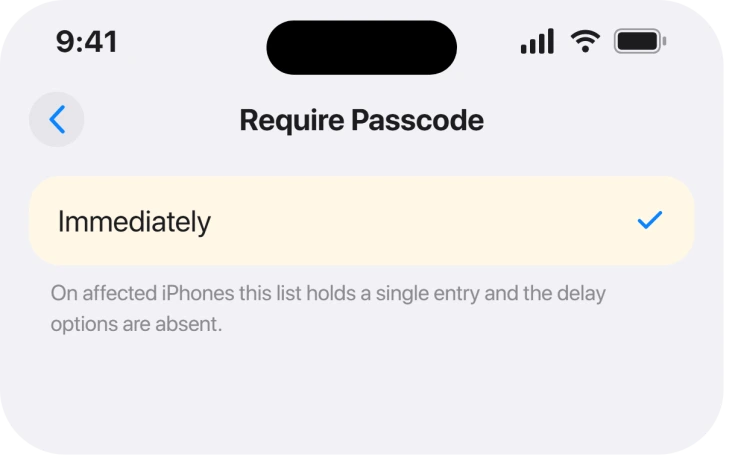
Two different complaints share the same search terms, worth pinning down first, and an owner reported on an Apple Community thread with 84 replies that their iPhone 17 Pro offers only Immediately under Require Passcode.
Their iPhone 15 Pro still shows the full list of delays. Both on iOS 26. A second and separate complaint on the same results page is the option to change a passcode disappearing altogether after updating an iPhone 16 Pro to iOS 26.
Those are different problems, and this page covers the first.
Why the option collapses to Immediately
Now the cause, and it is not new behaviour, just newly noticed. Members on that thread pointed at a long-standing Apple rule: if you use Apple Pay, the immediate passcode requirement cannot be changed.
Enrolling a card locks that setting to Immediately. Be careful with that explanation, because we could not confirm it.
We read Apple's current passcode page, its Face ID document and its Touch ID document end to end, and that sentence is not on any of them today.
Members quote it as Apple support documentation, and it may well be from an older page that has since been rewritten.
So treat it as the best available explanation from experienced members rather than as something Apple currently states, a distinction that matters because everything else on the results page repeats it as fact.
What Apple does document, which turns out to matter
This is the part nobody quotes, and it answers the question underneath the question. Apple sets out when your passcode is always required, whatever your setting says.
One condition contains the very number people are chasing: "You haven't unlocked your iPhone with the passcode in the last 6.5 days, and you haven't unlocked it with Face ID or Touch ID in the last 4 hours."
There is your four hours, and it is not a preference: it is a security floor.
The rest of that list is worth one read. Apple: "You haven't unlocked your iPhone for more than 48 hours." And: "There are five unsuccessful attempts to unlock your iPhone with Face ID or Touch ID."
Ours, and marked as ours: on a phone you use daily with Face ID working, the practical difference between Immediately and After 4 hours is small, because Face ID unlocks it either way.
The setting mattered far more in the Touch ID era. That is our reading, not Apple's position.
The workarounds, and what each one costs
Three fixes turn up on that thread, and none of them is free. Members report that turning Face ID off and setting it up again brings the delay options back, and you may lose them again the moment you re-enrol a card.
Removing your cards from Wallet and restarting is the same idea, aimed at the suspected cause rather than at Face ID.
Restoring from a backup of a phone that still has the full list is also reported as working, for an enormous amount of effort over one dropdown.
None of these was confirmed to restore the option while keeping both Face ID and Apple Pay. Eighty-four replies, and nobody managed that. If a page tells you otherwise, ask what they gave up.
Do not confuse this with a passcode you cannot change
Separate fault, separate page: if your problem is that Change Passcode has vanished, or that iOS told you your passcode had expired and forced a new one, that is usually a management profile rather than this.
Check Settings, General, then VPN & Device Management. A profile installed by a workplace or a school sets passcode rules and strips out the controls you would use to change them.
If the phone is asking for a code you never chose, an iPhone asking for a passcode you never set is the right page, and it starts by telling you not to guess.
What to do if you actually want fewer prompts
This is the practical answer for most people who land here. The delay you lost was about how soon a passcode is demanded after the screen locks.
The screen locking is the part you can still control. Apple gives the route as Settings, Display & Brightness, Auto-Lock.
One buried detail there is worth knowing. Apple: "If you keep your iPhone on the Home Screen and don't take any action, your Auto-Lock time is reduced by half."
So a phone sitting on the Home Screen locks in half the time you set.
If Auto-Lock is what is really annoying you, Auto-Lock stuck at 30 seconds covers the version where you cannot change even that.
What does not help
- Updating iOS. Reports span iOS 26.1 and 26.2 with the same result. This behaves like a rule, not a defect.
- Resetting all settings. Nothing on the thread reports it restoring the option, and it clears every other preference you have.
- Toggling Require Passcode off and on. There is nothing to toggle. Immediately is the only entry in the list.
- Comparing with somebody else's iPhone. Two phones with the same iOS genuinely behave differently here, which is what makes it look like a bug.
Status: iOS 26.6.1, checked 19 August 2026. Unresolved. No owner has restored the delay options while keeping both Face ID and Apple Pay, and Apple documents none of this.
Why does my iPhone only show Immediately under Require Passcode?
Experienced Apple Community members attribute it to having Apple Pay set up, which locks the requirement to Immediately.
That explanation is not on Apple's current passcode, Face ID or Touch ID pages, so treat it as the best available account rather than documented fact.
What happened to the After 4 hours passcode option?
It is absent on affected phones rather than moved. Owners report an iPhone 17 Pro showing only Immediately while an iPhone 15 Pro on the same iOS keeps the full list, and no reply in 84 has restored it without giving something up.
Does my iPhone ask for a passcode after 4 hours anyway?
Yes, as a security floor. Apple states a passcode is required if you have not unlocked with it in the last 6.5 days and have not used Face ID or Touch ID in the last 4 hours, regardless of any setting.
Is this the same as Change Passcode disappearing?
No. A missing Change Passcode option, or a passcode that iOS says has expired, usually points at a management profile under Settings, General, VPN & Device Management, which is a different cause entirely.
The Short Version
- Only Immediately appears on affected phones, and it is not a fault you can clear.
- Members blame Apple Pay, and that explanation is not on Apple's current pages.
- Apple does document a 4 hour biometric floor that applies regardless of the setting.
- Turning off Face ID or removing cards is reported to bring the list back, at a cost.
- Nobody in 84 replies kept Face ID, Apple Pay and the delay options together.
- Auto-Lock is the related control you can still change, and the Home Screen halves it.
Where to Next
A page like this beats another list of resets, because those resets quietly cost you something and the pages recommending them never say so.
If you have got the delay options back while still using Apple Pay, please say how in the comments. Eighty-four people have tried and none of them managed it, so yours would genuinely be news.

Isaac Smith is the founder and editor of PC Glance, a website that covers computers, laptops, and technology. He is a tech enthusiast and a computer geek who loves to share his insights and help his readers make smart choices when buying tech gadgets or laptops. He is always curious and updated about the latest tech trends.