
You set Emergency Bypass for the one person who must always get through, and their message arrived in silence anyway. Missing something from that person is exactly what you were trying to prevent, so I understand why this one stings.
I have put the six reasons in order, commonest first.
The first one accounts for most of these and takes about thirty seconds.
1. You turned it on for calls, not for texts
There are two Emergency Bypass switches for every contact, and turning on one does nothing for the other.
Apple's Focus notifications page gives the route with both named: "Tap Ringtone or Text Tone, then turn on Emergency Bypass."
Ringtone covers calls and FaceTime. Text Tone covers messages. They are separate screens inside the same contact.
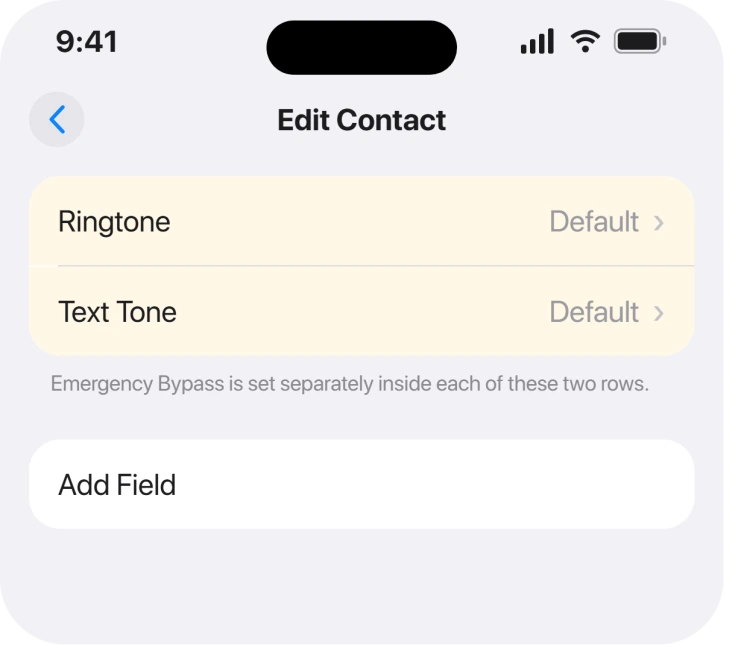
So open Contacts, tap the person, tap Edit, and check both rows. Almost everybody sets the first one they reach and stops.
Owners report this is the answer. An Apple Community thread on Emergency Bypass failing is marked Solved, and the solution is exactly that: go to the contact, edit, text tone, then enable Emergency Bypass there.
2. There are two contact cards for the same person
Second, and it makes your switch look as though it never saved.
If somebody exists twice, once from your iCloud account and once from a mail account or an old import, you may have set Bypass on the card their messages do not arrive through.
The tell is that the setting looks correct when you go back and check, and nothing changes.
Search Contacts for their name and see whether more than one result appears. If it does, duplicate contacts that will not merge covers tidying that up properly.
3. They are messaging a number that is not on the card
Third, and this one is invisible from the contact card.
Emergency Bypass is attached to a contact, and the contact is matched by the number or address the message arrives from.
A colleague texting from a second phone, or a relative on a new number you have not added, arrives as an unknown sender.
An unknown sender has no contact card, so there is nothing holding a Bypass switch.
Open the conversation and check the number at the top actually appears on their card. Adding it fixes this permanently.
4. A Focus is allowing people rather than being overridden
Fourth, and it is a different mechanism people confuse with Bypass.
Apple describes a separate control on the same page: "Allow specific people: Tap Allow Notifications From" and then choosing from your contacts.
That is a Focus-level allow list. Emergency Bypass is a contact-level override. They can disagree.
Ours, and marked as ours: if one person is failing while others get through, we would set both. Apple documents them as separate mechanisms and never says which wins when they conflict, so belt and braces costs nothing here.
There is a third control on that screen too. Apple: "You can also turn on Time Sensitive Notifications, which allows all apps to send time-sensitive notifications immediately." That is app-level and does nothing for one contact.
5. The phone is silenced by something Bypass was never meant to beat
Fifth. Rule this out before you blame the setting itself.
Apple is specific about the scope of the feature: "To give this contact the option to override a Focus, so any important messages can get through, turn on Emergency Bypass."
Override a Focus. That is the stated job. It is not described as overriding anything else you may have done to the phone.
So a tone set to None for that contact, a muted conversation thread, or a blocked number will still produce silence with Bypass switched on. An iPhone not notifying you about one person works through those in order.
6. It was never saved, because Edit was not finished
Last, and it sounds trivial until it happens to you.
The switch lives inside an editing screen. Leaving that screen without tapping Done discards it, and the contact looks untouched when you come back.
Set it, tap Done at the top right, then reopen the contact and confirm it is still on before you trust it with anything important.
Ours: we would test it rather than assume. Turn on a Focus, have them send one message, and see what happens. A five-second test is worth more than a switch you believe in.
What does not help
- Restarting the iPhone. Nothing in the community threads reports a restart changing this, and a setting that did not save will not appear after a reboot.
- Turning the Focus off and on. If the switch is on the wrong tone or the wrong card, the Focus was never the problem.
- Adding them to Favourites. That is a separate list and does not carry a Bypass.
- Raising the volume. Bypass either fires or it does not. Volume changes how loud it is, not whether it arrives.
Status: iOS 26.6.1, checked 19 August 2026. Every cause here is a documented setting rather than a bug, and the two-switch split accounts for most reports.
Why is Emergency Bypass not working for texts?
Because it is set separately for calls and messages. Apple's route says to tap Ringtone or Text Tone and then turn on Emergency Bypass, so switching it on under Ringtone leaves messages silenced. Open the contact, tap Edit, and set it under Text Tone as well.
Does Emergency Bypass override silent mode?
Apple describes it as letting a contact override a Focus. It is not documented as overriding a tone set to None, a muted thread or a block, so those will still silence the person even with Bypass enabled.
Where is Emergency Bypass on iPhone?
Inside a contact rather than in Settings. Open Contacts, tap the person, tap Edit, then tap either Ringtone or Text Tone. The Emergency Bypass switch sits at the top of each of those screens.
Why does Emergency Bypass work for one person and not another?
Usually a duplicate contact card or a number that is not on the card. Bypass attaches to a contact, so a message from a second number they own arrives as an unknown sender with no card and no override.
The Short Version
- Ringtone and Text Tone hold separate Emergency Bypass switches.
- A duplicate contact card can hold the switch you set while messages arrive on the other.
- A number missing from the card arrives as an unknown sender and cannot be overridden.
- A Focus allow list is a different control and can be set alongside it.
- Apple describes Bypass as overriding a Focus, not a muted thread or a None tone.
- Tap Done, then reopen the contact and confirm before you rely on it.
Where to Next
The two switches are the part worth remembering. Almost every report of Emergency Bypass failing turns out to be a person who set it under Ringtone and never scrolled back to Text Tone.
For the other Wallet feature that fails quietly, Express Transit stops working for reasons you can check.
If you have both set, both cards checked, and it still fails, tell me what the Focus is and which iPhone you are on. That combination is the one nobody has written up properly and I would like to.

Isaac Smith is the founder and editor of PC Glance, a website that covers computers, laptops, and technology. He is a tech enthusiast and a computer geek who loves to share his insights and help his readers make smart choices when buying tech gadgets or laptops. He is always curious and updated about the latest tech trends.