
You press the button and nothing happens. No fans. No lights. No beep. Nothing at all. I know that sinking feeling, so I will not pad this out before the part that matters.
One question decides whether anything here can help you, and it takes five seconds to answer.
The question
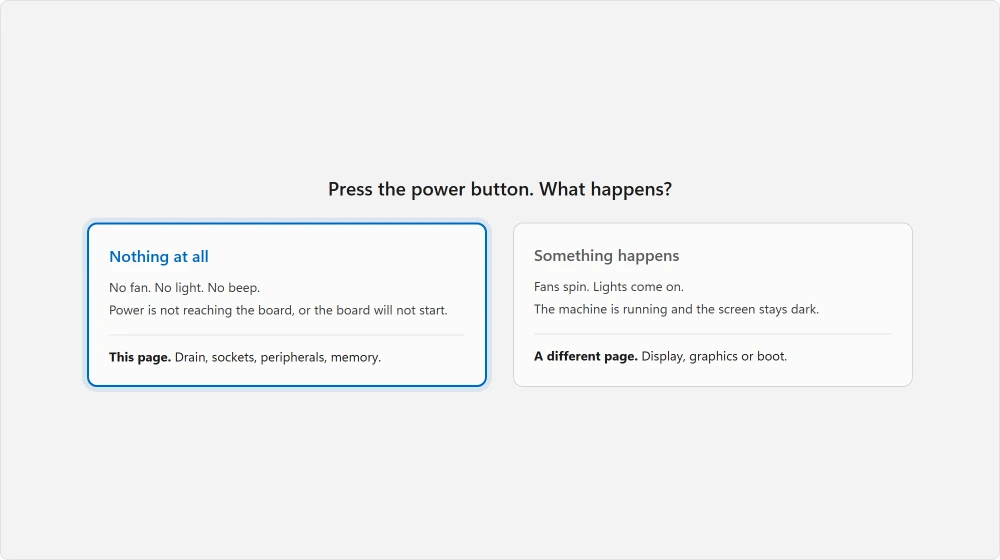
Press the power button and listen.
Does anything at all happen? A fan turning, a light coming on, a click, a beep, a whirr.
Or is it completely silent and completely dark?
An adviser on Microsoft's own Q&A puts the same split to people in a single sentence: "when you start your PC, does it sound like Windows is starting in the background, but there is no image on the screen?"
If something happens but you get no picture, the machine is running and this is not your page. Go to a black screen at startup, which covers exactly that.
If nothing happens at all, carry on here.
Drain the power properly
Free, and it revives a surprising number of machines.
Unplug the computer from the wall. On a laptop, take the battery out too if it comes out.
Now hold the power button down for twenty seconds, with everything still unplugged.
Ours, and marked as ours: that sounds pointless on a machine with no power in it, and it is not. Capacitors on the motherboard keep a charge after you unplug, and the board can sit in a latched state that stops it starting.
Holding the button with nothing connected discharges them and clears it.
Plug it back in. Wait a few seconds. Try again.
Reported by advisers across several Microsoft Q&A threads as the first step for a machine with no response, and it gets skipped constantly because it feels like superstition.
Check the power is really reaching it
Obvious, and usually glanced at rather than actually tested.
Try a different wall socket, ideally in another room. Then swap the cable if you have a spare, because a kettle lead is a kettle lead and any of them will do.
On a desktop, look at the back of the power supply for a small switch marked I and O. It gets knocked when machines are moved, and a machine with that switch off is completely dead in exactly this way.
On a laptop, watch for a light on the charger or the machine as you plug it in. No light usually means the charger, and a borrowed one of the right rating settles that in a minute.
A Chromebook adds one more step after the charger check, a Refresh plus Power reset, which our Chromebook won't turn on guide explains.
If yours has been running hot beforehand, a laptop that overheats may be the reason it shut down in the first place.
Take everything else off
Peripherals can stop a machine starting, and this is quick to rule out.
Unplug every USB device, external drive, dock, second monitor, printer and card reader. Leave only the keyboard, the mouse and the power.
Then try again.
Ours, and marked as ours: a shorted USB device, or a dock holding the machine in a strange state, gives you a completely dead computer. From the outside that looks identical to a failed power supply.
For a desktop, reseat the memory
This is the last thing you can reasonably do yourself, and it is free.
Unplug the machine and open the side panel. Find the memory sticks. Release the clips at each end, take them out, and push them firmly back until the clips close by themselves.
Do the same for the graphics card if you have one.
Memory that has crept slightly out of its slot leaves a machine that will not respond to the button at all. That happens easily after a desktop gets moved, and correcting it is free.
Unplug first, touch a bare metal part of the case before touching components, and do not force anything.
When it is hardware, and how to know
This is the point where I stop pretending there is a setting for it.
Drained the power, tried another socket, removed every peripheral, reseated the memory, and the machine is still completely silent? Then it is a hardware fault.
Reported on Microsoft's Q&A, 25 December 2024, on a desktop where the motherboard lights were on but the power button did nothing.
The owner had already reset and replaced the CMOS battery, disconnected every drive and peripheral, and bypassed the power button itself.
The adviser's answer was blunt and, I think, correct: "In that case, this is a hardware problem, it is not software, you will need to take your system to a PC Shop to have the hardware tested." And again: "If there is no image on your screen, not even the PC manufacturers logo screen when you start your PC, you cannot fix this yourself it is a hardware fault."
No fix was confirmed on that thread. It ended there.
I include it because you deserve the same honesty. A completely dead machine is usually the power supply, the motherboard or the processor. None of those can be diagnosed without spare parts or a meter.
What to tell a repair shop
Ours, and marked as ours: if you get that far, the five minutes you have already spent are not wasted.
Tell them exactly what happens when you press the button, including whether any light or fan moves. Tell them what you have already tried, especially the power drain and the reseat. And tell them what happened just before it died.
A machine that shut itself down suddenly is a different story from one that was fine yesterday.
That beats handing over a box and saying it is broken.
Status: written 21 August 2026. The power drain and the hardware verdict come from Microsoft Q&A advisers rather than a formal support page, and are marked that way throughout.
Why does holding the power button for 20 seconds work?
Because the motherboard holds a charge in its capacitors after you unplug, and it can sit in a state that prevents starting. Holding the button with no power connected discharges them and clears it. It has to be done with the machine unplugged, or it does nothing.
My PC has lights and fans but no picture. Is that the same problem?
No, and by comparison that is good news. Your machine is running, so look at the display side or at booting rather than at power. That is a separate and much more fixable set of causes.
If the screen shows one line asking you to pick a proper boot device, loading the BIOS defaults comes first.
Can a USB device stop a computer turning on?
Yes. A shorted device, a dock, or an external drive can hold a machine in a state where it will not start, and from the outside it looks exactly like a dead power supply. Unplugging everything takes a minute and rules it out.
When should I give up and take it to a shop?
Once the power drain, a different socket, no peripherals and a memory reseat have all failed and the machine is still silent. By then you are looking at the power supply, the motherboard or the processor. None of those can be confirmed without spare parts or a meter.
The Short Version
- Does anything at all happen? That answer decides which page you need.
- Unplug, hold the power button twenty seconds, plug back in. It works more often than it should.
- The switch on the back of a desktop power supply gets knocked when machines move.
- A USB device or dock can hold a machine dead, and it looks like a power fault.
- Memory that has crept out of its slot gives you a completely silent machine.
- Silent after all of that is hardware, and no setting will reach it.
Where to Next
If it is a phone rather than a computer showing you nothing, the same approach works with a different question. Dead and dark is not the same as alive and dark.
Go back and double-check the power drain. It has to be done with the machine unplugged, and nearly everybody does it with the cable still in. That one detail is the difference between it working and doing nothing at all.
If it does come back to life, ask yourself why it died in the first place. A machine that shut itself down suddenly beforehand was probably overheating, and a laptop running too hot covers what to check before it happens again.
Say in the comments exactly what happens when you press the button. Whether a single light comes on separates a page of fixes from a trip to a repair shop. That is what I would ask you first.

Isaac Smith is the founder and editor of PC Glance, a website that covers computers, laptops, and technology. He is a tech enthusiast and a computer geek who loves to share his insights and help his readers make smart choices when buying tech gadgets or laptops. He is always curious and updated about the latest tech trends.