

You set up Guided Access so a child can only use one app. Now you want the iPad back, you triple-click the Home button, and nothing happens. The iPad stays locked in that app.
No need to panic, since nothing is lost. I will show you the way out that works right now, then what to change so it does not trap you again.
What owners are seeing
The owner who raised it in a forum thread has an iPad (9th generation) running iPadOS 27. Guided Access still starts, but once it does, "the iPad home button stops working and I cannot use home button".
The thread has 38 people saying Me too. The owner found one exit: "The only way to leave guided access is by force restart (power button + home button)."
That matters to you because the Home button is exactly what Apple uses to end a session. The explanation is ours: iPadOS 27 seems to ignore that button inside Guided Access on some iPads.
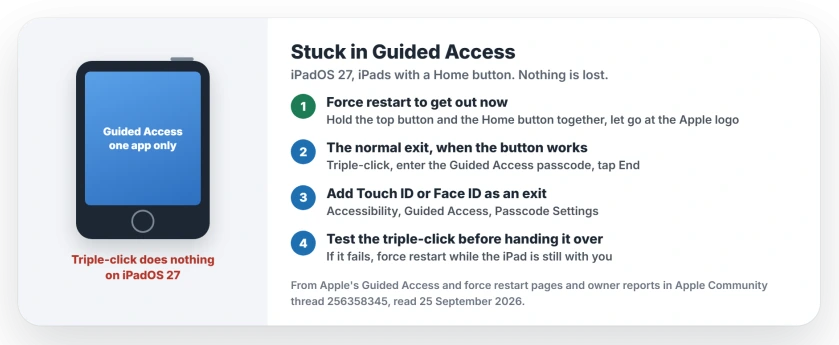
Status: iPadOS 27, checked 25 September 2026. Owners on Home-button iPads report the button stops working during Guided Access, and a force restart is the only way out so far. Apple has not commented.
1. Get out now: force restart
This does not erase anything: it restarts the iPad and drops it out of Guided Access.
Apple's steps for iPads with a Home button are simple. Hold the top button and the Home button together, and let go when the Apple logo appears.
An iPad without a Home button is different. Press and release the volume button nearest the top button, then the one farthest from it. Then hold the top button down until the Apple logo shows.
2. The normal way out, once the button works
This is how Guided Access is meant to end. A Level 8 member gave the steps: "Triple-click the top button (on an iPad with Face ID) or Home button (on other iPad models), then enter your Guided Access passcode."
Apple's own page finishes the job: "Tap End to end the session." If the triple-click does nothing, go back to step 1.
3. Add Touch ID or Face ID as a way out
Guided Access has its own passcode settings. Apple says Face ID or Touch ID can be a second way to pause or end a session. Our Guided Access guide walks through those settings.
In Settings, open Accessibility, then Guided Access, then Passcode Settings. It cannot help if the triple-click itself does nothing, since that still opens the prompt. But it saves you typing a passcode you may have forgotten.
4. Test it before you hand the iPad over
Until Apple fixes this, test the way out every time. Start Guided Access, then triple-click straight away while the iPad is still in your hands.
If it does not respond, force restart now, rather than later with a child waiting. That habit is ours, and it takes seconds.
Tell Apple about it
The Level 8 member suggested writing to Apple's accessibility team at accessibility@apple.com. Say which iPad you have and that the Home button stops working inside Guided Access on iPadOS 27.
If other things broke on your iPad with the update, the iPad 9th generation charging guide covers another iPadOS 27 fault on the same model. For setting limits without locking one app, Content and Privacy Restrictions has its own checks.
How do I get my iPad out of Guided Access?
Normally, triple-click the Home button or the top button, enter your Guided Access passcode and tap End. If the button does not respond on iPadOS 27, force restart the iPad.
Does a force restart erase my iPad?
No. It restarts the iPad and ends the Guided Access session. Your apps and data stay as they were.
Why does my iPad Home button not work in Guided Access?
Owners report that on iPadOS 27 the Home button stops responding once a Guided Access session starts, so the triple-click cannot end it. Apple has not explained why yet.
Can I use Touch ID to end Guided Access?
Yes, as a backup. Apple lets you add your fingerprint or your face as an exit, in the Guided Access passcode settings. You still need the triple-click to reach it.
The Short Version
- On iPadOS 27, the Home button can stop working inside Guided Access.
- Force restart to get out: hold the top button and Home button together.
- Your data survives a force restart.
- The normal exit is a triple-click, your passcode, then End.
- Add Touch ID or Face ID under Guided Access Passcode Settings.
- Test the triple-click before you hand the iPad over.
Where to Next
Keep the force restart in mind for now. It is the one exit that works every time on an affected iPad.
Which iPad do you have, and does the triple-click fail every time? Leave a comment. When iPadOS 27 gets a fix, I will add it here.

Isaac Smith is the founder and editor of PC Glance, a website that covers computers, laptops, and technology. He is a tech enthusiast and a computer geek who loves to share his insights and help his readers make smart choices when buying tech gadgets or laptops. He is always curious and updated about the latest tech trends.