
You are on macOS Tahoe 26.6.2, you know 26.7 is out, and Software Update will not offer it. Maybe it only shows a Safari update, or claims nothing is waiting at all.
Two Macs in one household hit exactly this, and the forum answers point at a few simple causes. I lined them up against Apple's own update and safe mode pages, starting with the quickest.
What the owner saw
The owner had two Macs, and neither offered the update: "Two Macs on Tahoe 26.6.2 - an M1 mini and an M5 Air - do NOT show 26.7 in the software Update page".
What did appear was something else: "They both show only a Safari 27.0 update". A Level 10 volunteer added some comfort: "It is not always a perfect science, I had issues getting both the 26.6.2 and 26.7!"
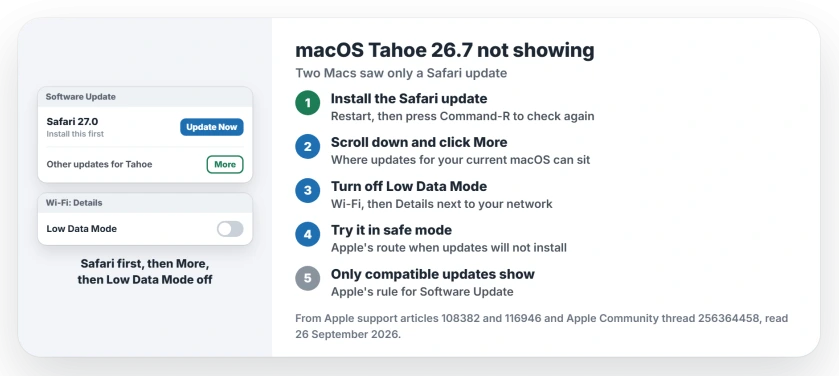
Status: macOS Tahoe 26.6.2, checked 26 September 2026. Software Update showed only Safari 27.0 on two Macs. Clear that first, then try More, Low Data Mode and safe mode.
1. Install the Safari update, then restart
A Level 10 volunteer's top answer was to "Update Safari to 27.0" first. Then restart and look again.
A pending update can sit in front of the next one. After the restart, Apple's update guide says you can check again by clicking Check for Updates or pressing Command-R.
2. Scroll down and look under More
The same volunteer said to scroll halfway down the Software Update panel and click More. On a Mac that also offers a newer macOS, updates for your current version can sit lower down.
That position of the minor update is our reading of why it hides. Apple's own page calls 26.4 or 26.7 a minor release and macOS 27 a major one.
3. Turn off Low Data Mode for your Wi-Fi
One owner's tip was to check the network: "Within the details of your Wi-Fi settings, make sure you have 'Low-data mode' in 'Details' turned off".
In their words: "You will then notice those difficult updates being shown and able to be completed for installation". Open System Settings, click Wi-Fi, click Details next to your network, and check the Low Data Mode switch.
4. Check again in safe mode
If it still hides, try safe mode. The volunteer's last step: "If not, startup the Mac in Safe Mode and re-check for 26.7".
Apple backs this up: "If you can't install software updates, try installing them in safe mode".
On a Mac with Apple silicon, keep the power button pressed until the startup options appear. Select your disk, then hold Shift and click Continue in Safe Mode.
5. Know when your Mac is simply not offered it
Apple is clear that "Software Update shows only software that is compatible with your Mac model". If it reports no updates, Apple means nothing compatible is waiting.
Both of the owner's Macs run Tahoe, so both should see 26.7 in time. Still nothing after these steps? Give it a day and check again. That advice is ours.
Other Mac update problems
If your Mac is on macOS 27 and file sharing with an older Mac broke, the file sharing page covers what still works. And if RAW photos broke after a Sequoia update, the RAW page has the workarounds.
Why is macOS 26.7 not showing in Software Update?
On the owner's Macs, only a Safari 27.0 update showed. Installing that first, restarting and checking again is the volunteers' first step, then More, Low Data Mode and safe mode.
Where are other updates in Software Update on a Mac?
A Level 10 volunteer says to scroll about halfway down the Software Update panel and click More.
Does Low Data Mode stop Mac updates from showing?
One owner reported that turning off Low Data Mode in the Wi-Fi details made hidden updates appear and install.
How do I install macOS updates in safe mode?
Start up in safe mode, then open Software Update. Apple says to try this if you can't install software updates normally.
The Short Version
- Install the pending Safari update first.
- Restart, then press Command-R to recheck.
- Scroll down and click More.
- Turn off Low Data Mode for Wi-Fi.
- Try Software Update in safe mode.
- Apple only offers what fits your Mac.
Where to Next
Install the Safari update now, restart, and open Software Update again. That first step takes about five minutes.
Which step made 26.7 appear for you? Add your Mac model in a comment, and I will move the winning step to the top.

Isaac Smith is the founder and editor of PC Glance, a website that covers computers, laptops, and technology. He is a tech enthusiast and a computer geek who loves to share his insights and help his readers make smart choices when buying tech gadgets or laptops. He is always curious and updated about the latest tech trends.