
Your new Apple Watch restarts on its own, sometimes minutes after setup and sometimes in the middle of a workout. A thread about it collected 170 Me too clicks in nine days.
Apple has shipped a fix, and I read its release notes for watchOS 27.0.1 along with both pages of the thread, including one owner the update did not help.
Restarts within a day of setup
The first poster had their Series 12 for one day. Their crash log blamed the Neural Engine, which "waited=2020 ms, timeout=2000 ms" before the watch gave up and rebooted.
Owners report it on the Series 12 and the Ultra 4. One saw it while reading notifications, another during a workout, and one only while texting in Messages.
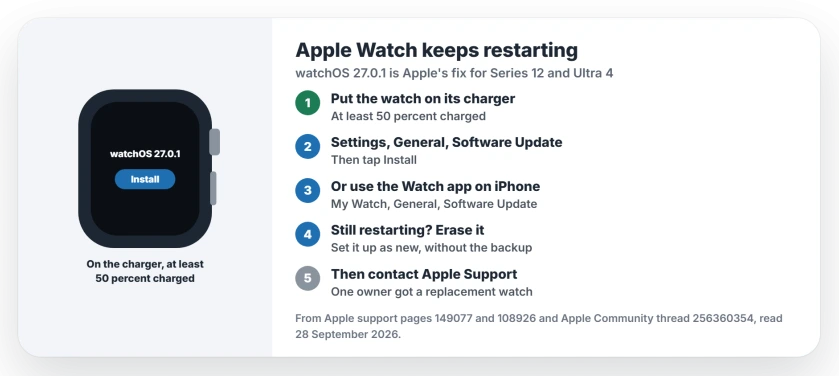
Status: watchOS 27.0.1, checked 28 September 2026. Apple says it fixes an issue where Apple Watch may restart unexpectedly. One owner still had restarts after it, so the warranty route stays open.
1. Install watchOS 27.0.1
Apple's watchOS 27 release notes describe the fix plainly. The update includes "fixing an issue where Apple Watch may restart unexpectedly".
On the watch, join Wi-Fi, open Settings, tap General, then Software Update, and tap Install. Apple's update page also asks for at least 50 percent charge.
Leave the watch on its charger until it finishes. In Apple's words: "When the update completes, your Apple Watch restarts on its own." That last restart is the good kind.
2. Try it from your iPhone if the watch keeps crashing
A watch that reboots every few minutes may not finish an update started on its own screen. I find the iPhone route steadier, and that view is ours.
On the iPhone, the Watch app has the same button: My Watch, then General, then Software Update. Keep the phone next to the watch while it installs.
3. Still restarting after 27.0.1
It did not work for one owner, who posted on 24 September: "My AWS12 still crashes after the 27.0.1 update."
If yours keeps going, Apple Support may try what it tried with owners. One was told to delete VPN profiles, then "force restart both phone and watch". Another was asked to reset the watch after two rounds of diagnostics found no fault.
4. Erase it, then ask about the warranty
A Level 10 volunteer suggested you wipe the watch and pair it as a new watch, without restoring your backup. The erase steps are the same ones on our passcode reset page.
If the restarts carry on, contact Apple Support. One Ultra 4 owner was sent to an Apple Store, where they "exchanged the watch to another new unopened Ultra 4".
Related watch and iPhone problems
If the watch will not take the update at all, the watch update page goes through what blocks it. And if your iPhone 18 Pro Max reboots by itself too, the iPhone restart page explains how Apple's diagnostics decide it.
Why does my Apple Watch Series 12 keep restarting?
One owner's crash log showed a Neural Engine timeout. Apple's fix is watchOS 27.0.1, which it says stops Apple Watch restarting unexpectedly.
Does watchOS 27.0.1 fix the restarts?
Apple says so in its release notes. One owner still had crashes after installing it, so contact Apple Support if yours keeps going.
Which models are affected?
In the thread, owners report it on the Apple Watch Series 12 and the Ultra 4.
Will Apple replace my watch?
It can happen. One Ultra 4 owner got a new watch at an Apple Store after repeated reboots, and a Level 10 volunteer points out that the one-year warranty covers the hardware.
The Short Version
- New Series 12 and Ultra 4 watches restart.
- watchOS 27.0.1 is Apple's fix.
- Update while it sits on the charger.
- Use the iPhone app if the watch crashes.
- Still restarting? Wipe it and pair it fresh.
- Then ask Apple Support about an exchange.
Where to Next
Charge your watch and install watchOS 27.0.1 today. Then wear it for a day and watch for restarts.
If yours still restarts after the update, leave a comment with your model, and I will add what Apple does next.

Isaac Smith is the founder and editor of PC Glance, a website that covers computers, laptops, and technology. He is a tech enthusiast and a computer geek who loves to share his insights and help his readers make smart choices when buying tech gadgets or laptops. He is always curious and updated about the latest tech trends.