

You open Storage on your Mac and System Data is taking 100 GB or more. On a Mac with 256 GB, that can leave you short of space for updates. That is a nasty surprise, and the good part is that much of it is often temporary.
I read Apple's pages on Mac storage and safe mode, plus a MacRumors discussion where people posted their numbers after macOS 27. One owner halved theirs in seconds, and I start with what they did.
Numbers that alarm people
The thread's title said it all: 100 GB of macOS and System Data. Others posted their own numbers. One wrote: "Mine is still hovering around 160GB System Data." Another: "I just checked mine and I'm at 46GB."
So the size varies a lot from Mac to Mac. That fits Apple's own description, which says the category "varies in size depending on the current state of your Mac."
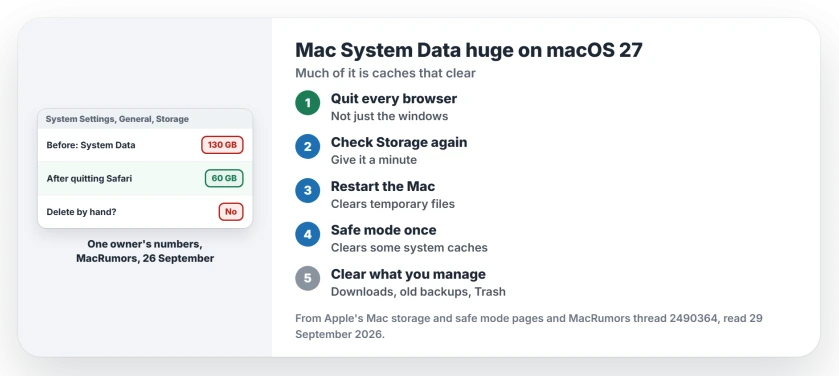
Status: macOS 27.0.1, checked 29 September 2026. Apple says macOS manages System Data and its size changes with your Mac's state. Quitting Safari took one owner from 130 GB to 60 GB.
1. Quit Safari, then look again
This is the quickest win, confirmed by an owner in the thread. They had "130GB System Data", then added: "Closing-restarting Safari dropped it down to 60GB immediately."
They suspected streaming, writing "Likely Netflix cache via Browser." Streamed video and web pages build up caches while a browser stays open for days.
Quit every browser you use, not just close its windows. Then open System Settings, click General, then Storage, and give the numbers a minute to settle.
2. Restart, or start up in safe mode once
A restart clears temporary files that apps and macOS hold open. If System Data stays high, Apple's safe mode page describes a deeper clear-out.
Apple says safe mode "Clears some system caches, including font caches and the kernel cache, which are automatically created again as needed." It adds that this "can temporarily make more storage space available on your startup disk."
Apple silicon Macs: turn the Mac off, then press and keep pressing the power button until startup options show. Pick Macintosh HD and, with Shift held down, click the safe mode button under it. Restart normally afterward.
3. Know what System Data is
Apple's storage page calls it a general category for "all Apple and third-party files that don't belong to any more specific category." Its Mac guide lists "log files, caches, VM files, and other runtime system resources".
That is why it swells and shrinks. Caches grow while you work and shrink when apps quit or macOS cleans up.
4. Free space where you can manage it
You cannot sort through System Data yourself. Apple says so plainly: "You can't manage the contents of this category." Leave folders you do not recognize alone.
What you can clear sits in the other categories. Apple suggests deleting files in Downloads, old iPhone or iPad backups, and apps you no longer use.
Then empty the Trash. Apple says the space "doesn't become available until you empty the Trash".
If Photos on the Mac says it paused syncing for lack of local storage, the Photos storage page shows how one owner tracked the missing space to a single app's cache.
If macOS 27 itself is the problem
If System Data is only part of a Mac that feels worse since the upgrade, the downgrade page covers going back to Sequoia. And if your iPhone shows the same category eating space, the iPhone System Data page explains that version.
Update, 29 September 2026: the Spotlight index adds to this as well. One owner measured their index folder at 8.7 GB at rest, and about 40 GB in use during a rebuild. The Spotlight indexing page shows how to tell when it has finished.
Why is System Data so big on my Mac?
It holds caches, logs and temporary files from macOS and your apps, and Apple says its size changes with what your Mac is doing. Browsers that stay open for days can add a lot.
Can I delete System Data on a Mac?
Not directly. Apple says macOS manages it. Quitting apps, restarting and safe mode let macOS clear what it can.
Does restarting reduce System Data?
Often, yes. One owner saw it fall from 130 GB to 60 GB just by quitting and reopening Safari.
Is 100 GB of System Data normal?
It happens, but it varies widely. Owners in the same thread reported anything from 46 GB to 160 GB.
The Short Version
- System Data holds caches, logs and temporary files.
- Its size changes with what your Mac is doing.
- Quit Safari and other browsers first.
- One owner dropped from 130 GB to 60 GB.
- Restart, or use safe mode once.
- You cannot delete System Data by hand.
- Clear Downloads, old backups and Trash.
Where to Next
Quit your browsers now, then check Storage again in a minute. If the number barely moves, restart once and look again.
If it still sits over 100 GB, post your number and your Mac's storage size as a comment. I will compare it with what other owners report and tell you what to try.

Isaac Smith is the founder and editor of PC Glance, a website that covers computers, laptops, and technology. He is a tech enthusiast and a computer geek who loves to share his insights and help his readers make smart choices when buying tech gadgets or laptops. He is always curious and updated about the latest tech trends.