
You use your iPhone in a dim room, and your eyes ache, or your head starts to throb. You wonder whether the screen itself is doing it.
It might be, and Apple now says so in its own guide. Before you return the phone, try one new switch. I read Apple's iPhone guide and the latest page of a MacRumors thread that has run since 2017, with two million views.
How your iPhone dims its screen
Apple explains it in plain terms: "Your iPhone controls brightness using a technique called pulse width modulation (PWM)". At low brightness, Apple adds, that can look like flicker to some people.
Apple says only some people see it. The long-running thread is full of people who do, as eye strain, headaches or a throbbing temple.
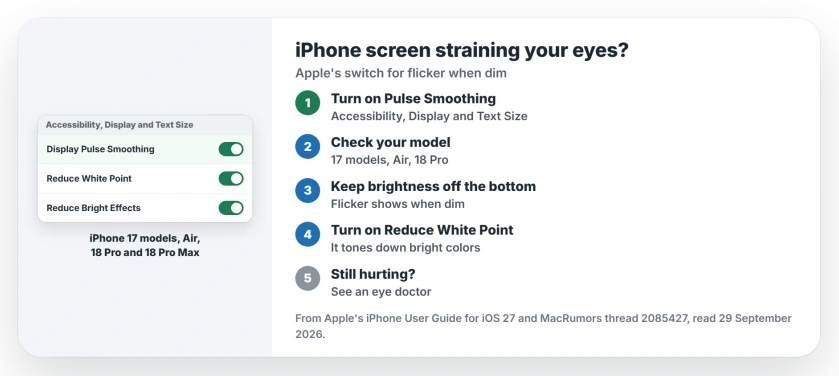
Status: iOS 27, checked 29 September 2026. Apple's Display Pulse Smoothing works on the iPhone 17 models, iPhone Air and iPhone 18 Pro models. Owners report mixed results.
1. Turn on Display Pulse Smoothing
Apple added a switch for exactly this. On supported models, Apple says, "you can turn on Display Pulse Smoothing to create a smoother dimming experience at low brightness levels."
Open Settings, tap Accessibility, then Display & Text Size. Then, as Apple puts it, "Turn on Display Pulse Smoothing (PWM)."
Apple adds one warning: "Disabling PWM may affect low brightness display performance under certain conditions." So test it with the screen dim, where the switch matters most.
2. Check that your model has the switch
Apple's supported models list is short:
- The iPhone 17, the 17 Pro and the 17 Pro Max.
- iPhone Air.
- iPhone 18 Pro and 18 Pro Max.
Older models do not get it. If yours is not on the list, the next two steps are what you have.
3. Soften the screen in other ways
Apple's flicker note is about dim screens, so try not to run yours at the bottom of the slider. To stay comfortable at a higher setting, turn on Reduce White Point. Apple's display page says it tones down bright colors.
The same Display & Text Size screen has Reduce Bright Effects. Apple says it softens the highlights and flashes on some onscreen elements, such as the keyboard.
4. What owners report
The switch does not settle it for everyone. One owner who tested several iPhone 17 models wrote: "I don't believe that the pwm toggle works on LG panels, at least not from my personal experience."
Another, on an 18 Pro Max, feels "a light throbbing sensation on the right temple". They found some relief elsewhere: "I just turned on low power mode which seems to be helping".
A third tried swapping an iPhone 14 to an LCD screen at a repair shop. In their words: "Unfortunately, it didn't work out." I would not go that far with your own phone.
5. Know when to stop testing
Apple is careful about what these settings are for. Its guide says they are no substitute for medical treatment, and not something to rely on in risky situations.
If headaches or eye pain keep coming back, see an eye doctor. For a new phone, Apple's US store takes returns for 14 days after delivery, so test the switch early.
Other iPhone screen settings
If your screen keeps dimming on its own instead, our dimming page covers what turns it down. If the glassy look makes text hard to read, the Liquid Glass page shows the clearer options.
Does the iPhone 18 Pro use PWM?
Apple says iPhone controls brightness with PWM, and the iPhone 18 Pro and 18 Pro Max both support Display Pulse Smoothing.
Which iPhones have Display Pulse Smoothing?
Apple lists the iPhone 17, 17 Pro, 17 Pro Max, iPhone Air, 18 Pro and 18 Pro Max.
Does Display Pulse Smoothing fix eye strain?
Apple says it smooths dimming at low brightness. Owners in the thread report mixed results, so try it for a few days.
The Short Version
- iPhone dims its screen with PWM, Apple says.
- Some people see that as flicker when dim.
- Turn on Display Pulse Smoothing in Accessibility.
- It works on the iPhone 17 models, Air and 18 Pro models.
- Keep brightness off the very bottom of the slider.
- Try Reduce White Point and Reduce Bright Effects.
- See a doctor if symptoms keep coming back.
Where to Next
Turn on Display Pulse Smoothing tonight and use the phone in a dim room as usual. Give it a few evenings before you judge it.
If the switch made a clear difference for you, say in a comment which model you use. I will add what owners report.

Isaac Smith is the founder and editor of PC Glance, a website that covers computers, laptops, and technology. He is a tech enthusiast and a computer geek who loves to share his insights and help his readers make smart choices when buying tech gadgets or laptops. He is always curious and updated about the latest tech trends.