
Your screen keeps dimming, you have already turned Auto-Brightness off, and it is still doing it. That is enough to make anyone suspect the phone is faulty.
Brightness on an iPhone is not one setting. It is several, and each of them can pull it down without telling you.
Let me go through them in the order I would check them myself. Apple documents each one separately and Apple never lists them together, which is why this is so hard to pin down. Ours is the order worth working through.
It dims later in the day and nothing was touched
Adaptive Power watches how heavily you are using the phone and trims back so the battery lasts.
Apple's Power Modes page has it lowering screen brightness, limiting background activity and making performance adjustments "to conserve power throughout the day".
Take the qualifier seriously. Apple's dedicated Adaptive Power article says the brightness step is "by a small amount". If your screen drops by half, this is not your cause.
It runs on iPhone 15 Pro or later, on by default on iPhone 17, 17 Pro, 17 Pro Max and iPhone Air.
Those ship with it enabled but do not act straight away: the footnote is that it "needs at least 7 days to learn your charging habits, so it won't engage before then".
So the dimming starts about a week in, long enough that few owners connect the two.
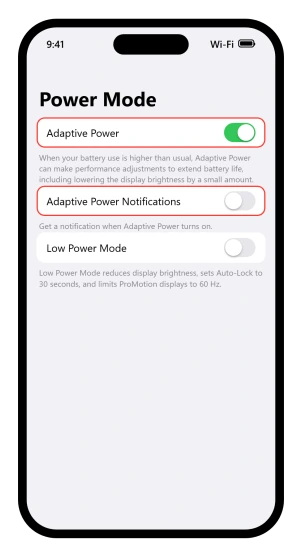
The switch is at Settings > Battery > Power Mode. Turn Adaptive Power off there and the trimming stops, at the cost of the battery life it was buying.
Our guide to what drains an iPhone battery on iOS 26 tells you to turn this feature on, for exactly that reason.
On an iPhone 14, or a standard iPhone 15 or 16, there is no Adaptive Power row at all, so this is not your cause. The Power Mode screen itself exists on iPhone 15 and later.
One exclusion doubles as a test. Adaptive Power "doesn't manage performance while you use features that require maximum performance, such as when using camera or playing games with Game Mode on".
So a screen that dims in the camera or mid-game is something else, most likely heat.
Catch it happening
Turn on Adaptive Power Notifications at Settings > Battery > Power Mode and the phone tells you when it kicks in.
Apple adds that "if you turn off notifications, Adaptive Power will still help extend battery life", so this changes what you are told rather than what the phone does.
Leave it on for a day. If the notification lands just before you notice the screen going flat, you have your answer.
It changes on its own as the light changes
Apple: "The sensor lowers brightness in dark locations and raises brightness in light locations."
The sensor works in both directions. It brightens you outdoors and dims you indoors, so a screen that goes dark in a dim room is usually this, and one that goes dark in the sun is usually heat.
The switch is at Settings > Accessibility > Display & Text Size > Auto-Brightness. It is not in Display & Brightness, where the brightness slider lives, so searching Settings for the word brightness will not find it.
Apple attaches a caution to switching it off, "Turning off Auto-Brightness may increase power consumption", and offers a repair rather than a removal: if brightness stops adapting properly, turn Auto-Brightness off and then back on again.
On the same screen sits Reduce White Point, which Apple describes as toning down the intensity of bright colors. Left on it dims the screen permanently and never announces itself.
Before blaming the sensor: with Auto-Brightness off, the screen still dims for every other reason here. Turning it off narrows the list rather than ending it.
It dims when the phone is warm
Leave the phone on a dashboard in the sun for twenty minutes, then pick it up. The screen will be at its floor and the slider will not lift it.
When the inside of the phone goes past its normal operating range, Apple lists what you might notice, and one item is blunt: "The display dims or goes black." Charging slows or stops, the camera flash can stop working, and frame rates drop.
There is a detail that explains why the slider achieves nothing: if your device gets too warm, "the display might dim and your maximum screen brightness is reduced until your device can cool down".
The ceiling has dropped, so there is nothing left to reach for.
The named situations match when people notice: a car on a hot day, prolonged direct sunlight, GPS navigation, graphics-heavy games and long camera sessions.
While navigating there is a specific version.
The phone might show "Temperature: iPhone needs to cool down" and turn the display off, while spoken directions carry on, and the display illuminates again as you approach a turn.
Our guide to an iPhone that runs hot on iOS 26 is for the other kind of heat, the kind that turns up days after an update with the phone sitting idle, and its lead fix is switching off Background App Refresh.
It dims once the battery gets low
Look at the battery icon. If it is yellow, read this section and skip the rest of the page.
Two entries on Apple's list of what Low Power Mode changes are about the screen. "Display brightness: reduced", stated flatly, so this one really does dim you.
And "Auto-Lock: defaults to 30 seconds", which overrides whatever you chose, so a screen set to stay awake five minutes goes dark in thirty.
A third explains a complaint people struggle to word. On ProMotion models the refresh rate is limited to 60 frames per second, so scrolling looks less smooth, which reads as worse rather than darker.
The two power features are linked. Adaptive Power "can also automatically turn on Low Power Mode when your battery reaches 20%", so on a supported iPhone one triggers the other without you doing anything.
Turn it off at Settings > Battery > Power Mode on iPhone 15 and later, or Settings > Battery on iPhone 14 and earlier.
It dims while you are looking straight at it
Does the dimming always end with the screen locked, needing Face ID to get back in? Then it is a timer, not a brightness control, and there are two parts to it.
Attention Aware Features is the iPhone checking for attention before dimming the display. With it on, Apple's wording is that "your display won't dim until you stop looking at your device".
With it off, the dimming runs on the timer regardless of whether you are reading.
The same switch explains the opposite complaint, a screen that stays on at a desk. The screen that won't turn off page covers that case.
It sits at Settings > Face ID & Passcode, also listed under Settings > Accessibility > Face ID & Attention, and it applies to Face ID models.
The timer underneath is Settings > Display & Brightness > Auto-Lock. A longer time delays both the dimming and the lock, with one caution: "Delaying or preventing Auto-Lock may increase power consumption."
Our guide to an iPhone Lock Screen that looks dark covers the locked version, where Apple says the setting "allows a dimmed version of your Lock Screen to stay visible, even when your iPhone is locked", and it lists eight separate conditions that blank it completely.
The color changed rather than the level
Some of what gets called dimming is the screen going warmer instead of darker, though one of these does both.
True Tone adapts "the color and intensity of the display to match the light in your environment", so it shifts apparent brightness as well as tint, and it is on by default.
Night Shift warms the display. Dark Mode changes the interface rather than the backlight.
All three live under Settings > Display & Brightness, and all three are also in Control Center under the brightness slider.
One more sits on the newest models.
Display Pulse Smoothing, at Settings > Accessibility > Display & Text Size, exists because iPhone controls brightness with pulse width modulation, which "for some people can make the display appear to flicker when dim".
If a dim screen gives you eye strain or headaches, the Pulse Smoothing page lists the models that have the switch and what owners found.
It is on iPhone 17, 17 Pro, 17 Pro Max and iPhone Air, and it answers a screen that looks bad when dim rather than one that keeps going dim.
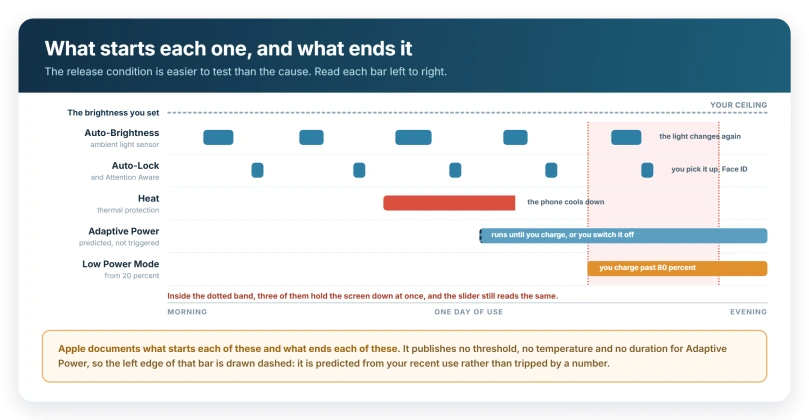
What ends each one
Each cause has its own exit, and the exit is easier to check than the cause.
- The light changes and the screen follows within a second. Auto-Brightness. True Tone tracks room light too, but shifts color rather than level.
- It lifts once the phone is cool, and the phone is warm now. Heat.
- Face ID or a passcode is needed to get back in. Auto-Lock. Heat blanks a screen too, but a heat-blanked screen wakes without asking who you are.
- The battery icon is yellow. Low Power Mode, though on iPhone 15 Pro and later Adaptive Power may be what switched it on.
- A notification said so. Adaptive Power.
That notification is the one check here you can set up in advance. The rest you run after the fact.
If none of this is your phone
A cool phone at 60 percent battery, with Auto-Brightness off and a long Auto-Lock, has none of the causes here.
The question then is whether the dimming follows the phone or follows the app. If it happens in one app only, it belongs to that app.
If it survives a restart, holds everywhere, and no notification or yellow icon ever appears, that is a hardware conversation with Apple Support rather than a setting on this page.
What does not help
- Dragging the brightness slider back up. Under heat it cannot work at all, because your maximum has been lowered.
- Turning Auto-Brightness off and stopping there. It costs battery, and every other cause here survives it.
- Restarting the phone. None of these is a stuck state. They are settings and thermal protection, so a restart leaves them as they were.
- Blaming the display or buying a screen protector. Heat dimming lifts on its own as the phone cools, so a screen that comes back by itself is doing what Apple documents.
- Assuming a battery percentage caused it. No percentage is published for Adaptive Power, only prediction from your recent use.
Status: current for iOS 26.6. Every cause on this page is documented behavior on this release rather than a fault, and only the heat one is a protection you cannot switch off.
Why does my iPhone screen keep dimming with Auto-Brightness off?
Because Auto-Brightness is only one of several ceilings. Adaptive Power lowers screen brightness by a small amount, Low Power Mode reduces brightness outright and forces Auto-Lock to 30 seconds, and heat lowers your maximum brightness until the phone cools. Start at Settings, Battery, Power Mode, which holds two of those three.
What is Adaptive Power on iPhone?
A power feature on iPhone 15 Pro and later that predicts heavy days and trims performance. Apple says it can lower screen brightness by a small amount, limit background activity and turn on Low Power Mode at 20 percent. It is on by default on iPhone 17, 17 Pro, 17 Pro Max and iPhone Air, and needs seven days before it engages.
Why does my iPhone screen go dark in the sun?
Heat, not Auto-Brightness. The sensor raises brightness in bright places rather than lowering it. Sustained sun warms the phone, and once the interior temperature passes its normal range the display dims or goes black, and your maximum brightness is reduced until it cools down again.
Where is Auto-Brightness on iPhone?
It is not in Display and Brightness, which is why it seems to be missing. Go to Settings, tap Accessibility, tap Display and Text Size, then find Auto-Brightness. Turning it off may increase power consumption, and it does not stop the dimming, because heat, Adaptive Power and Low Power Mode all still lower the screen.
The Short Version
- Adaptive Power lowers brightness "by a small amount", is on by default on iPhone 17, 17 Pro, 17 Pro Max and iPhone Air, and waits seven days before starting.
- Turn it off at Settings > Battery > Power Mode, accepting that you lose the battery life it was buying.
- Adaptive Power Notifications, on the same screen, tells you when it happens.
- Low Power Mode reduces brightness and forces Auto-Lock to 30 seconds, overriding what you chose.
- Auto-Brightness hides in Accessibility, under Display & Text Size, and raises brightness outdoors rather than lowering it.
- Reduce White Point, on that same screen, dims permanently and says nothing.
- Heat lowers your maximum brightness until the phone cools, which is why the slider stops helping.
- Attention Aware Features keeps the screen lit while you are looking at it, on Face ID models.
Photos looking wrong rather than the screen going dark: Night Shift, True Tone and Color Filters change every photo on screen without touching the file, and our guide to photos that look washed out sorts those from a Photographic Style.
The screen covered rather than dimmed: If a message blocks the whole screen until you move the phone back, that is Screen Distance, and our guide to why your iPhone says to move it farther away covers the switch.
Where to Next
Brightness is not one setting, and that is the whole reason this is so hard to pin down. Work through them in order rather than flipping switches at random.
Adaptive Power is the one most people have never heard of, and it is on by default on the newest iPhones.
If you have been through every one of them and it still dims, tell me whether it happens when the phone is warm, because that is a different mechanism entirely.

Isaac Smith is the founder and editor of PC Glance, a website that covers computers, laptops, and technology. He is a tech enthusiast and a computer geek who loves to share his insights and help his readers make smart choices when buying tech gadgets or laptops. He is always curious and updated about the latest tech trends.