
Your work PC will not take your password, and Windows says the trust relationship with the domain failed. That is worrying when the password is right. I would check the September update before anyone rejoins the PC.
It has been documented by Microsoft since 25 September, and it hits PCs with a Credential Guard feature switched on, and the cure is to switch that feature off.
What Microsoft says happens
The trigger is the September 8 update, KB5124008, or anything newer. Microsoft says "some Credential Guard protected machine accounts might lose their secure channel with an on-premises Active Directory (AD) domain".
Then people get locked out, and in Microsoft's words, users "might receive a message stating that the trust relationship between the device and the domain failed".
Two things still work, since Microsoft says "Offline sign-in using previously cached credentials might continue to work", and the domain controllers themselves "are not affected".
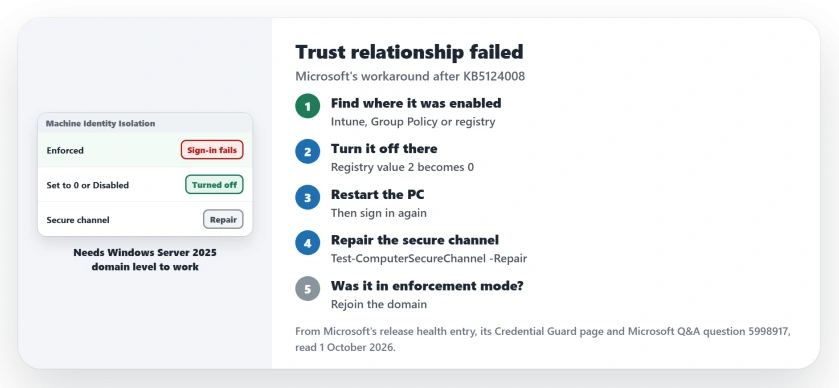
Status: checked 1 October 2026. Microsoft lists it as mitigated: turn off Machine Identity Isolation, restart, and repair the secure channel. A fix is planned for a later update.
Why the update sets it off
The update did not add a new setting to your PC. Microsoft says it makes Windows "begin honoring any existing or policy-provisioned settings that enabled Machine Identity Isolation enforcement".
That feature has a hard requirement, because Microsoft says it "is only supported for environments connected to domain controllers running at a Windows Server 2025 Domain Functional Level (DFL)" or higher.
So a domain on older servers breaks, and one owner of such a network hit exactly that in a forum thread, with two Windows Server 2019 domain controllers and several failing PCs.
1. Find where Machine Identity Isolation was turned on
Microsoft's known issues page sets the rule: undo it the way it was done. It says to "disable Machine Identity Isolation using the same management method that was used to enable it".
That means Intune, Group Policy or the registry. Ask whoever manages your PCs which one your company uses.
2. Set it to off in the same place
In Intune or Group Policy, set the policy to Disabled. Microsoft's Credential Guard page says Disabled "Turns off Machine Identity Isolation".
If it was set in the registry, Microsoft names two keys: HKLM\SYSTEM\CurrentControlSet\Control\Lsa\MachineIdentityIsolation and HKLM\SOFTWARE\Policies\Microsoft\Windows\DeviceGuard\MachineIdentityIsolation.
Change a value of 2 to 0 in either one, and back the registry up first, as Microsoft asks.
The admin's fix is user-reported, and it needed both routes. In their words: "We ended up also forcing 0 on the registry key."
3. Restart, then repair the secure channel
Microsoft's next step: "After you disable Machine Identity Isolation, restart the device." Then run its repair command in PowerShell as an administrator.
The command is Test-ComputerSecureChannel -Repair -Credential (Get-Credential). Microsoft says the cmdlet "Tests and repairs the secure channel between the local computer and its domain".
You can check the result too, since Microsoft says it "returns $true if the channel is working correctly".
4. If it was in enforcement mode, rejoin the domain
The repair alone may not be enough. Microsoft's Credential Guard page says that after enforcement mode, "the device must be unjoined and rejoined to the domain".
The forum admin found the same before the fix. In their words: "a full leave-and-rejoin was required". Their own setting had been "enabled in enforcement mode".
5. Keep cached sign-in in mind, and patch later
While IT works on it, a laptop that has signed in before may still open offline. That is Microsoft's note on cached credentials, so it can buy you time.
Microsoft plans a proper fix, and says it will resolve this "by temporarily preventing Machine Identity Isolation enforcement while improvements are made to the feature".
A home PC that is not joined to a company domain does not use this setting, so this error is not one it can show.
For other faults from the same update, the USB audio page and the File History page cover two of them.
Why does my PC say the trust relationship with the domain failed after an update?
After KB5124008, Microsoft says PCs with Machine Identity Isolation enforced can lose their secure channel unless the domain runs at the Windows Server 2025 level.
How do I fix the trust relationship error after KB5124008?
Turn off Machine Identity Isolation where it was enabled, restart, and run Test-ComputerSecureChannel with Repair. Rejoin the domain if it was in enforcement mode.
Does this affect home PCs?
No. It needs a PC joined to an on-premises Active Directory domain with the feature enabled.
The Short Version
- KB5124008 can break domain sign-in.
- Machine Identity Isolation is the cause.
- It needs Windows Server 2025 domain level.
- Turn it off where it was turned on.
- Set the registry value from 2 to 0.
- Restart, then repair the secure channel.
- Rejoin the domain after enforcement mode.
Where to Next
Tell your IT team the error, the update number and the feature name today. That points them straight at Microsoft's workaround.
If you are the admin and something here did not work, describe your setup in a comment. I will add every working route to this page.

Isaac Smith is the founder and editor of PC Glance, a website that covers computers, laptops, and technology. He is a tech enthusiast and a computer geek who loves to share his insights and help his readers make smart choices when buying tech gadgets or laptops. He is always curious and updated about the latest tech trends.