
Your Surface Go or Go 2 switches on to a black screen that says No Bootable Device. A July 2026 owner found theirs like that after a night on the charger.
I would skip the general boot fixes and use the USB package Microsoft made for these two models. Owners who ran it got their tablets back, one of them on newer firmware.
Two Microsoft Q&A threads on it have 600+ people each with the same question.
Why the Surface Go does this
In 2022 it hit owners in a wave. An MVP counted "at least 50 me too's on issues like this after firmware update 1.0.34".
One owner proved the drive was alive: "Same problem here. SSD is not dead." They could start an installer from USB and still not boot Windows.
Microsoft answered on the 600+ thread that September: "Thank you for reporting the issue. We have created and published a solution." It still turns up in 2026. Both of this year's cases came after a reset or a night of charging.
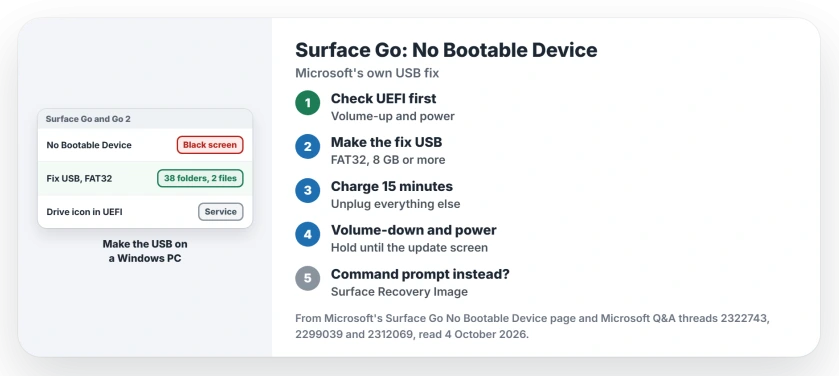
Status: checked 4 October 2026. Owners recovered with Microsoft's SurfaceGo_FixNoBootableDevice USB package. A Surface Recovery Image or a repair comes next when it fails.
Look for a drive warning in UEFI first
Shut the Surface down. Hold volume-up and tap power. Release volume-up once the logo shows. The UEFI screen opens.
The MVP on the 600+ thread asked one thing first: "Do you see this icon in the upper right". The next line: "If yes, your SSD may have gone bad".
Ours: with that warning icon showing, skip the USB fix and go to service. Without it, carry on.
Build Microsoft's fix on another computer
Microsoft's page for this error needs a second computer. It also needs a USB drive "that is at least 8 GB and formatted to FAT32".
Download SurfaceGo_FixNoBootableDevice.zip from that page to the computer itself. Microsoft says: "Don't download the file directly to your USB drive."
Open the zip, select everything inside, and copy it all to the USB drive. Microsoft's check: "you'll see 38 folders and 2 files on the USB drive."
Count them. A Go 2 owner who built the stick on a MacBook Pro hit this: "When I copy its 40 files, 38 folders 2 files, but in the USB only appears 36 files."
Ours: use a Windows PC for it if you can. Mac-made sticks have failed in Windows setup as well.
Before you start the Surface
Microsoft's preparation fits in two words: "Disconnect everything." That means the Type Cover, any dock, SD cards and monitors.
Then charge it. "Plug your power supply to a wall outlet and connect it to your Surface for at least 15 minutes." Microsoft wants the original charger.
If the error is still on screen, hold the power button until it goes away.
Start it from the stick
Plug the drive into the USB-C port. For a stick with the older plug, Microsoft says "you will need a USB-A to USB-C adapter".
Then: "Press and hold the volume-down button on your Surface. While you're doing this, press and release the power button." Keep holding through the logo.
Let go when "Please wait while we install a system update" appears. From there: "Leave your Surface on and don't touch it until after the process is complete."
One owner wrote back the week Microsoft published it: "the device recovered and I am now on version 1.0.37". Owners report it working that same week.
Another, who followed Microsoft's page on starting a Surface from USB that same day, wrote: "I got my Surface Go back".
If a command prompt opens instead
Not every Surface takes it. A Go 2 owner on a 20+ thread wrote: "I get a Blue-Screen and the CMD (Command Prompt) pops up". They had tried FAT32, a smaller stick and other sticks.
Microsoft's page covers that case: "If you see any Windows error messages after the USB solution finishes and your Surface restarts, Windows might be corrupted."
Its answer is a Surface Recovery Image. A Microsoft agent on that thread warned that the image "will wipe out everything on the device". I would save what you can before that.
If Windows then lands on Automatic Repair instead, the SrtTrail log shows why.
If the stick is not detected at all, Microsoft points to the UEFI setting Enable Boot from USB devices. "Make sure the setting is Enabled and not set to Disabled."
When it needs a repair
Some owners did everything. One wrote: "Have done all steps listed by Microsoft and still says no bootable device."
Microsoft's page ends with service: "If these solutions didn't help resolve the problem, then self-repair, service order or in-person support may be available to help you."
The MVP's 2022 advice: "Contact Support, they have been replacing some of these for others." Out of warranty, owners said they were "all being asked to pay".
Ours: note the serial number under the kickstand before you call. It saves a step.
What did not help
The normal recovery image, for a September 2026 owner. Their Surface Go 1 failed during a reset, and the recovery USB "still received No Bootable Device error".
A moderator pointed them to the dedicated fix: "This is different from the normal Surface recovery image you already tried."
Secure Boot changes, for the 20+ owner, who tried it on and off. A correct boot order, for the owner whose SSD was alive.
Does the fix erase my files?
Microsoft's page calls it a system update and says Windows starts automatically when it finishes. The Surface Recovery Image is the step that erases everything.
Does this work on a Surface Go 3 or 4?
Microsoft's page applies to the Surface Go and Surface Go 2 only. On a later model, start from Microsoft's general Surface startup pages instead.
Can I make the USB on a Mac?
One owner tried and ended up with fewer files than the 38 folders and 2 files Microsoft lists. A Windows PC avoids that.
The Short Version
- Microsoft made a USB fix for the Surface Go and Go 2.
- Check UEFI for a drive warning icon first.
- Make the stick on Windows: FAT32, 8 GB or more.
- Expect 38 folders and 2 files on it.
- Hold volume-down, press power, wait for the update screen.
- Command prompt instead? A Surface Recovery Image is next.
Where to Next
Charge the Surface for 15 minutes now and build the stick on another computer. Count the folders before you plug it in.
Did the fix bring yours back, and which firmware does UEFI show now? Both details in a comment help the next Go owner.

Isaac Smith is the founder and editor of PC Glance, a website that covers computers, laptops, and technology. He is a tech enthusiast and a computer geek who loves to share his insights and help his readers make smart choices when buying tech gadgets or laptops. He is always curious and updated about the latest tech trends.