
The fan spins up, Task Manager shows Windows Modules Installer Worker eating the processor, and ending it buys you five seconds. It often starts the moment you step away from the desk.
I would let it finish and then restart. It is the part of Windows that installs updates, and owners saw it settle once the pending update was done.
The oldest Microsoft Q&A thread on it has 4,400+ people asking the same question.
What it is doing
Microsoft describes the service behind it, TrustedInstaller, as one that "Enables installation, modification, and removal of Windows updates and optional components". In Task Manager's Details tab it shows as TiWorker.exe.
The adviser on a 100+ thread put it plainly: "The process is evoked when an update has to be downloaded or installed".
It also tidies up after updates. Microsoft says "The StartComponentCleanup task automatically cleans up components when the system isn't in use", and that explains the way it wakes up once you leave your PC alone.
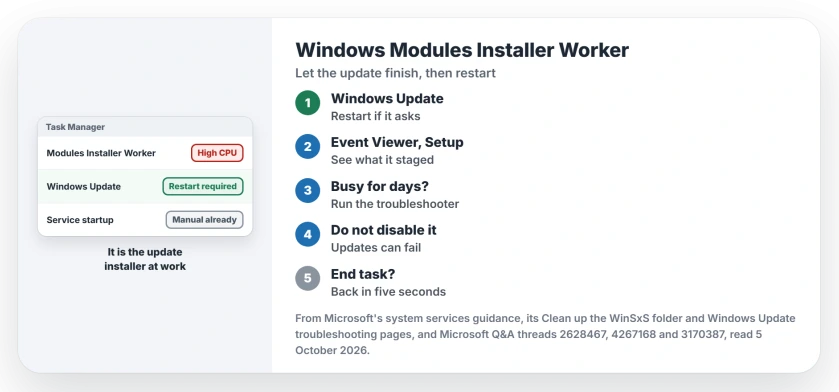
Status: checked 5 October 2026. Owners saw it stop after the pending restart, or after the Windows Update troubleshooter. Setting the service to Manual changes nothing on Windows 11.
1. Look for a pending update, then restart
Open Settings, Windows Update, and if it asks for a restart, give it one before you try anything else.
An owner on the 100+ thread got there by waiting: "Thanks, yeah Windows now asks me to restart to install Windows Updates, after a very while though".
Ours: leave a laptop on power while it works. If the restart then sits on Getting Windows ready, read the drive light before forcing it off.
2. See what it was installing
Open Event Viewer, then Windows Logs, Setup. Ours: on our own Windows 11 25H2 PC, each run left Servicing events naming the packages it had staged.
An owner who gets it up to three times a day on 25H2 saw the same: "different packages have successfully staged to state". A helper there said "The Event Log will ideally show you if it is installing something".
Ours: staged packages are an update getting ready for your next restart. If they keep coming for days with no restart prompt, move on to step 3.
3. Run the Windows Update troubleshooter
Microsoft's first step on Windows 11 is the automated Windows Update troubleshooter, run from Get Help. On Windows 10, Microsoft points you to Settings, Update & Security, Troubleshoot, Additional troubleshooters.
An accepted answer on the 4,400+ thread came from someone with the same fault: "I've just got a same problem and troubleshoot it. Now it's over".
One 50+ owner had less luck. The troubleshooter "found and repaired errors, but my problem continues after rebooting". For that case, the deeper Windows Update fixes come next.
Why setting it to Manual does nothing
The answer with 900+ helpful votes on the big thread sets Windows Modules Installer and Windows Update to Manual. Ours: on the PC we checked, the service already starts as Manual.
Microsoft's service table for Windows Server lists Manual too. The 50+ owner tried the Windows Update half anyway: "set wuauserv to Manual. This did NOT fix the problem either".
Disabled is worse. Microsoft warns that if you disable the service, "install or uninstall of Windows updates might fail for this computer".
Ending the task in Task Manager
It comes straight back, and the 50+ owner put it this way: "If I try to End Task, it just re-appears five seconds later and continues". Ours: Windows restarts it because the job is not done.
How long should it run?
Microsoft gives no figure. Ours: if the Setup log stops gaining entries while your CPU stays busy for hours, treat the update as stuck and run the troubleshooter.
Is TiWorker.exe a virus?
The real one runs from the Windows component store. The owner on the 100+ thread checked: "The process is located under Windows Component Store", with Microsoft's signature on it.
Why does it run when I am not using the PC?
Because the cleanup task waits for idle time. Microsoft adds that "When run automatically, the task will wait at least 30 days after an updated component has been installed before uninstalling the previous versions of the component".
Microsoft Compatibility Telemetry also runs on a schedule, and its appraiser task is one to switch off only briefly.
The Short Version
- Windows Modules Installer Worker is the update installer.
- Restart when Windows Update asks for one.
- Event Viewer, Windows Logs, Setup shows what it staged.
- Still busy for days? Run the Windows Update troubleshooter.
- Manual changes nothing on Windows 11; Disabled breaks updates.
- Ending the task brings it back in seconds.
Where to Next
Open Settings, Windows Update now and look for a restart prompt. If there is none, check the Setup log before you try anything else.
Did a restart settle yours, or did it take the troubleshooter? Tell us in the comments, with your Windows version.

Isaac Smith is the founder and editor of PC Glance, a website that covers computers, laptops, and technology. He is a tech enthusiast and a computer geek who loves to share his insights and help his readers make smart choices when buying tech gadgets or laptops. He is always curious and updated about the latest tech trends.