
Your PC starts, the fan roars, and Task Manager shows Microsoft Compatibility Telemetry eating your disk or processor. It is annoying, and half the internet says to switch it off.
I would let it finish one run first. A short burst after startup is normal, and switching it off has a cost that owners found the hard way: feature updates stop arriving.
5,000+ people have asked Microsoft's forum how to stop it.
What it is doing on your PC
The process is CompatTelRunner.exe. On the 25H2 PC we checked, a scheduled task starts it with appraiser.dll.
The task's own description reads "Collects program telemetry information if opted-in to the Microsoft Customer Experience Improvement Program".
That appraiser checks your programs and hardware against the next Windows version, and Windows uses the answer to decide whether your PC can take a feature update.
Microsoft says it uses diagnostic data "to keep our products secure and up to date, troubleshoot problems, and make product improvements".
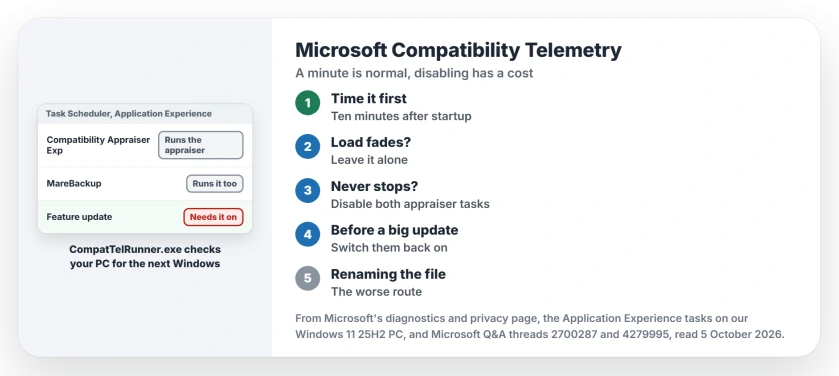
Status: checked 5 October 2026. Owners stopped it by disabling the appraiser task in Task Scheduler. Another owner found a disabled appraiser blocked a Windows feature update.
1. Time it before you change anything
One asker described the normal pattern exactly. It "uses about 50-80% of my CPU which stops after a minute or so".
Give it ten minutes after startup, plugged in. If the load drops by itself, leave it alone. Ours: that is the daily appraiser run.
2. If it never stops, disable the appraiser task
Open Task Scheduler and go to Task Scheduler Library, Microsoft, Windows, Application Experience in the left-hand pane.
An owner in 2016 wrote "I did this" and listed that path, then right-clicked Microsoft Compatibility Appraiser and chose Disable.
Ours: on our 25H2 PC that task is called Microsoft Compatibility Appraiser Exp. A second task there, MareBackup, runs the same appraiser. Switch off both.
3. Turn it back on before a big update
That cost is why I would only disable it for a while: Windows uses this task to decide if you can take a feature update.
An owner had disabled it during privacy tweaks, and their update never came. Once they switched it back on, the update started downloading at once, as our Windows Update stuck guide records in its eighth fix.
So if Windows Update says your PC is not ready for the new version, check this task first. It takes seconds.
The rename trick, and why I would skip it
One owner renamed CompatTelRunner.exe so it could not start. One reader replied: "this is the only solution that actually worked".
Ours: that edits a Windows system file. An update can put it back or trip over it, while disabling the task does the same job and comes back with one click.
Why it ran anyway for one owner
A 2022 reply said the task had been off for a year, yet the process still showed up: "Mine has been disabled for a year".
Ours: on our PC two tasks start the appraiser. Switch off one and the other still runs it, so if yours keeps coming back, check every task in that folder.
Is Microsoft Compatibility Telemetry a virus?
No. The real file is CompatTelRunner.exe in C:\Windows\System32, signed by Microsoft, as the one on our PC was. One owner reported theirs under SysWOW64; on our PC it sits only in System32.
Does it send my files to Microsoft?
Microsoft's privacy page says required diagnostic data "is information about your device, its settings and capabilities, and whether it is performing properly". Your documents are not on that list.
Will disabling it slow down my PC?
No. It only stops the appraiser runs. The cost lands on updates rather than on speed, which is also why the update installer is a process to leave alone.
The Short Version
- Microsoft Compatibility Telemetry is CompatTelRunner.exe running the appraiser.
- A minute of load after startup is normal.
- If it never stops, disable the appraiser task.
- On 25H2, Appraiser Exp and MareBackup both run it.
- Switch them back on before a feature update.
- Renaming the system file is the worse route.
Where to Next
Watch Task Manager for ten minutes after your next startup. If the load fades, you are done and nothing needs changing.
Did disabling the task hold for you, or did it come back after an update? Tell us in the comments, with your Windows version.

Isaac Smith is the founder and editor of PC Glance, a website that covers computers, laptops, and technology. He is a tech enthusiast and a computer geek who loves to share his insights and help his readers make smart choices when buying tech gadgets or laptops. He is always curious and updated about the latest tech trends.