
The fans spin and your Mac feels warm. In Activity Monitor, a process named replayd holds a spot high on the CPU list. You quit it, and seconds later it is back.
I would look at which app last shared or recorded your screen. Start there. replayd works for those apps, and the busy one is often still open.
The question on Ask Different goes back to September 2023, and it has 32,734 views so far. Owners found three different apps behind it, and each fix is in the thread.
What replayd is
The accepted answer is short: "replayd is a MacOS daemon to support screen recording and video capture." It belongs to macOS, not to any app you installed.
The asker saw it stuck at a high level: "a process called replayd that is constantly consuming over 90% of the CPU". And "If I kill it, it comes back immediately."
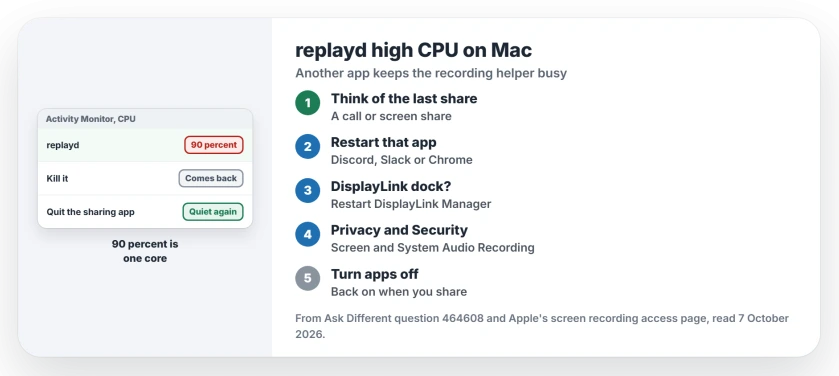
Status: checked 7 October 2026. replayd held high CPU on owners' Macs after a screen share. Restarting Discord, quitting Chrome or DisplayLink Manager, or removing screen access fixed it.
That is the clue. Killing replayd does not help, because the app that asked for it asks again a second later.
First, read the number correctly
The accepted answer adds a point about the number that calms many people down. "So if you have an 8-core CPU, 90% is 11.25% of your total CPU."
Activity Monitor counts each core as 100 percent, so the 90 percent you see is one core, not the whole Mac. It still drains your battery. Fix it anyway.
1. Quit the app that shared your screen
The asker found it first: "My investigation shows the culprit might be Slack." After they closed Slack, the process ended.
If you use Discord, try that next. Quit it fully from the menu bar. One owner wrote: "For me, restarting discord fix the issue", and a reader replied, "I was losing my mind, this works".
Chrome came up too, after a video call. Check yours. One owner "had had a Google Meet in Chrome and forgot to quit the browser after it." Closing Chrome stopped it.
Another owner traced hours of CPU time to a failed window share in a Google Meet call on Chrome. "The amount of CPU time accumulated was about 21 hours".
That matched the time of the call to the hour, which points straight at the share that failed.
2. Using a DisplayLink dock? Restart its app
DisplayLink docks drive extra screens by capturing the picture in software, and a commenter wrote: "Quitting and restarting DisplayLink Manager fixed it." That was the whole fix.
If you use one, quit DisplayLink Manager from the menu bar and open it again. Then watch the number. Our DisplayPort dock page covers other dock faults you can hit on a Mac.
3. Take screen recording access away
One owner fixed a stubborn case through permissions. Their advice: try "revoking the Screen and System Audio Recording permission" from as many apps as you can.
"With that permission revoked, replayd has once again become a well-behaved background process using a reported 0.0% CPU". Their Mac cooled from over 95°C to about 45°C.
Apple says you decide which apps can record your screen.
Its screen recording access page gives the full route: open System Settings, then Privacy & Security, then Screen & System Audio Recording. "For each app listed, turn the ability to record on or off."
The cost is small. Owners report switching the app back on only when they need to share their screen again.
Switched back on and Chrome still shares nothing in Meet? A tccutil reset clears its stale permission.
Which app is behind it on my Mac?
Ours: in Activity Monitor, quit your screen-sharing apps one by one, checking replayd after each. When it drops, you have the app. Video call apps, chat apps with screen share, and dock software are the usual suspects on the Macs in this thread.
Is replayd a virus?
No. It is part of Apple's screen capture system, and it lives in the system folder /usr/libexec. Other macOS processes can spike the same way, as our apfsd page shows for disk work.
distnoted near the top works the same way. It serves another app, and quitting that app calms it.
The Short Version
- replayd is macOS's screen recording helper, not malware or a virus.
- 90 percent in Activity Monitor is one core, not the whole Mac.
- Quit or restart the app that last shared your screen: Slack, Discord or Chrome.
- On a DisplayLink dock, restart DisplayLink Manager.
- Still high? Remove apps from Screen & System Audio Recording.
Where to Next
Quit the app you last shared your screen from, then watch replayd in Activity Monitor for a minute.
Which app was it on your Mac? Name it in a comment, and I will add it to the list of apps.

Isaac Smith is the founder and editor of PC Glance, a website that covers computers, laptops, and technology. He is a tech enthusiast and a computer geek who loves to share his insights and help his readers make smart choices when buying tech gadgets or laptops. He is always curious and updated about the latest tech trends.