
You click Apple Pay in Safari on your Mac, and instead of asking for a touch, the sheet says Double-click Touch ID to pay. You press twice and the screen locks. The payment never goes through.
I would reset one switch before anything else. Two people report it brought the normal prompt straight back, and it takes less than a minute to try.
Since November 2023 the question about it on Ask Different has drawn 7,563 views.
What the double-click prompt is telling you
Apple's Safari guide gives two ways to finish a payment on a Mac with Touch ID. The normal one: "Place your finger on Touch ID to complete the purchase".
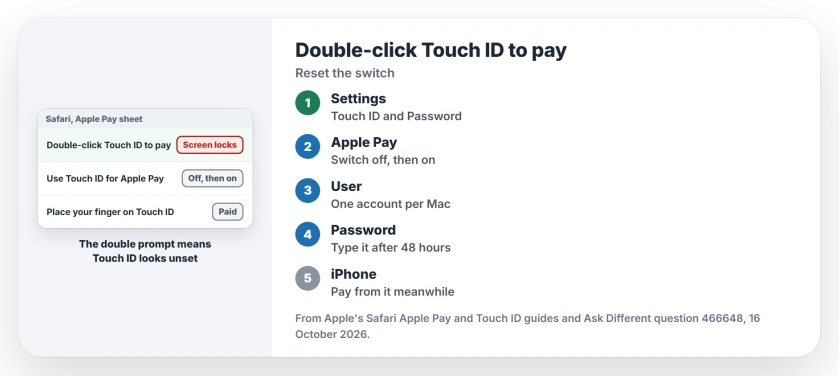
The other is for a Mac where Touch ID is not set up: "you can double-tap Touch ID and enter your password". So the double prompt is a clue. Your Mac is acting as if Touch ID for Apple Pay is off.
That fits what the asker saw on Sonoma. Pressing twice locked and unlocked the screen, and on a lucky try the login password box came up instead.
Ours: none. No Mac with Touch ID was used for this page, so each step leans on Apple's guides or an owner.
Status: checked against Apple's Safari and Touch ID guides on 16 October 2026, plus an Ask Different fix from November 2023 that a second reader confirmed.
Turn the Apple Pay switch off and on
Open System Settings, then Touch ID & Password. Turn off Use Touch ID for Apple Pay, wait a moment, then turn it back on.
The asker's next payment "simply prompted me to touch the Touch ID sensor, no clicks required". A reader confirmed it. In their words, "toggling this setting fixed it for me".
Apple says the switch lets you "complete purchases you make on this Mac using Apple Pay". My reading is that flipping it makes macOS register Touch ID for payments again.
Check which user owns Apple Pay on this Mac
Apple sets a limit that catches shared Macs. Only one user account can use Touch ID for Apple Pay, and "Other user accounts must use iPhone or Apple Watch".
If someone else set up Apple Pay first, your account may be one of the others. Check the switch in their account. Or pay from your iPhone for now. I would check this first on a family Mac.
Enter your password, then try again
Touch ID itself stands down after some events. Apple says users "must re-enter their password every 48 hours and after five incorrect fingerprint attempts".
So if you have not typed your password in two days, unlock the Mac with it first, then try the payment again with one touch.
If Touch ID refuses to unlock the Mac at all after an update, the Tahoe Touch ID page deals with that bigger fault.
Why did pressing twice lock my screen?
On a MacBook, the Touch ID sensor is also the power button. Apple's password reset page tells you to "press and hold the power (or Touch ID) button" to shut down.
Two quick presses therefore land on a power button, not a payment sensor. The asker's screen locked and unlocked each time. I am linking the two myself, since Apple's pages do not say so directly.
Can I pay with my iPhone instead?
Yes, as long as the iPhone uses the Apple Account your Mac uses. Apple's steps: "Double-click the side button, then authenticate with Face ID on iPhone or use Touch ID".
If the card fails on your iPhone too, Apple Pay on iOS 26 is the place to start.
The Short Version
- Double-click Touch ID to pay is Apple's prompt for a Mac without Touch ID set up for Apple Pay.
- Turn Use Touch ID for Apple Pay off and on in Touch ID & Password. Two owners report it fixed the prompt.
- Only one user on a Mac can use Touch ID for Apple Pay; others pay with an iPhone or Apple Watch.
- After 48 hours or five failed fingerprints, type your password once before paying.
- On a MacBook the sensor is also the power button, which fits the screen locking on a double press.
Where to Next
Shared Mac or a single user? Your comment tells me whether the one-account limit belongs higher up this page.

Isaac Smith is the founder and editor of PC Glance, a website that covers computers, laptops, and technology. He is a tech enthusiast and a computer geek who loves to share his insights and help his readers make smart choices when buying tech gadgets or laptops. He is always curious and updated about the latest tech trends.