

Your MacBook trackpad is set to right-click in the bottom-right corner, and on most days it does. Then a corner click stops opening the menu. Clicking again does not bring it back.
I would not book a trackpad repair yet. The fix that worked for one owner was a single setting, while a replaced trackpad left another owner exactly where they started.
Asked in May 2023, the Ask Different question has 11,064 views, and its accepted answer carries ten votes.
Why a corner click stops counting
Trackpad settings let you choose how a secondary click happens, and Apple says it is "also called Control-click on Mac or right-click on Windows". The corner is one choice.
Apple's gestures page gives the other: "Click or tap with two fingers". A corner click only works if the trackpad decides your single finger is a click, not the start of a gesture.
The fix came with a theory. Either newer trackpads read gestures more broadly, or "it ignores the right-click if it recognizes another gesture".
Ours: none. I had no Mac with a trackpad for this page, so every step names where it came from.
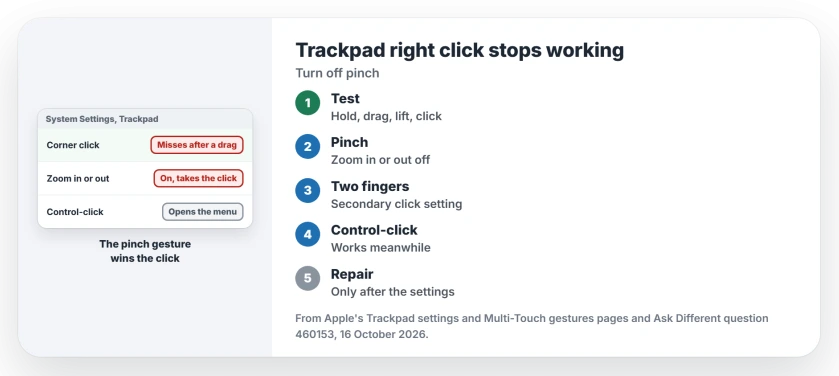
Status: Apple's Trackpad settings and Multi-Touch gestures pages, checked 16 October 2026, plus three Ask Different owners with M1, M2 and M3 MacBook Pros.
Reproduce it in ten seconds
The asker, on a 14-inch MacBook Pro M2 with Ventura 13.4, found a sequence that broke it most of the time. Press and hold the bottom-right corner. Slide toward the bottom middle and back.
Lift your finger and click the corner again. It should open the menu. For them it did not, and repeated clicks kept failing until something they never pinned down reset it.
The bottom-left corner behaved the same way, with no mouse connected. Run the test once first, since a fault you can trigger on demand is one you can check a fix against.
Turn off Zoom in or out
Open System Settings, then Trackpad, then the Scroll & Zoom tab, and turn off Zoom in or out. Apple's gestures page describes it as "Pinch with two fingers to zoom in or out".
In their words, the right-click "started working normally once I disabled" that option. The asker's drag test led them there.
To be safe, they also switched off their other two-finger gestures, which on that tab means Smart zoom and Rotate. Their fallback if a click still misfires: "do a zoom-in motion, then right-click with only one finger".
You do lose pinch to zoom. If you keep Smart zoom on, a two-finger double-tap still zooms a webpage or PDF in Safari or Preview.
Switch to a two-finger click
If you would rather keep pinch, change the click instead. In Trackpad, under Point & Click, set Secondary click to click or tap with two fingers.
A two-finger click does not care where your finger lands. That is my reasoning, not an owner report. Run the drag test again after the change.
For ordinary page movement, compare scrolling gestures and paging keys before adjusting the click controls.
Before you book a trackpad repair
One M3 owner had the fault on a new 14-inch MacBook Pro, while their M1 with identical settings behaved. Safe Mode did not help. Neither did resetting the trackpad settings or turning off Stage Manager.
An external trackpad right-clicked perfectly for them. Apple Service then replaced the built-in trackpad, and in their words, "that wasn't successful".
Their post came ten days before the Zoom fix appeared on the same question, so they may never have tried it. Try the setting first, and if you still go to Apple, show the drag test so the fault happens in front of them.
If the pointer freezes rather than the click, the Tahoe cursor freeze page is the fault you have.
A keyboard failing alongside the entire trackpad needs the power and wired-input route, rather than a secondary-click adjustment.
For a moving pointer with no ordinary click or click sensation, compare pressure clicks with tapping before treating it as a corner-menu fault.
Does Control-click still work?
It should, and it is the quickest way to keep working while you test each setting. Apple's settings page names the secondary click Control-click, so hold Control and click anywhere on the trackpad for the same menu.
Is it only newer MacBooks?
The reports point that way, though three owners are no survey. The asker had an M2. The second owner had an M3 that failed beside an M1 that behaved, and a reader called it a step down from their older MacBook.
A Magic Mouse right-clicks on its right side and has its own macOS 27 problems, so the Zoom setting will not help there.
The Short Version
- A corner right click can be swallowed when the trackpad reads your finger as part of a two-finger gesture.
- Test it: hold the corner, slide to the bottom middle and back, lift, then click.
- Turn off Zoom in or out in Trackpad, Scroll & Zoom. That is the accepted owner fix.
- Or set Secondary click to two fingers, and use Control-click meanwhile.
- A replaced trackpad did not cure one M3, so try the settings before paying for a repair.
Where to Next
Pinch, two fingers, or still broken? Leave a comment with the setting that held on your MacBook, and I will move it up the page.

Isaac Smith is the founder and editor of PC Glance, a website that covers computers, laptops, and technology. He is a tech enthusiast and a computer geek who loves to share his insights and help his readers make smart choices when buying tech gadgets or laptops. He is always curious and updated about the latest tech trends.