
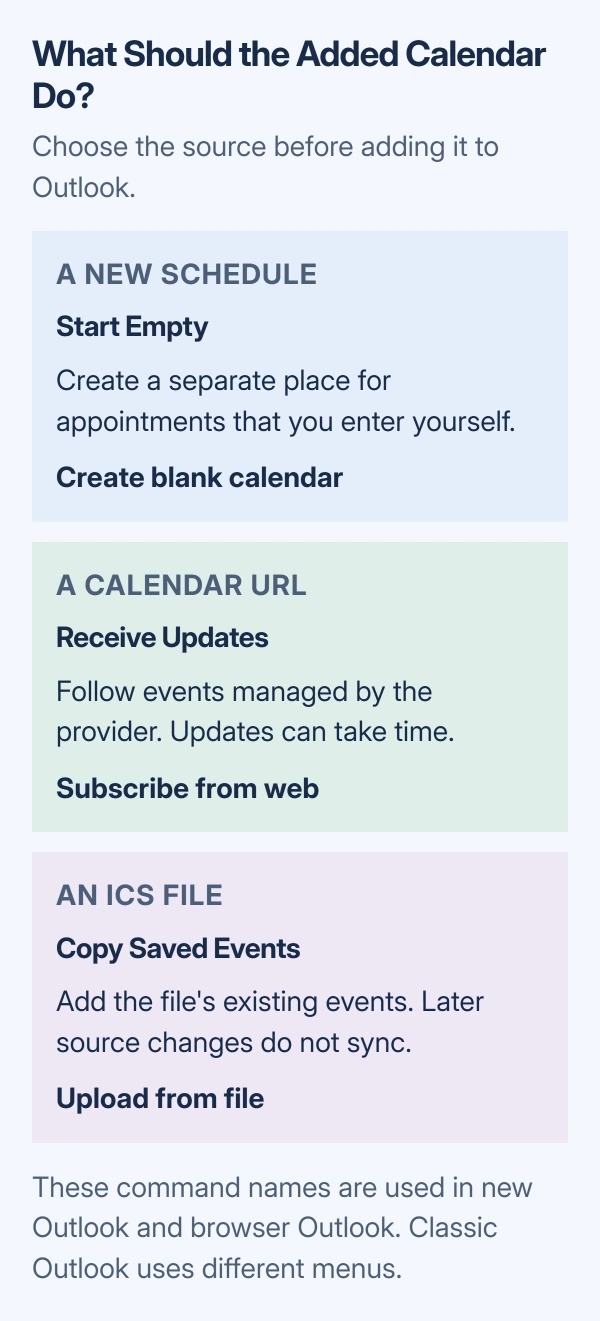
Adding a calendar to Outlook starts in Calendar > Add calendar when using the new Windows app or browser version. Choose Create blank calendar for a separate schedule, Subscribe from web for updates, or Upload from file for saved events.
Classic Outlook for Windows uses different controls. Its blank-calendar command is Folder > New Calendar, while an .ics file opens through File > Open & Export > Import/Export.
Choose what the new calendar should do
A blank calendar gives new appointments their own place. A subscription follows a calendar maintained elsewhere. A file import copies the events available when the file was created; later changes do not arrive automatically.
Microsoft's import and subscription instructions make that distinction. Choose the source before adding anything so a static copy does not become a stale schedule.
Status: Microsoft calendar creation, subscription and import instructions checked October 29, 2026. New and classic Outlook use different routes. No account or calendar was changed.
These steps cover Outlook on Windows and in a desktop browser. Outlook.com is the personal-account website; Outlook on the web is the work or school version. Check the signed-in account before choosing a destination.
Create a blank calendar for a separate schedule
In new Outlook for Windows, open Calendar and select the Home tab. Choose Add calendar > Create blank calendar, enter a name, choose its group under Add to, then select Save.
In Outlook.com or Outlook on the web, use Calendar > Add calendar > Create blank calendar. Give it a name and select Save. Color and group choices help distinguish it from the default calendar.
In classic Outlook, open Calendar, select Folder > New Calendar, and enter its name. Under Select where to place the folder, select the intended Calendar and choose OK. Select its checkbox in the calendar list to display it.
Microsoft states that classic Outlook's secondary calendars do not affect Scheduling Assistant availability. Keep appointments that must block work time on the primary calendar.
For a secondary calendar under Exchange, Microsoft also warns that meeting responses are not tallied. Use the primary calendar when sending an Outlook meeting invitation that needs response tracking.
Subscribe when the calendar owner will change events
Get the calendar's subscription URL from its provider. It must be the calendar feed address, rather than the address of a normal webpage showing a schedule. Keep a private calendar link private when copying it.
In new Outlook, open Calendar > Add calendar > Subscribe from web. Paste the URL and select Import. Microsoft's Google Calendar instructions document this route for an iCal address.
In Outlook.com, the route is also Add calendar > Subscribe from web. Paste the address and select Import. For Outlook on the web, Microsoft's work-account instructions use Import and Save to finish.
In classic Outlook, open Calendar and find Open Calendar in the ribbon's Manage Calendars group. Choose From Internet, enter the calendar address and select OK. Follow any confirmation Outlook presents.
A subscription receives later changes, but it is not an instant update service. Microsoft says Outlook.com and Outlook on the web can take more than 24 hours to reflect changes. Do not import files repeatedly to force a refresh.
Import an ICS file when a fixed copy is enough
An .ics file contains calendar events. Save the file from the provider first. If it arrived inside a ZIP archive, extract that archive and use the .ics file inside it.
In new Outlook, choose Calendar > Add calendar > Upload from file > Browse. Open the .ics file, choose the calendar that should receive its events, then select Import.
Microsoft documents those new Outlook controls in its calendar migration instructions. The destination selection matters: uploading a file does not necessarily create a separate calendar.
For Outlook.com, use Add calendar > Upload from file, browse to the file and select its destination calendar before importing. In Outlook on the web, the last command is Import and Save.
For classic Outlook, choose File > Open & Export > Import/Export. Select Import an iCalendar (.ics) or vCalendar file (.vcs), then Next. Browse to the .ics file, choose OK, then Open as New for a separate calendar.
Microsoft's classic import instructions show the new calendar under Other Calendars, beside the existing one. Check a known date and event after importing. Keep the source file until the expected entries are present.
Open someone else's calendar through its shared access
A shared Microsoft calendar does not require exporting its events. Accept its sharing invitation, or in new Outlook use Home > Add calendar > Add from directory to locate an organizational calendar.
The calendar owner controls which details their Outlook sharing permissions reveal. Adding its name to the list does not grant editing rights. Ask the owner about missing access rather than requesting their password.
When Add calendar is missing or adding does nothing
In browser Outlook, expand the navigation pane with the menu button at the top of Calendar. Microsoft says a collapsed pane can hide Add calendar. Make sure Calendar is open rather than Mail.
For an internet calendar that silently fails to appear in the Windows app, Microsoft documents a server compatibility problem. Its workaround is adding the subscription through Outlook on the web.
Use the browser subscription route for that same mailbox. Microsoft's troubleshooting page calls the option From internet, while its current web import guide calls it Subscribe from web. Both refer to entering a calendar URL.
Our final check is the calendar name and one expected event. For a blank calendar, an empty grid is expected. For an imported schedule, confirm that the correct destination is selected in the calendar list.
If a valid feed still fails, contact its provider and Microsoft Support. For work or school calendars, involve the mailbox administrator. Include the Outlook version, account type, exact message and whether adding it in the browser works.
The Short Version
Choose a blank calendar for a new schedule, a subscription URL for continuing updates, or an .ics import for a fixed copy. Use the controls for the correct Outlook version, then verify the calendar and expected events.

Isaac Smith is the founder and editor of PC Glance, a website that covers computers, laptops, and technology. He is a tech enthusiast and a computer geek who loves to share his insights and help his readers make smart choices when buying tech gadgets or laptops. He is always curious and updated about the latest tech trends.