
Halo: Campaign Evolved has an update that fixes keyboard and mouse assignments failing to save, so install it first. If only Grenade changes back to G after restarting, use Halo Support's workaround with the secondary binding.
Before remapping everything, check whether you lose the whole layout or just Grenade. The remaining Grenade bug happens with certain key choices.
1. Install the update for your PC storefront
Close the game before checking for updates. Xbox says the August 17, 2026 patch fixed custom keyboard and mouse bindings that didn't stay saved. The later known-issues page still lists the narrower Grenade problem.
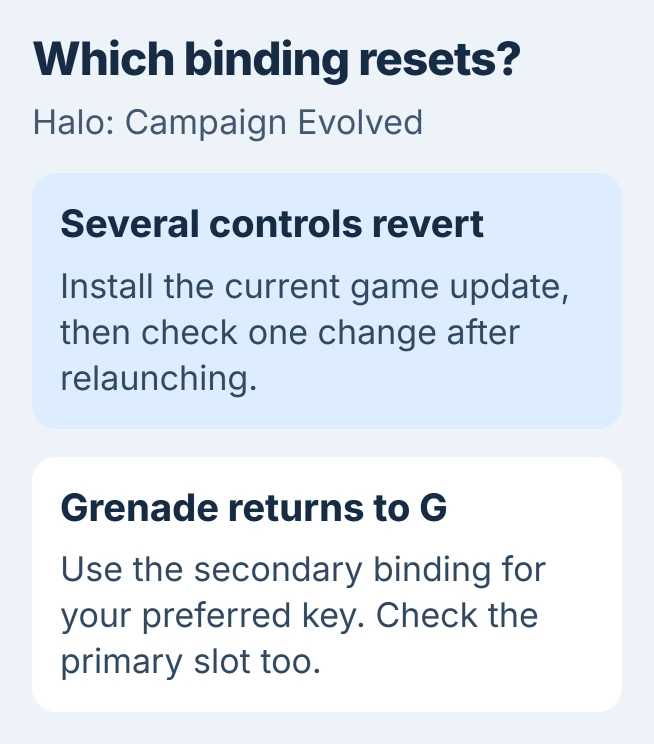
Status: checked November 3, 2026. The August patch fixes general binding resets. Halo Support still lists a separate Grenade-key workaround on its known-issues page.
Open the app you bought or installed the game through. Steam and the Xbox app each update their own copy, so make sure you're checking the one you play.
If you're still on a build from before August 17, finish your current mission first. That patch resets mid-mission progress when installed, while keeping unlocked missions and Rally Points available.
For Steam, open Library, locate Halo: Campaign Evolved, and install its available update. Halo's update instructions describe right-clicking the entry and choosing Update when offered.
For the Xbox app, open Library, then Manage installs. Find the game and choose Update if one is available. Let the download and installation finish before launching it again.
For Microsoft Store, open Library and find the game's update. Use Get updates to refresh the list if needed. Halo Support notes that an outdated Store app can have a different layout.
If you're waiting on Steam, keep the computer awake while it finishes. The Steam downloading guide explains why an ordinary shutdown or sleep interrupts that process.
After updating, change one of the affected key assignments, then quit and relaunch the game. If it stays saved, set up the rest of your controls. If only Grenade changes back, try the next fix.
2. Put the Grenade key in the secondary slot
Open the game's settings and find its keyboard and mouse bindings, the keys assigned to each action. Look for Grenade and its primary and secondary entries. You'll change these in the game, not in Windows keyboard settings.
Halo Support says the primary Grenade assignment can return to G when you assign a key that's another action's default. Its examples are R, normally Reload, and Q, normally Equipment.
Use the workaround documented by Xbox on the known-issues page: put the Grenade key you want in the secondary slot.
If you also want G available for a different action, change Grenade's primary slot to a key that isn't another action's default. Halo Support gives L and 8 as examples; check your own custom layout before choosing either.
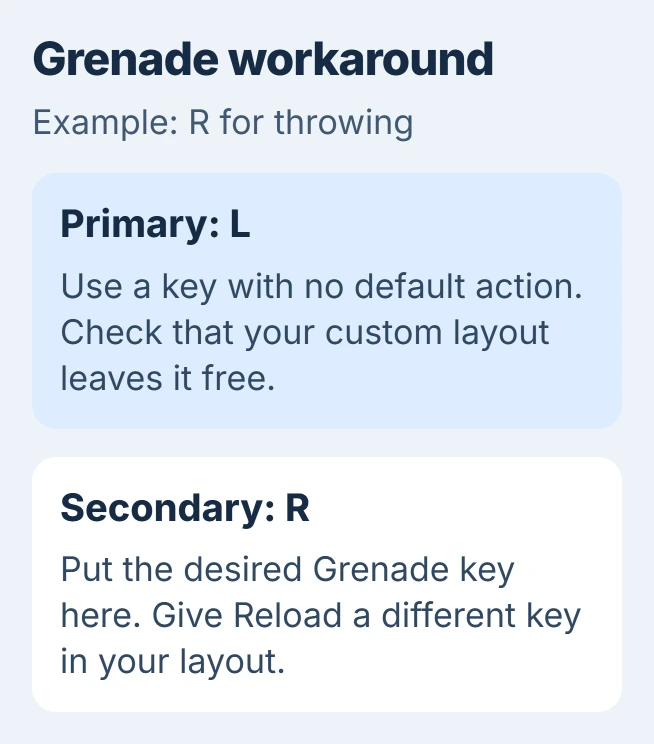
For example, primary L plus secondary R lets you use R for Grenade without making R its primary assignment. Give Reload a different key you want to use, then check that each key does what you expect.
Close the settings, try the action in gameplay, then quit and relaunch. Check both the saved entry and what the key actually does. The change needs to survive the restart and work when you're playing.
I'd try this small change before resetting all your controls. It addresses the Grenade bug without changing your mouse sensitivity or movement keys.
3. Check exactly when an assignment disappears
If several controls still revert, write down one example before changing anything else: the action, its original key, your replacement key, and whether you're using the primary or secondary field.
Change that one entry, leave settings, and open them again without quitting. Then close the game normally and relaunch it. This shows whether your choice disappears right away or only when the game restarts.
Compare a keyboard assignment with a mouse assignment too. If a mouse button keeps its new action while a keyboard key changes back, include that difference in your report. It helps explain which controls are affected.
For Steam, start the game from its Library entry. Halo Support warns that opening HaloCampaignEvolved.exe directly can bypass the Steam connection and cause sign-in or performance problems.
Halo Support doesn't list that launch problem as a cause of lost key assignments. Starting from Library keeps it from complicating your checks and support report.
If the same keys don't work in other apps, try the Windows keyboard repair checks. If a key responds but still performs its old Halo action, check its assignment in the game.
4. Repair the installation when the update won't finish
Try file repair if the game also won't update properly or has missing or damaged files. Halo's file-repair instructions cover each app you can install it through.
In Steam, right-click the game in Library, choose Properties, and open Installed Files. Run Verify integrity of game files, wait for it to finish, and restart your PC as Halo Support directs.
In the Xbox app, select the game in My Library, open its three-dot menu, and choose Manage. Under Files, run Verify and repair. Launch again after the check finishes.
For a Microsoft Store installation on Windows 11, open Settings > Apps > Installed apps. Use the game's three-dot menu to reach Advanced options, then choose Repair.
Microsoft documents that Windows route in its app repair instructions. Some apps don't have Advanced options. If yours doesn't, use the repair steps for the app you installed the game through.
If Repair fails, check what Reset removes before choosing it. Halo Support says Reset clears app data and requires signing in again. File repair also won't replace the secondary-Grenade workaround while that specific issue remains listed.
5. Send Halo Support the binding that still fails
If the updated game still loses an assignment other than the known Grenade case, use the game issue report linked from Halo Support's known-issues page. Include where you installed the game from and the version it shows.
Describe the exact action, primary or secondary slot, old key, new key, and result after relaunching. Mention whether repair changed anything and whether other bindings survived the same restart.
A screenshot before quitting and another after reopening can show which assignment changed. Keep account details out of the images, and describe the steps that make the assignment disappear.
The Short Version
Update, then test one binding after restarting. For Grenade reverting to G, put your preferred key in the secondary slot. Repair an incomplete installation if needed, and report any remaining reset with the exact action and key.

Isaac Smith is the founder and editor of PC Glance, a website that covers computers, laptops, and technology. He is a tech enthusiast and a computer geek who loves to share his insights and help his readers make smart choices when buying tech gadgets or laptops. He is always curious and updated about the latest tech trends.