A JBL Bluetooth speaker connects through your phone's Bluetooth settings once it's in pairing mode. Press its Bluetooth button, choose the speaker's name on your phone, then play some audio to check the connection.
For a speaker you've used before, selecting its saved name is usually enough. If the speaker isn't listed, put it in pairing mode. If it shows as connected but stays silent, check the audio output selected on your device.
In this guide
1. Make the JBL speaker discoverable
Turn on the speaker and keep it near the phone or computer you're connecting. Read the speaker's printed model name, especially if several JBL devices are nearby. You'll need to recognize that name in the device list.
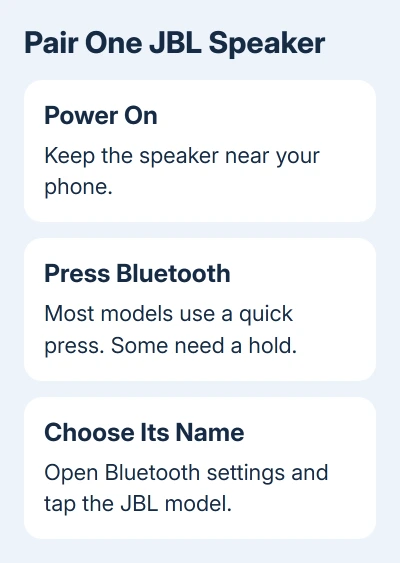
Press and release the Bluetooth button. JBL's pairing instructions say this works for most speakers; some models need the button held for a few seconds. A blinking light or sound usually signals that the speaker is ready to pair.
Use the Bluetooth control rather than a speaker-group button. Pairing a phone to one speaker is a different job from joining several speakers through PartyBoost, Connect+ or Auracast.
A Brookstone speaker has separate controls too: use the BKS800 pairing and reset steps only for that matching model.
If pressing the button doesn't make the speaker discoverable, look up that model's own instructions. Don't try a reset combination meant for another JBL speaker. Button layouts and reset commands aren't identical across the range.
I'd start with the phone's own settings before opening an app. They show whether the basic Bluetooth connection exists, which you need before music can play through the speaker.
2. Choose the JBL entry on your phone
On an iPhone, open Settings > Bluetooth and turn Bluetooth on. Leave that screen open while the speaker is in pairing mode. Tap the JBL model when it appears in the list of nearby devices.
Accept any pairing request that appears. If a passcode is requested, use the speaker's manual rather than guessing a code. Once it connects, the JBL entry should show Connected.
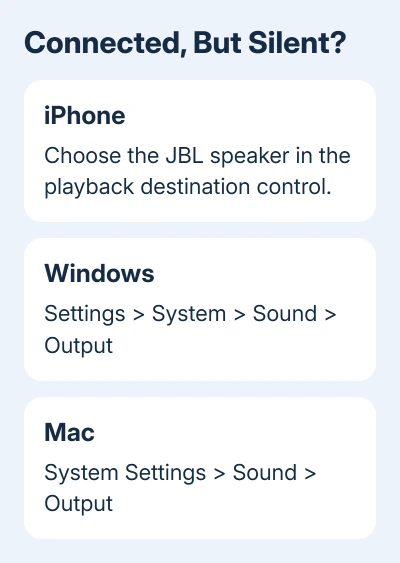
Start a song or podcast. If the phone still plays through its own speaker, use the playback destination control from Control Center or your audio app and select the JBL speaker. Pairing and choosing where audio plays are separate choices.
On Android, open the quick settings shade, then press and hold Bluetooth. Choose Pair new device, then tap the JBL model. Follow any confirmation shown on screen.
Some Android versions show Available devices instead of Pair new device. Google's Bluetooth setup steps also describe using Refresh from the menu when the list needs another scan.
On a Samsung Galaxy, the usual route is Settings > Connections > Bluetooth. Turn the switch on and select the speaker from the available devices. Check the model name, whether your phone calls the list available or nearby.
Play audio after the connection completes and raise the phone and speaker volumes gradually. If the device list shows a connection but you hear nothing, check the audio output and volume before trying to pair again.
3. Connect from a Windows laptop or Mac
On Windows 11, open Start > Settings > Bluetooth & devices. Turn on Bluetooth, select Add device, then Bluetooth. Choose the JBL speaker when it appears and finish the prompts.
On Windows 10, open Start > Settings > Devices > Bluetooth & other devices. Turn Bluetooth on, then select Add Bluetooth or other device > Bluetooth and choose the speaker.
Keep the speaker in pairing mode while Windows searches. A speaker saved on your phone doesn't automatically appear as a paired device on the laptop. You'll need to pair the speaker with each phone or computer separately the first time.
For sound, open Settings > System > Sound and choose the JBL entry for sound output. In Windows 11, look under Output; in Windows 10, use Choose your output device. Then play something from the laptop.
On a Mac running macOS Ventura or later, open Apple menu > System Settings > Bluetooth. Turn Bluetooth on and click Connect beside the nearby JBL speaker. On Monterey, use System Preferences > Bluetooth instead.
For sound still playing on the MacBook, open Sound > Output in System Settings or System Preferences and choose the JBL device. Use Bluetooth to check the connection and Sound to check where the Mac is playing audio.
For another accessory on the same computer, the Sony Bluetooth pairing guide explains its separate pairing controls. A speaker's button sequence doesn't apply to headphones automatically.
A cutter also needs its own app connection; Cricut's Bluetooth checks include Design Space access and Windows discovery.
4. Reconnect without pairing everything again
After the first pairing, turn on the speaker and Bluetooth on the saved phone. They may reconnect automatically. If they don't, open the phone's Bluetooth list and tap the existing JBL entry.
A second phone can prevent that connection on a speaker that accepts only one source at a time. Disconnect the speaker from the other phone, or turn Bluetooth off on that phone, then select the saved JBL entry on yours.
Some speakers accept more than one connected phone, so don't assume another saved phone is always the cause. The useful check is whether disconnecting that phone lets yours connect and play.
Leave Forget This Device or Unpair alone for an ordinary reconnection. Removing the saved entry means starting the pairing process again. A factory reset also clears pairings, so it isn't a normal step each time you play music.
5. Handle a missing speaker or a silent connection
For a missing entry, confirm that the speaker is powered on and in pairing mode, then scan again. If the saved JBL entry won't reconnect, disconnect the second phone before deleting that pairing.
For silence after connection, choose the JBL output and check both volume controls. If music plays correctly from another phone but not this one, tell support which source fails and whether its Bluetooth list shows Connected.
To play through several speakers, use the multiple Bluetooth speaker guide. Pairing one speaker with your phone doesn't mean every other speaker can join it.
If the speaker never becomes discoverable, ask JBL Support for that model's pairing or reset instructions. Give the model name and describe its light or sound after pressing Bluetooth.
The Short Version
Turn on the JBL speaker, activate pairing with its Bluetooth button, and choose its model in your device's Bluetooth settings. Reconnect through the saved entry later. For a connected speaker with no sound, choose it as the audio output.
Checked November 11, 2026.