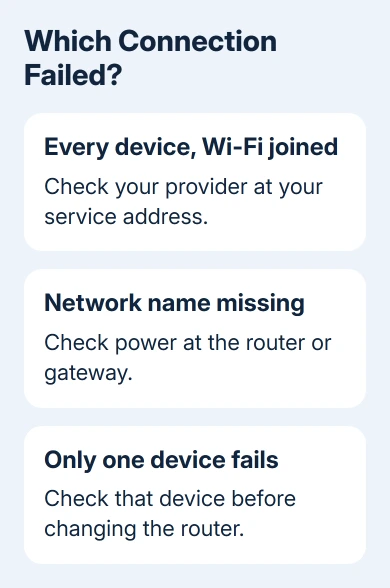
A provider outage can stop every device while Wi-Fi stays connected. Check the provider's outage service over cellular data first, then compare devices on home Wi-Fi to tell an area outage from a fault at home.
If Wi-Fi disappears from the network list, check the router and its power. If just one website won't open, the problem may be with that service alone.
In this guide
Check the provider using a connection that still works
Turn off Wi-Fi on your phone temporarily and open your internet provider's official app or support website over cellular data. Otherwise, the broken home connection can stop the outage checker from loading too.
Use the provider named on your home internet bill. A mobile carrier's coverage map won't tell you whether a separate cable or fiber connection at your address is down.
Look for Outages, Service status, or Support. Enter the service address when asked, or sign in to the account attached to that address. If you've moved, make sure the checker isn't still using your old address.
An outage notice for your address tells you more than reports of problems across the country. Check which service is affected, how repairs are going and when service is expected to return, if a time is listed.
I'd check that notice before restarting equipment. A confirmed area outage needs the provider's repair, and changing settings won't make that repair finish sooner.
Find the address-specific outage result
For Xfinity, open the Outage Map from its Support page. Its outage instructions explain that an unsigned-in visitor can enter an address; signed-in customers can select the house icon.
The Xfinity app also shows outage information when your location is affected. Open View outage details to read the cause, repair status and an estimated fix time when available.
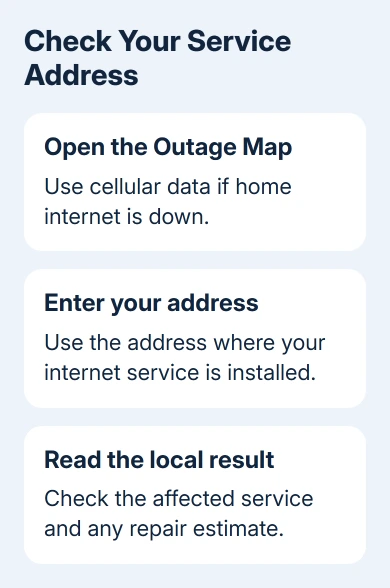
For AT&T home internet, open the outage checker and sign in to check your service. Follow the result for the home connection, rather than assuming a wireless-service notice applies to your router.
Other providers have their own address or account check. Use a link from the bill, official app or main support site. A search result saying there was an outage yesterday doesn't describe your connection now.
A repair estimate can change as the provider works. Keep the current notice or its reference number, and use available text alerts so you don't need to refresh the page throughout the interruption.
Compare two devices and more than one website
Reconnect the phone to home Wi-Fi after checking the provider. Open two unrelated websites, then repeat the same check on a laptop or another phone connected to that network.
If both devices fail on both sites, the shared connection needs attention. That can be the router, modem or provider; it still doesn't confirm that the whole neighborhood is affected.
If only one device fails, leave the working devices alone. Check that device's Wi-Fi settings and VPN next, especially if the outage map shows normal service.
A Windows laptop showing No Internet can still have a working wireless link to the router. The label refers to internet access. Full signal bars only tell you about the wireless connection to your router.
If the connection returns but keeps dropping on one computer, use the Wi-Fi disconnection checks rather than repeatedly checking regional reports.
If just one app or website fails while other pages open, check that service's own status page. Keep those results separate from a home internet outage when reporting the problem.
Check the router when the network itself disappears
Look for your usual network name in the phone's Wi-Fi settings. If it has disappeared from every device nearby, check that the router has power and its power lead hasn't come loose.
Read the router or gateway's own label or manual for its light meanings. A flashing light can mean startup, pairing or a service fault depending on the model; use the model's explanation to interpret its color.
Check both boxes in a separate modem-and-router setup. The modem connects to the provider and the router supplies your home network. A combined gateway performs both jobs in one box.
Try the affected devices near the main router, rather than beside a separate extender. That avoids confusing an extender's missing network with a failure of the entire home connection.
Keep any router error message or unusual light pattern for the provider. For repeated incidents after service returns, a Wi-Fi health report can help match a computer's disconnect times to the interruptions.
Restart equipment once when no outage is reported
When the provider shows no outage and several devices have lost internet, follow its gateway restart instructions. Use a restart, not the recessed factory-reset button that erases your network settings.
Microsoft's connection troubleshooting steps describe unplugging the modem and router, waiting at least 30 seconds, then powering the modem first.
Let the modem reconnect before powering the separate router, and allow the equipment to finish starting. With a combined gateway, restart that one unit. Battery-backed equipment needs the provider's own power instructions.
Open the same two websites on the same two devices again. If both now work, keep using the connection. If they still fail, report the fault instead of cycling the power repeatedly.
If you have an Ethernet cable, try connecting a computer directly to the router. Internet that works by cable while Wi-Fi fails points toward the wireless side of the home network.
Report a missing outage or a fault at your address
An outage map can show no current incident while your own line is broken. Contact the provider using its official app or telephone support and ask it to check the connection to your service address.
Tell support when it started, whether every device fails, what the gateway's lights show and what happened after one restart. Ask whether it sees an area incident or a fault that needs a technician for your line.
For a confirmed outage that continues past the estimate, check for an updated notice and ask for the incident reference. Keep the equipment connected as the provider directs so it can return to service when repairs finish.
The Short Version
Check your provider's outage tool over cellular data, using your exact service address. Compare two devices and two websites. No reported outage plus a home-wide failure calls for one proper restart, then a provider line check.
Checked November 13, 2026.