Code 80070003 means ERROR_PATH_NOT_FOUND: Windows Update needed a folder that wasn't where it expected. When a monthly update fails with it, the update cache is usually to blame, and renaming SoftwareDistribution clears it.
Seeing it on a feature update that downloads, restarts and then rolls back? That needs a different check.
On those upgrades, one registry value can end up pointing at the wrong file, possibly after backup software such as Macrium Reflect touched it. Correcting it ended months of failed upgrades for more than ten owners.
In this guide
Monthly update or feature update?
Open Settings > Windows Update > Update history and find the entry that failed. A KB number with 0x80070003 beside it means a monthly cumulative update failed, while a Windows version name such as 22H2 or 24H2 means a feature update.
The two fail in different places. A failed monthly update points at Windows Update's own files and the update itself, which fixes 1 and 2 deal with.
A feature update gets further. The PC restarts and installs for a while, then undoes the changes and starts up on the old version again.
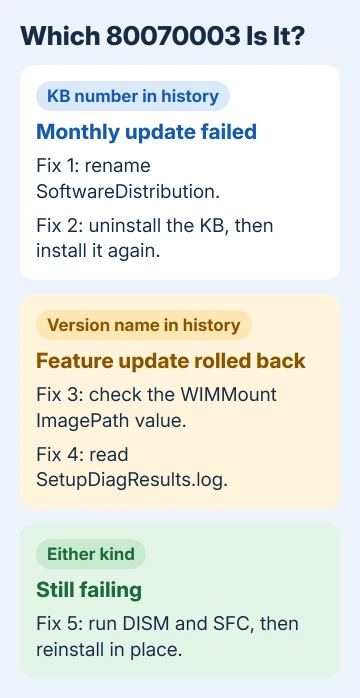
Fixes 1 and 2 suit monthly updates, 3 and 4 suit feature updates, and 5 covers both.
The 3 at the end of the code is the actual error number. In Windows' list of system error codes, ERROR_PATH_NOT_FOUND is code 3, right after code 2, the file-not-found error Windows Update shows as 0x80070002.
1. Rename the SoftwareDistribution folder
Windows keeps update downloads and their records in C:\Windows\SoftwareDistribution. One broken record in there sends Windows Update hunting for files that are gone, and a fresh folder ends the hunt.
From an administrator Command Prompt, stop Windows Update with net stop wuauserv and its download helper with net stop bits. Next, rename the folder:
ren C:\Windows\SoftwareDistribution SoftwareDistribution.oldIf ren stops with an access error, a service still has the folder open. Run both stop commands again and repeat the rename.
Finally, start them again with net start bits and then net start wuauserv, and check for updates. Leave the renamed copy alone for now. Windows builds a new, empty folder by itself, and you may want the old one back.
More than 2,300 people marked one thread's question as their own, and this rename was its accepted answer. One reader came back the next day to say it worked perfectly.
Two people replied that it changed nothing for them, so if the same KB fails again, move on to the next fix. If your history shows 0x80070002 instead, the 0x80070002 repair guide walks through that one.
2. Uninstall a looping update, then install it again
Sometimes a cumulative update installs, fails at the restart and tries again every day. One owner watched a December update do that for an hour a day. Uninstalling it, then letting Windows Update put it back, fixed it.
- Open Settings > Windows Update > Update history.
- Scroll down and select Uninstall updates.
- If the failing KB is listed, select Uninstall next to it and restart.
- Return to the main Windows Update page and pick Check for updates.
A KB missing from that list never finished installing, so nothing needs removing. Skip ahead to fix 5.
3. Check the WIMMount entry Macrium can leave behind
WIMMount is a small Windows driver that opens WIM files, the packed image format Windows installation files use. On a healthy PC, its registry entry points at system32\drivers\wimmount.sys.
When something rewrites that path, a feature update can't find what it needs. The owner who found this suspected Macrium Reflect but couldn't confirm it, and another owner who'd never heard of Macrium had the same wrong path.
- Open Start, type
regedit, and open Registry Editor. Approve the prompt. - Paste
HKEY_LOCAL_MACHINE\SYSTEM\CurrentControlSet\Services\WIMMountinto Registry Editor's address bar and press Enter. - Right-click WIMMount, choose Export, and save the backup somewhere safe.
- Click the top WIMMount key and find ImagePath among its values on the right.
- If its data isn't
system32\drivers\wimmount.sys, double-click ImagePath, type that path into Value data, and click OK. - Confirm that
C:\Windows\System32\drivers\wimmount.sysexists, then restart and run the feature update again.
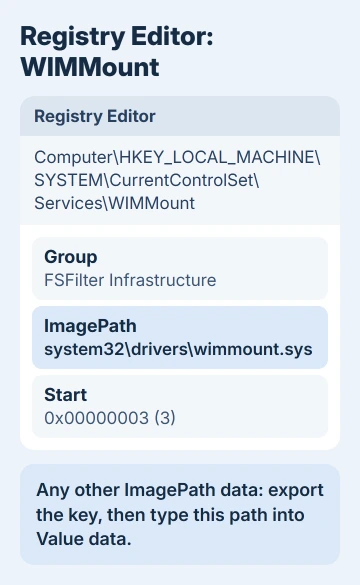
On a working Windows 11 laptop here (build 26200), the key holds 11 values and ImagePath reads exactly system32\drivers\wimmount.sys. If yours matches, WIMMount isn't what's breaking your upgrade, so you can delete the backup.
4. Ask SetupDiag why the upgrade failed
SetupDiag is a free Microsoft tool that reads the Windows setup logs and tells you why an upgrade failed. Run it soon after the failed upgrade, while those logs are still on the PC.
- Download it from the SetupDiag page into your Downloads folder.
- Open an administrator Command Prompt, move to that folder with
cd %userprofile%\Downloads, and runsetupdiag.exe. - When it finishes, open
SetupDiagResults.logfrom the same folder in Notepad.
A matched rule in that log names the reason and sometimes the fix. That's exactly how the owner behind the WIMMount fix found the wrong path.
Another owner got a disk layout error from SetupDiag and fixed it by creating an extra 128 MB partition with diskpart, the built-in disk tool. I'd leave partition work like that to a technician if you haven't used it before.
5. Repair Windows files, then reinstall in place
Whichever kind of update failed, repair the files Windows Update depends on. In an administrator Command Prompt, run DISM /Online /Cleanup-Image /RestoreHealth, let it finish, then run sfc /scannow and restart.
Still failing? Reinstall Windows on top of itself, which keeps your apps and files. On Windows 11, open Settings > System > Recovery and choose Reinstall now.
When that button is missing, or the PC runs Windows 10, the repair install guide walks through the same repair with installation media. Keep personal files and apps selected when setup asks what to keep.
Still stuck on 0x80070003
The Get Help app can put you in touch with Microsoft's support team. Have SetupDiagResults.log and the failing KB number or version ready, because those two things save a long back-and-forth.
A PC under warranty can also go to its maker's support line. If your employer or school looks after the laptop, ask IT before going further, because their update policies can block both the reset and the reinstall.
The Short Version
0x80070003 means Windows Update lost a path it needed. Monthly update: rename SoftwareDistribution or reinstall the KB. Rolled-back feature update: fix WIMMount's ImagePath and read SetupDiag's log. Then try DISM, SFC and Reinstall now.
Checked November 19, 2026.