Error 0xc1900209 means Windows Setup found an app it can't carry over to 24H2, so it canceled the upgrade before changing anything. Setup's message names that app, and removing it is the fix.
If the message keeps naming an app you've already uninstalled, such as VirtualBox, leftover files are the trigger. For the person who first reported it, a forgotten VirtualBox folder on the desktop kept blocking the upgrade.
A message saying the PC can't be upgraded to this version is a different block, covered in step 5. Everything here applies to the newer 25H2 and 26H2 upgrades too, because setup runs the same check.
In this guide
1. Remove the app setup names, then restart
Write down the exact app name on setup's screen. On Windows 11, open Settings > Apps > Installed apps, find the app, select the three dots beside it and choose Uninstall.
On Windows 10 the list sits in Settings > Apps > Apps & features: select the app, then Uninstall. Restart afterward, because some uninstallers only finish removing their drivers during a reboot.
Run setup again. If it gets past the check, you're done. If it stops on the same app, the uninstall left something behind, as it did for the asker: VirtualBox was gone, yet setup kept naming it, even after a System Restore.
Microsoft's compatibility log guide says this can happen "even if the incompatible application or driver was already uninstalled". The next step shows you how to track down what got left behind.
2. Read the setup log for the leftover path
Setup saves its compatibility results in log files you can open in Notepad. One of them records the full path of every file it flagged, including files an uninstaller missed, and its name ends in _APPRAISER_HumanReadable.xml.
Type cmd into Start, right-click Command Prompt in the results, then pick Run as administrator. This command searches the whole C: drive, hidden folders included:
dir C:\*_APPRAISER_HumanReadable.xml /s /aThe search can take a minute, and then it lists each log with its date, folder by folder. Open the newest one by typing notepad, a space, then its full folder path and file name inside quote marks.
Prefer clicking? In File Explorer on Windows 11, choose View > Show > Hidden items; on Windows 10 it's the Hidden items box on the View tab. Then browse to C:\$WINDOWS.~BT\Sources\Panther, where setup keeps its compatibility logs.
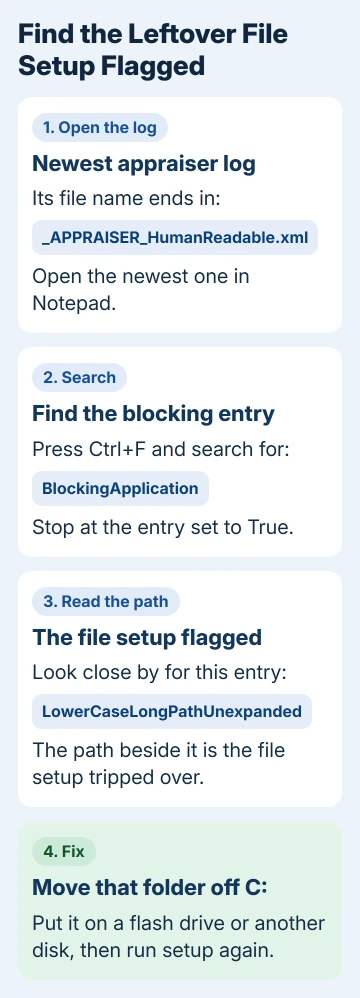
In Notepad, press Ctrl+F and search for BlockingApplication. Stop at an entry set to True, then look close by for LowerCaseLongPathUnexpanded. The path beside it is the file your upgrade tripped over.
For the asker, the logs led to a VirtualBox folder inside a project folder on the desktop. An uninstaller only removes what it installed, so a folder like that stays put and keeps tripping the check.
3. Move that folder off the drive and run setup again
Drag the flagged folder onto a flash drive or a different disk. I'd move it instead of deleting it, so the files survive and can come back after the upgrade. That one move fixed the asker's PC: "A forgotten folder caused all the trouble."
If the path points into Program Files for an app you've already removed, delete that leftover folder instead.
Then clear out the old update and setup files: empty C:\Windows\SoftwareDistribution\Download and, now that you've read setup's logs, the hidden C:\$WINDOWS.~BT folder.
Run setup the way you started it, from Windows Update or the Installation Assistant. Don't expect Microsoft's ISO to get around the block: the asker tried an in-place upgrade from it first and hit the same check.
Once the upgrade is done, you can put the folder back, though it may trip the same check at the next version upgrade. If you still use VirtualBox, install a current release from Oracle rather than restoring old program files.
4. Other apps and drivers behind the same code
The same thread turned up other software behind this check. One owner's logs pointed at cFosSpeed, a network traffic driver, and the moderator told them to uninstall it from the apps list or run this in an admin Command Prompt:
"C:\Program Files\cFosSpeed\setup.exe" -uninstallAnother owner was told to remove the Easy Anti-Cheat drivers that some online games install. Neither came back to say whether it worked, so go by what your own log names.
Drivers show up in the CompatData log (its name includes the date) in C:\$WINDOWS.~BT\Sources\Panther. Search it for BlockMigration set to True to spot a driver setup won't move, then update it from the PC maker's site or remove it.
5. When the PC can't be upgraded, or space runs out
A hard block looks different. One owner's log showed the title This PC can't be upgraded to this version of Windows, with a note saying the PC isn't supported yet on this version.
That points at the PC model or one of its drivers, not a stray folder. The adviser in that case suggested a newer BIOS from the laptop's maker. Otherwise, wait it out: Windows Update offers the new version once the problem is fixed.
Low disk space can be the real problem too. In one case posted under this error, the moderator read the logs and found 6 GB free on C:, while setup needs at least 20 GB. Move files off the drive or run Disk Cleanup before you try again.
6. Let SetupDiag read the logs for you
SetupDiag is Microsoft's free log reader for failed upgrades. It needs .NET Framework 4.7.2 or newer, which current Windows 10 and 11 already have.
Get SetupDiag.exe from its Microsoft Learn page, save it to an empty folder and run it after a failed attempt.
When it finishes, it saves SetupDiagResults.log in the same folder. Open it in Notepad and look for a rule starting with CompatBlockedApplication, which names the program setup refused to carry over.
When setup still refuses
Contact Microsoft support from the Get Help app: describe a Windows 11 upgrade stopped by 0xc1900209 and ask for an agent. Have your SetupDiag results and the path from the appraiser log ready.
Staying where you are isn't a long-term answer. The 24H2 end-of-updates guide lists which Windows 11 versions still receive security fixes, and 23H2 is no longer one of them.
The Short Version
- 0xc1900209 means setup found an app it won't carry over. Uninstall the app it names and restart.
- When it still names an app you removed, search the appraiser log for BlockingApplication and LowerCaseLongPathUnexpanded, then move that folder off C:.
- A block saying the PC can't be upgraded needs a BIOS or driver update, or time; setup also needs 20 GB free.
Checked November 19, 2026.