Security websites that fail in every browser while other sites load fine usually mean malware has redirected their addresses, most often through the Windows hosts file, so you can't download the tools that would remove it.
Start by resetting the hosts file to Microsoft's default. If a hosts entry was blocking them, the sites load again straight away. After that, Microsoft Defender's offline scan, which needs no download, deals with whatever made the change.
In this guide
Is it a block or a connection problem?
Three things point to a block on the PC itself:
- Only security sites fail, such as mcafee.com, malwarebytes.com or Microsoft's security pages, while news, shopping and email sites load normally.
- Every browser fails the same way, and switching to another network or a phone hotspot doesn't help.
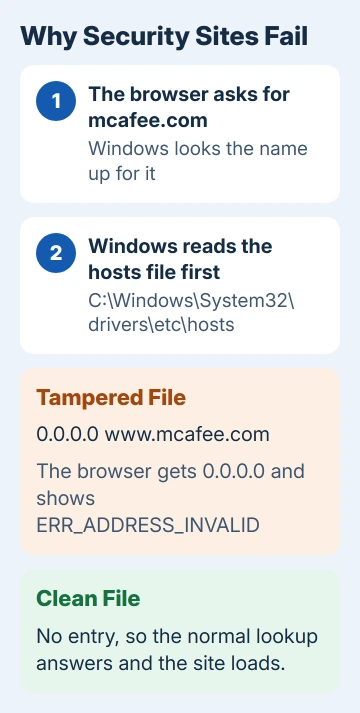
- Chrome or Edge shows ERR_ADDRESS_INVALID. Both run on Chromium, whose error list uses that code for an address the browser can't connect to, such as 0.0.0.0. That's exactly where a blocking hosts entry sends a site.
If every site fails, the problem is your connection rather than malware, and the hosts file is the wrong place to start.
One owner with these exact symptoms also had VirTool:Win32/DefenderTamperingRestore turn up in their scans. That one isn't the malware itself: it flags settings that may stop Defender from working, and Defender resets them on its own.
1. Reset the hosts file
The hosts file is a small text file Windows reads before it asks the internet where a site lives, so one line in it can send mcafee.com nowhere. Malware that wants to keep security tools away edits it for exactly that reason.
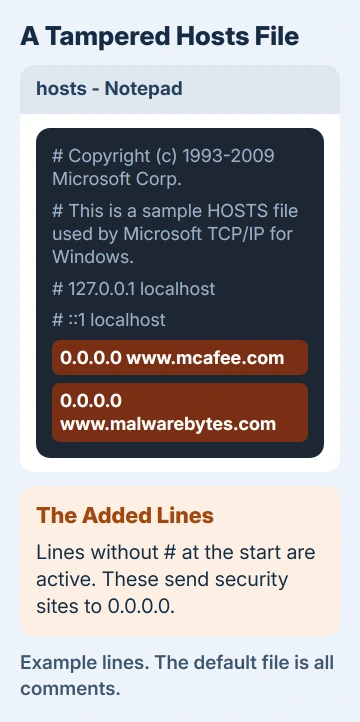
I'd look at it before replacing it, because the added lines show exactly which sites were blocked.
Open Notepad, choose File > Open and go to C:\Windows\System32\drivers\etc. Switch the file type from Text Documents to All files, then open hosts.
A clean file has only lines starting with #. Any line that pairs 0.0.0.0 or 127.0.0.1 with a security site is the block.
Then reset it the way Microsoft's hosts file article lays out:
- Open a new Notepad window and paste in the default hosts text from that article.
- Choose File > Save as and type the name hosts inside quote marks so Notepad can't add .txt. Choose All files under Save as type, and save to the desktop.
- Open C:\Windows\System32\drivers\etc, rename the old hosts file to Hosts.old and move the new one in. Choose Continue if Windows asks for admin approval.
If Windows won't let you replace the file, right-click it, choose Properties and clear Read-only, then try again.
Now open the security site in a fresh browser window. If it loads, the hosts file was the block. If the change doesn't seem to take, test the hosts file with ping to see where Windows now sends the name.
2. Switch off a proxy you didn't set
Open Settings > Network & internet > Proxy. Under Manual proxy setup, Use a proxy server should be off unless your work or school set one up. Use setup script, a little higher up the page, should be off too.
A proxy you didn't add can stop pages loading just as well as a hosts entry, so turn off anything you don't recognize and try the security site again.
3. Reset the network settings
If security sites still fail, reset your network settings. On Windows 11 that's Settings > Network & internet > Advanced network settings > Network reset; on Windows 10 it's Settings > Network & Internet > Status > Network reset.
Select Reset now and then Yes, and the PC restarts by itself. Your network adapters come back with default settings, and you may have to set up VPN apps again. That's why it comes after the hosts file and proxy checks.
4. Scan with Defender before Windows loads
Once the sites load, go after whatever changed them. The offline scan needs no download: Windows Security > Virus & threat protection > Scan options > Microsoft Defender Antivirus (offline scan) > Scan now.
Save your work first. The PC restarts and scans before Windows starts, at a point when malware can't shield itself the way it does in a running system.
Anything it caught shows up later in Protection history, though an offline scan can look empty even when it ran properly.
For a second opinion, Microsoft Safety Scanner runs without installing. Get a fresh copy each time you use it, because each download stops working 10 days later.
Malwarebytes can also remove hosts file malware once its site loads again. If you kept your own custom entries in the hosts file before the infection, you'll have to add them back by hand.
5. Get your logs read by a volunteer
If the block comes back after a reset, something is still running. For the owner mentioned earlier, two scanners and two antivirus programs reported removals, but the sites stayed blocked until a volunteer moderator read their logs.
The logs came from the Farbar Recovery Scan Tool (FRST), and the moderator wrote a fix script for that one PC. Afterwards the asker reported that "the problem seems to be fixed" and thanked the volunteer.
FRST writes two logs, FRST.txt and Addition.txt, listing installed programs, services, drivers and recently changed files. Post a new question in Microsoft Q&A under Windows security, or in a malware removal help forum, and offer the logs.
Don't run a fix list from someone else's thread: each one is written for a single PC, and the wrong one can remove things yours needs.
When nothing works
If the sites stay blocked or the malware keeps coming back, save your personal files to a drive you can scan later. Then reinstall Windows with Reset this PC and Remove everything, or do a clean install.
Afterwards, use another device to change the passwords that matter, starting with email and banking.
The Short Version
Security sites blocked in every browser means a redirect on your PC, usually in the hosts file. Reset the hosts file to Microsoft's default, turn off any proxy you didn't set and reset the network if the sites still fail.
Then scan with Defender's offline scan. If the block comes back, have a volunteer go through your FRST logs.
Checked November 20, 2026.
 If you have any business, I can build it online