
Google Drive appears in File Explorer after installing Drive for desktop and signing into the right Google Account. Open the app's folder shortcut to reach My Drive, then decide which files need a local copy.
A shortcut to the Drive website does not create that file-system connection. The desktop app supplies it, while Google Docs, Sheets and Slides files still open in a browser when selected.
Install Google's desktop app and sign in
Use the Windows download on Google's Drive for desktop page. Open GoogleDriveSetup.exe after downloading it and complete the installer.
Google says the first sign-in begins with Get started > Sign in. Choose the Google Account that owns the files you expect to see, then return to the installed app when sign-in finishes.
Status: Windows Drive for desktop setup, current sync choices and offline limits checked November 2, 2026. No Google account was connected or software installed during research.
An organization may require its administrator to install or approve the app. Contact them when setup is restricted; moving company or school files into a personal account is not the answer to that restriction.
Google's system requirements exclude 32-bit Windows. They support Windows 10 or later on 64-bit systems, and Windows 11 or later for ARM64.
Open My Drive through File Explorer
Find Google Drive in the system tray near the clock. Use Show hidden icons if needed, then open Drive's menu and select its folder icon to browse the files in File Explorer.
Open My Drive in that location. Google also documents reaching the Google Drive folder directly in File Explorer. Its drive letter is configurable, so G: is not the only possible location.
Check that a familiar file is present and that the app is signed into the intended account. A successfully installed app can still show the wrong files when a different account was selected.
If Explorer simply starts on its Home page, use its This PC landing-page setting for easier access to drives. That preference controls where Explorer opens; Drive still needs its own app and account.
Double-click a file to test access. Google states that Docs, Sheets and Slides open in the browser, while other formats use their desktop applications. A Sheets file opening in Chrome is expected behavior.
Decide how much of My Drive to keep on the PC
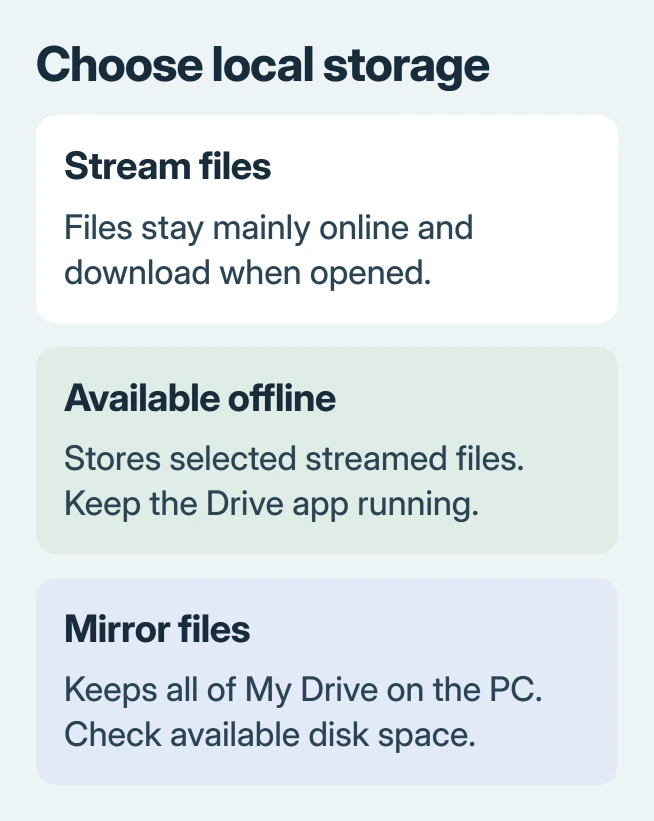
Open Drive's Settings > Preferences and find Folders from Drive. Under My Drive syncing options, choose Stream files or Mirror files. Some layouts label that preferences area Google Drive.
With streaming, files stay mainly online and download as needed. With mirroring, My Drive has a full local copy as well as its cloud copy. Google's streaming and mirroring guide explains both.
Choose streaming when disk space is limited and an internet connection is normally available. Choose mirroring when the whole My Drive collection needs local access and the PC has room for it.
Shared drives can only stream. Mirroring My Drive does not automatically create local copies of everything shared through an organization's shared drives.
Wait for current changes to finish syncing before switching modes. Deleting files inside a synced folder can also change the cloud copy, so do not remove them merely to hide a navigation entry.
Keep selected streamed files available without internet
For an ordinary file such as a PDF or Excel workbook, open its Google Drive location in Explorer. Right-click it and choose Offline Access > Available offline. Allow the download to complete.
Google's steps show a green check when the file is available offline. Marking a whole folder also stores its contents locally, so check disk space before selecting a large collection.
The offline access instructions say the desktop app must remain running to access streamed files, including offline copies. Mirrored files remain ordinary local files when the app closes.
Native Docs, Sheets and Slides need Google's browser-based offline setup instead. The desktop Available offline choice for a PDF does not establish that a Google spreadsheet can be edited without internet.
When files are missing after setup
Open drive.google.com with the same account and compare its My Drive contents with Explorer. If the file is absent online too, reinstalling the desktop app cannot make that account contain it.
One owner repeatedly rebuilt the desktop connection because storage usage seemed much larger than the files shown. They eventually found that the large collection was in Google Photos, rather than My Drive.
Their installation on a second computer showed the same My Drive contents. That case is a reason to check the account and service holding a file before treating a storage total as evidence of missing Explorer folders.
If the file is present online but absent locally, check Drive's Sync status and any error notification. Report the error to Google Drive Help or your administrator while keeping unsynced local work intact.
A window that freezes even outside Google Drive needs the File Explorer response checks. Clearing Drive's local cache without checking unsynced work is not a routine installation step.
The Short Version
Install Drive for desktop and open My Drive from its folder shortcut. Choose streaming or mirroring, then download any streamed files needed offline. If files seem missing, compare My Drive online using that same account.

Isaac Smith is the founder and editor of PC Glance, a website that covers computers, laptops, and technology. He is a tech enthusiast and a computer geek who loves to share his insights and help his readers make smart choices when buying tech gadgets or laptops. He is always curious and updated about the latest tech trends.