The bcmdhd63.sys blue screen points toward the Broadcom wireless driver. Start by undoing its latest update, or reinstall the package that matches your computer and Windows version.
The full stop message is often SYSTEM_THREAD_EXCEPTION_NOT_HANDLED. A crash that returns after a few restarts needs further checks: reinstalling once hasn't necessarily fixed the underlying problem.
In this guide
1. Confirm the filename and reach a stable desktop
Read the filename on the crash screen or photograph it before the machine restarts. The bcmdhd63.sys filename directs the first check toward the wireless driver. The stop code alone covers many different failures.
If another filename appears, follow the general blue-screen checks for that error instead. Don't remove a Broadcom driver just because the stop-code wording matches this title.
The old report behind this fault involved an HP Envy x2 running 32-bit Windows 8 in 2013. The question is now labeled Windows 11, but the reported crash was on that older device and Windows version.
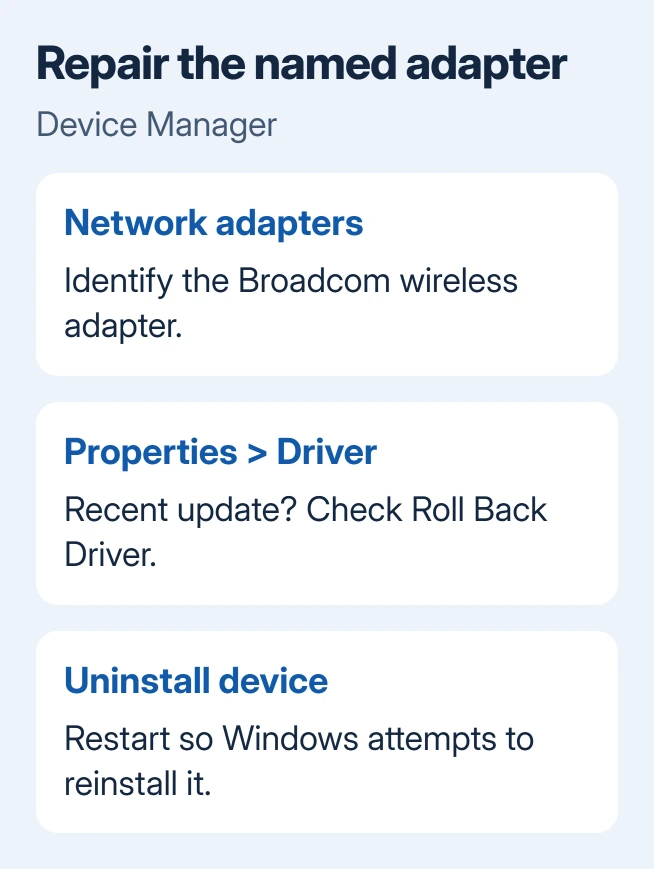
With a stable desktop, save unfinished work before opening Device Manager. Press Windows + R, enter devmgmt.msc, and press Enter. Expand Network adapters and find the Broadcom wireless entry.
For a restart loop on Windows 11 or 10, hold Shift while choosing Restart from the sign-in screen's power menu. Choose Troubleshoot > Advanced options > Startup Settings > Restart, then press 4 for Safe Mode.
Safe Mode loads a smaller set of drivers. If the ordinary desktop crashes but Safe Mode stays open, it gives you a place to change the adapter driver. Have your BitLocker key ready in case recovery requests it.
On Windows 8 or 8.1, the Shift-restart recovery route also leads to Startup Settings on supported installations. Don't force an obsolete tablet through a Windows 11 upgrade just to reach a repair menu.
2. Roll back a driver change that immediately preceded it
Open the Broadcom adapter's Properties > Driver tab. Note its provider, version and date. These details let you check whether a different driver was installed or the same package was simply installed again.
If the crashes began after a wireless-driver update, select Roll Back Driver when available and complete the prompt. Restart into ordinary Windows, then repeat whatever previously triggered the crash, such as waking the computer.
Rollback returns to the previously installed driver. A grayed-out button means the previous package isn't available through rollback. Leave the individual driver files alone. Use the reinstall step next.
If nothing changed before the first crash, don't pick a driver just because it's older. Match your exact model, Windows release and 32-bit or 64-bit system. A 64-bit package won't repair the old 32-bit Envy configuration.
3. Reinstall the identified Broadcom adapter
Arrange another way to connect first, such as Ethernet or an already working USB network adapter. Keep any model-matched wireless installer you already have available locally. Removing the Wi-Fi device can interrupt your only connection.
Microsoft's driver repair instructions describe uninstalling the identified device and restarting to let Windows try installing it again. Use the Broadcom wireless entry, not every item in Network adapters.
Right-click that adapter, choose Uninstall device, and confirm. Restart Windows. On the first attempt, don't select a driver-package deletion checkbox. This leaves the existing package available for reinstallation.
Check Network adapters again afterward. The wireless adapter should return without a warning symbol, and its Wi-Fi control should be available. If it doesn't return, use your saved manufacturer installer or the computer's support utility.
A successful installation isn't the end of the check. Restart more than once and test the same sleep, wake or reboot action that previously caused the blue screen. Keep the driver version with the result so support can compare it.
4. Use the right update route for the installed Windows
On Windows 11, check Settings > Windows Update > Advanced options > Optional updates for driver updates. On Windows 10, use Settings > Update & Security > Windows Update > View optional updates when that link appears.
Install a matching network update if one is offered, then test again. An empty optional-driver list means no package is offered through that route. It doesn't rule out a faulty installed driver.
For the original HP tablet, ask HP support about the wireless package for the exact Envy x2 product number and Windows architecture. A package for a different Envy generation can share the brand name while supporting different hardware.
Windows 8 and 8.1 no longer receive security support. Repairing Wi-Fi doesn't change that. Plan to replace a machine that can't run a supported system instead of collecting random driver downloads.
Never download an individual bcmdhd63.sys file to replace the installed copy. The driver comes as a package with installation information and matching components. Work with the package and adapter, not an isolated filename.
5. Treat a returning crash as an unresolved fault
An Envy x2 owner later reported that both a system reset and wireless-driver removal helped for only a couple of restarts. The crash then returned.
The accepted reply quoted someone else's success, but this owner's later experience shows why you need to check for a returning crash.
Don't keep resetting Windows for the same temporary result. If ordinary Windows stays usable, temporarily Disable device on the Broadcom adapter and use the alternate connection. Use the same menu to re-enable it when you're done checking.
If the crashes stop while the adapter is disabled, its driver or hardware needs checking. If they continue, a technician needs to check both the named driver and the rest of the system before deciding whether a part needs replacing.
What to send for a recurring crash
Give the manufacturer the stop-code photo, exact product number and driver version. Tell them whether the crashes continued with the adapter disabled. Ask for a compatible wireless package and a hardware assessment if the fault survives it.
For crashes that happen without a visible stop screen, the unexpected restart guide helps separate that behavior. Keep any existing files in C:\Windows\Minidump for the technician reviewing this crash.
The Short Version
Confirm bcmdhd63.sys, then repair the Broadcom driver through Device Manager. Repeat the restart check. If the crash returns, check whether it stops with the adapter disabled, then ask the manufacturer to check the driver and hardware.
Checked November 17, 2026.
 If you have any business, I can build it online