
In your Task Manager, Connected Devices Platform User Service is eating CPU, with a name ending in something like _604aa. You stop it. It comes back. You set it to Disabled, and Windows refuses.
It is not malware. No need to panic. I would leave the copy you can see alone and change the template it is made from.
That is Microsoft's documented method, and an owner on Microsoft Q&A confirmed it in a thread with 100+ Same question votes.
What CDPUserSvc is, and why the name changes
It is a Windows service, not malware. Microsoft lists it among its per-user services and says: "This service allows the user to connect, manage, and control connected devices".
Phones, Xbox, HoloLens and nearby sharing are the examples it gives for those devices.
Per-user services are built from a hidden template each time you sign in. Microsoft names each copy with an underscore and "a locally unique identifier for the user" session, so the ending changes.
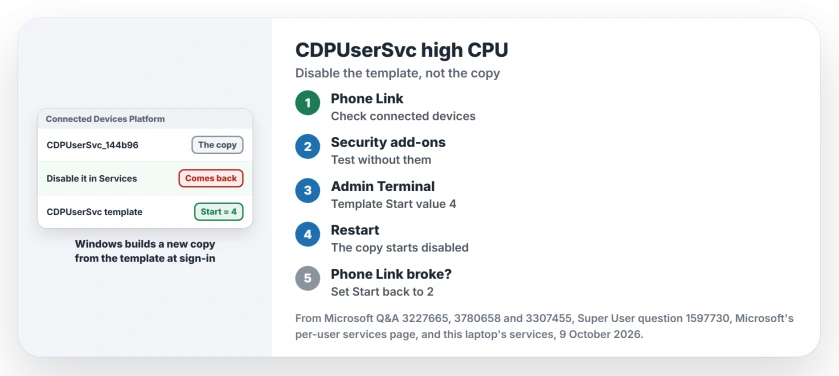
Status: confirmed on Windows 11 25H2 on 9 October 2026, where CDPUserSvc_144b96 runs from a template set to Start 2. The template fix is Microsoft's and an owner's.
Ours: the copy here runs in svchost with the UnistackSvcGroup group. A 2021 Q&A post showed both services in a group called DevicesFlow instead. The group name proves nothing either way.
Is it a virus?
No, as long as the name starts with CDPUserSvc and the path is svchost.exe in System32. A Super User asker who saw it with cbdhsvc after a fresh install had the same worry. That question has 61,838 views.
A commenter there explained that after a sign-out, or a shutdown with Fast Boot, the services "are recreated with a different suffix the next time you log in". A changing ending is normal, and it is not a sign of infection.
One advisor on Microsoft Q&A tied it to OneDrive, calling it "associated to the OneDrive service". Microsoft's own list says connected devices, not OneDrive.
Why Disabled will not stick
Services only shows the copy. An owner on the biggest Q&A thread stopped it but was "unable to disable its automatic startup" there. After a restart it came back, and they noted the code after the name had changed.
Microsoft explains the reason. The templates are not shown in Services at all. You change them in the registry instead, and the next copy Windows builds follows the template.
1. Check what it talks to
That owner saw it holding 15-20% CPU on a new Dell laptop, with fan noise. They unplugged everything and turned Bluetooth off, and the load stayed exactly where it was. In Safe Mode it did not run.
Still, look at your own connected devices first. Phone Link and nearby sharing both lean on this service, as Microsoft's own example shows. I would rule out a phone that keeps dropping and reconnecting over Bluetooth.
2. Look at third-party security tools
Owners report two add-ons behind it. One saw it start when they turned on Norton's Safe Web extension in Chrome, and reinstalling Chrome before turning it on again settled it.
Another suspected a custom firewall, Windows Firewall Control, and found the service stayed off after shutting that tool down. Run either? Test without it first.
3. Disable the template in the registry
Open an admin Terminal, run this line, then restart:
reg add HKLM\SYSTEM\CurrentControlSet\Services\CDPUserSvc /v Start /t REG_DWORD /d 4 /fMicrosoft's per-user services page uses the same command. It says: "When you disable a per-user service, Windows still creates it when the user signs in, but in a stopped and disabled state".
The Q&A owner tried the registry route after the Services console refused to change the startup type. Their report: "Disabling them from the registry method worked, after the restart the service did not run".
To undo it, run the same line with 2 at the end. That is the value on this laptop.
What stops working
An owner with a Dell XPS 13 found the catch fast. With it off, they could "no longer use the Your Phone app". That app is called Phone Link on Windows 11 today. Nearby sharing, which Microsoft names as its example, leans on it too.
Microsoft warns in general terms that "there might be dependent apps that don't work correctly" once a per-user service is off. If something you use breaks, set the value back to 2.
A reset may not last
The same owner later restored the laptop from its factory image. The load was gone at first. A week later they wrote: "its back again, just with a different name".
Another owner reset Windows. For them the problem was gone. So a reset can help, but I would treat it as the slow route, and the template change is faster to try and to undo.
And cbdhsvc?
That is the Clipboard User Service, a per-user service built the same way. Microsoft says Windows uses it for clipboard history and sync across devices. If you use Windows key + V, our clipboard history page shows what you would lose by turning it off.
The push notifications service is the same kind of service too, and our page on that one covers its own memory fault.
The Short Version
- CDPUserSvc_xxxxx is a Windows per-user service; the ending changes at every sign-in.
- Disabling the copy in Services fails or does not last.
- Check Phone Link, connected devices and third-party security tools first.
- Set the template's Start value to 4 in the registry and restart.
- Phone Link stops working with it off; set it back to 2 to undo.
Where to Next
Did you find the app that kept it busy? Name it in a comment, and say whether it was a phone, a tool or a device.

Isaac Smith is the founder and editor of PC Glance, a website that covers computers, laptops, and technology. He is a tech enthusiast and a computer geek who loves to share his insights and help his readers make smart choices when buying tech gadgets or laptops. He is always curious and updated about the latest tech trends.