
You open Task Manager and Windows Push Notifications User Service is eating gigabytes of memory, sometimes the processor too. End it and it comes straight back, which is frustrating when you never asked for notifications.
I would rename one folder from Safe Mode. An owner traced it to a damaged notifications database, and two weeks later wrote that all was well.
Over 500 people sit on one Microsoft Q&A thread with this fault.
What this service does
It carries notifications from apps to your screen. Microsoft says the push service lets developers "send toast, tile, badge, and raw updates from their own cloud service".
Every notification you see is stored in a small database in your user folder. Ours: on the PC we checked, that is wpndatabase.db, a 1 MB file inside AppData.
A service holding gigabytes is not the normal caching Windows does with spare memory.
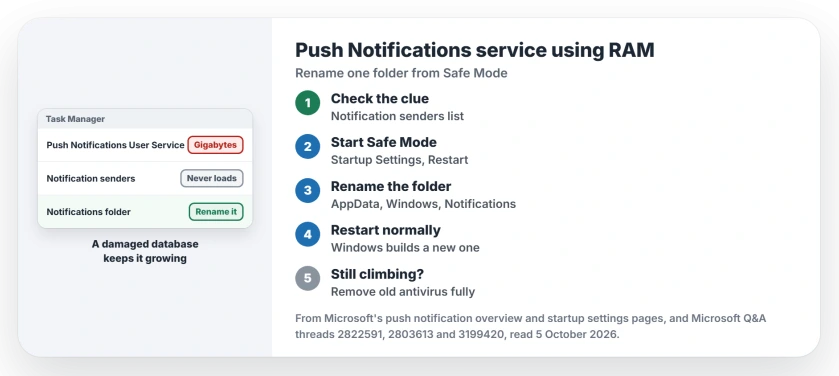
Status: checked 5 October 2026. An owner fixed it by renaming the Notifications folder from Safe Mode, and another by removing Avast completely with its own removal tool.
The sign that the database is the problem
Open Settings and look at the list of apps that may send notifications. One asker found the service "always starts up when I got to the Notification Settings tab" and saw only "the loading circular dots animation" where the list should be.
The owner of the 500+ thread saw the same: the list spun forever, then came back empty. Ours: an empty or endless list there points at the database, not at one app. That is your clue.
1. Start in Safe Mode
The file is in use while Windows runs normally, so the owner did this in Safe Mode. Microsoft's startup settings page gets you there: Windows Recovery, Troubleshoot, Advanced options, Startup Settings, Restart.
Then pick Safe Mode from the list. It looks plain, and that is expected.
2. Rename the Notifications folder
Open File Explorer and paste %LOCALAPPDATA%\Microsoft\Windows into the address bar. The owner's step: "Rename or delete the folder Notifications (it will be rebuilt automatically when you restart)".
I would rename it to Notifications.old rather than delete it, so a way back remains. Then restart normally.
In their words, the database "was corrupted during a previous Windows update". Two weeks on they reported back: "It has been over two weeks now and all is well".
Ours: your old notifications in the notification center go with the folder. That is the whole cost. Windows builds a fresh one.
3. Still climbing? Look at your antivirus
A second owner there fixed it differently. After "completely uninstalling avast (using their avast clear program), the wpnuserservice has seemed to have stopped crashing".
Ours: a normal uninstall can leave parts on your PC, so use the maker's own removal tool, as that owner did. Windows Security takes over on its own.
What did not help
Turning notifications off, or unticking the service in msconfig. One asker had every notification off already, and the 500+ asker unticked it in msconfig, yet it "comes back later or on reboot".
The restart command a helper posted for a Windows 11 owner did not work either: "nothing helped". Deleting the service from the registry, which one 2018 owner did, is a step I would not take.
Is this service a virus?
No. It runs inside a Service Host, and its name ends in a random suffix for each user, like WpnUserService_14edd1 on our PC, so yours will differ. If a copy turns up anywhere odd, check where the file lives.
CDPUserSvc, the Connected Devices Platform copy, is built the same way, so its CPU spikes return after you disable it. Change its template instead of the copy.
Can I disable notifications to stop it?
Owners here still had it with notifications off. Your service keeps starting either way, which is why fixing the database beats switching notifications off.
Will I lose my notification settings?
Ours: the apps came back in the list for the owner who renamed the folder. Expect old notifications to be gone, and check that the apps you care about still show.
The Short Version
- The service carries app notifications, and its database can break.
- An endless or empty app list in Notifications settings is the clue.
- Start in Safe Mode.
- Rename %LOCALAPPDATA%\Microsoft\Windows\Notifications, then restart.
- Old antivirus? Remove it with the maker's removal tool.
- Switching notifications off does not stop it.
Where to Next
Open Settings, Notifications now and see whether the app list loads. If it spins or comes back empty, the folder rename is your fix.
Did the rename hold for you after a week or two? Leave a comment, because owners have reported it for years and never in one place.

Isaac Smith is the founder and editor of PC Glance, a website that covers computers, laptops, and technology. He is a tech enthusiast and a computer geek who loves to share his insights and help his readers make smart choices when buying tech gadgets or laptops. He is always curious and updated about the latest tech trends.