
You try to open Command Prompt and nothing happens, because cmd.exe is gone from C:\Windows\System32. Maybe you deleted it while cleaning up, or a cleanup tool did it for you. No need to reinstall Windows for this.
I would not download a cmd.exe from any website, however official it looks. Windows keeps its own spare copy on the same drive, and its file checker puts it back. A Super User question on exactly this, asked in March 2021, has 60,730 views.
Why the file can come back
It is not the only copy. On Windows 10 and 11 the System32 file is a hard link to a copy inside the WinSxS folder, the component store.
Delete the System32 entry and the store copy stays where it was. The System File Checker reads from that store whenever it repairs or replaces protected files.
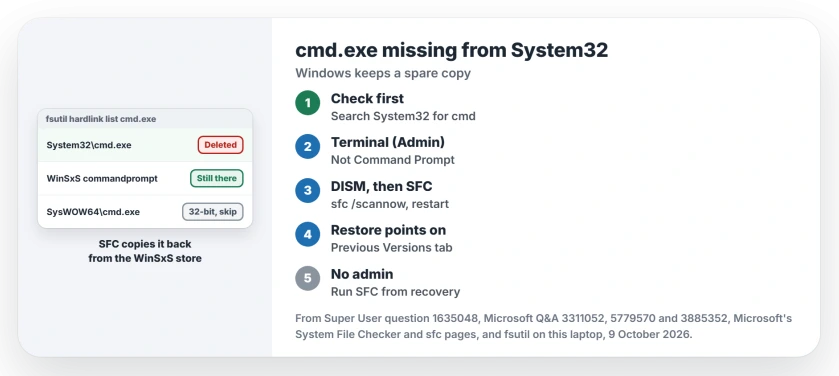
Status: on 9 October 2026, fsutil on this Windows 11 25H2 laptop listed two paths for cmd.exe: System32 and a WinSxS commandprompt folder. SFC is the fix owners and Microsoft name.
Ours: the WinSxS folder name ends in 10.0.26100.9278, so the store keeps the version the last update installed. The 32-bit cmd.exe in SysWOW64 exists too, and it is a different file.
First, is it really gone?
Open File Explorer, go to C:\Windows\System32 and search for cmd in that folder. An advisor on Microsoft Q&A asked the same thing first, since you "might have just deleted the shortcut and not the actual executable file". A deleted Start menu shortcut looks exactly the same from Search as a deleted file.
If cmd.exe is still there but blocked, the message says disabled by your administrator. That is a policy, not a missing file.
1. Open an admin shell without cmd
Microsoft's System File Checker page starts by telling you to type cmd in the Search box. That is the very file you lost. That step goes nowhere.
So right-click Start and pick Terminal (Admin), or search for PowerShell and choose Run as administrator. Both run the same repair commands that an admin Command Prompt would.
2. Run DISM, then SFC
Microsoft says DISM comes before SFC on that page. So do I. Type these one at a time and let each finish:
DISM.exe /Online /Cleanup-image /Restorehealth
sfc /scannow
DISM fixes the store if it is damaged, using Windows Update as its source. SFC then copies cmd.exe back from it into System32 for you. Restart, and try Windows key + R, cmd.
The top Super User answer, with 52 votes, is sfc /scannow. A commenter replied that it "often does not work". That is why I run DISM first.
3. Pull it from Previous Versions
Are restore points on? Then Windows may hold an older copy of the whole folder. Right-click C:\Windows\System32 in File Explorer, open Properties, then the Previous Versions tab.
One answer suggests opening a snapshot from before the deletion and copying cmd.exe out. A commenter called it the "safest and easiest solution possible" if restore was turned on.
4. Run SFC from recovery
No admin rights in Windows, or a PC that misbehaves since? Hold Shift while you pick Restart, then go to Troubleshoot, Advanced options, Command Prompt. Recovery has its own cmd.exe, and that one still opens.
Microsoft documents an offline repair with the offbootdir and offwindir switches. Check which letter Windows has with dir first, since it is not always C: in recovery:
sfc /scannow /offbootdir=C:\ /offwindir=C:\WindowsThe same page lists /scanfile for repairing one file by its full path. I have not tested it on a deleted file, so I would still use /scannow.
Three shortcuts to skip
Do not copy cmd.exe from SysWOW64 into System32. That one is the 32-bit build, and our page on 32-bit PowerShell shows how Windows keeps the two folders apart.
Downloading the file is a bad trade too. A Super User answer pointed to a site that indexes Microsoft's download links, and a commenter warned that "link verification needs to be left to security experts". Your own store copy is safer.
Copying cmd.exe from another PC also works, ideally one on the same Windows version. An owner on Q&A who had deleted it accepted that answer from an advisor. SFC is still simpler.
When SFC reports it could not fix files
Maybe SFC says it found corrupt files but could not fix some. Then the store copy is damaged too. Our page on SFC repair failures goes through DISM sources and the log.
The last route is a repair install, which reinstalls Windows over itself while your apps and files stay where they are. Two Q&A advisors gave that as the final step for a missing cmd.exe.
The Short Version
- Check System32 itself, not just the Start menu.
- Open Terminal (Admin) or PowerShell as administrator.
- Run DISM /Online /Cleanup-image /Restorehealth, then sfc /scannow, then restart.
- Restore points on? Try Previous Versions on the System32 folder.
- No admin, or Windows unstable: run sfc offline from recovery.
Where to Next
What removed your cmd.exe, a cleanup tool or a manual delete? Leave a comment about it, so others can steer clear.

Isaac Smith is the founder and editor of PC Glance, a website that covers computers, laptops, and technology. He is a tech enthusiast and a computer geek who loves to share his insights and help his readers make smart choices when buying tech gadgets or laptops. He is always curious and updated about the latest tech trends.