No, an Android phone doesn't give the caller a reliable blocked-number notice. A call going to voicemail or a text staying undelivered can happen for other reasons, so neither one confirms that someone blocked your number.
Check whether you can't reach just one contact or calls and texts fail with several people. If several are affected, check your connection. When only one person isn't responding, status messages can't tell you why.
In this guide
Understand what a blocked call can tell you
Blocking is handled on the receiving side, through a phone app, a carrier service, or another calling app. What the caller hears depends on that setup. There isn't one ring count shared by every Android phone and carrier.
Phone by Google automatically declines blocked calls. Its blocked-number instructions show how to manage your own blocked list. They don't give callers a way to see someone else's list.
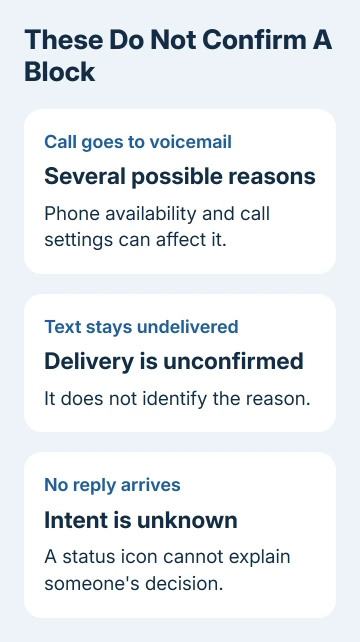
A short ring followed by voicemail can also mean the phone is unavailable or the call was declined. A long ring without an answer doesn't identify a block either. Neither is a sound reason to accuse someone of blocking you.
Voicemail behavior varies too. For example, Phone by Google notes that blocked callers can't leave voicemail when visual voicemail is enabled. That doesn't create a universal rule for other dialers or carrier blocking services.
If all calls fail, follow the connection checks later in the article. If the behavior affects only this contact, stop treating repeated calls as a way to make the result more certain.
Read Google Messages status indicators correctly
Open the conversation and check whether the message is RCS, SMS, or MMS. RCS uses an internet connection and supports richer delivery information; ordinary SMS and MMS don't use the same status icons in Google Messages.
For an RCS message, a timer means it's still being sent. One check means it was sent, two checks mean delivered, and filled double checks mean read. A missing read indication doesn't identify a block.
Read receipts also depend on settings. The other person must have read receipts enabled for you to see that they've read the message. They can read a message without providing the filled-check confirmation you were expecting.
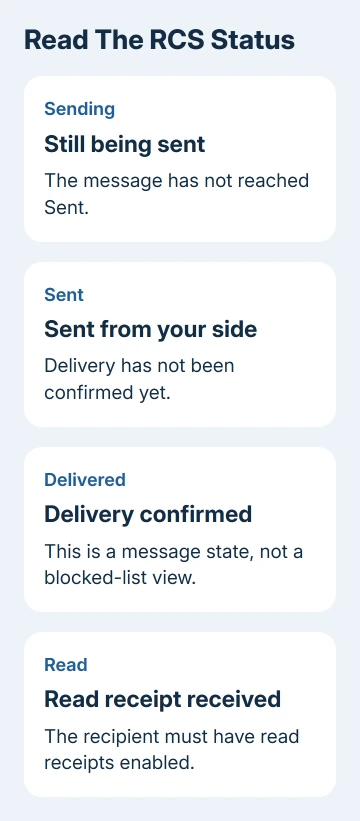
Google's RCS status explanation applies to those chat messages. Don't carry the same icon rules into a different messaging app or assume an SMS must display them.
If a message stays at sent, delivery hasn't been confirmed. The recipient could be offline, or a service or delivery problem could be holding it up. The app doesn't tell you why the person isn't answering.
A delivered status applies to that message. It doesn't tell you which calls the person's phone filters or whether they changed a block afterward. Check when the message was delivered before linking it to a more recent failed call.
Separate call blocking from another app's block
Your Android phone number can be used in several services. A normal cellular call, an RCS conversation, and a WhatsApp call don't all use one shared blocked list on every phone.
Phone-app blocking and message blocking can interact differently across dialers and messaging apps. Start with the app in which the failure occurs. A working call in one service doesn't explain a missing reply in another.
Profile photos, activity labels, and typing indicators are controlled by the particular app and its privacy settings. A disappearing photo isn't an Android system notice that your number was blocked.
Deleting and recreating a saved contact won't reveal the other person's blocked list. The contact card on your phone is your local entry; it isn't a view into the controls on their device.
I'd avoid any app claiming it can inspect another person's blocked numbers. The information you can verify is your own call or message status, not a private setting on someone else's phone.
For the reverse problem, the Android unblock instructions show how to inspect your own Phone by Google or Samsung list. That helps when you may have blocked an incoming number yourself.
Check your phone when several contacts are affected
Try calling a different person who normally accepts your calls to check your own service. If several outgoing calls fail, check the phone and carrier connection rather than one person's settings.
Check the signal indicator and confirm Airplane mode is off. Restart the phone if service isn't behaving normally. For a dual-SIM phone, select the intended calling line and confirm its service is active.
For RCS trouble, open Google Messages > profile picture > Messages settings > RCS chats. Check the connection status. If it says disconnected or verifying, that's about your own messaging setup, not whether a contact blocked you.
Test internet access using Wi-Fi or cellular data. For SMS or MMS failures, confirm you have mobile service and the correct number, including its country code when needed.
For failed incoming calls, check your blocked list and screening rules. The Pixel missed-call checks separate silencing, screening, and mobile connection faults.
Once calls to other people work normally, you've checked that your phone can place calls. That still doesn't distinguish a block from the other contact's coverage, settings, or decision not to answer.
Handle one unreachable contact without guessing
Wait for a reasonable opportunity for a reply instead of redialing to compare ring counts. If an established conversation matters, one ordinary message explaining what you need is clearer than a sequence of test calls.
If you have another way to talk that the person is comfortable with, ask whether the message arrived. A direct reply can answer that question; a delivery icon can't explain someone's intentions.
Don't hide your caller ID or borrow numbers to get around a suspected block. Those attempts still don't reliably explain the original call behavior and can turn an unanswered call into unwanted contact.
For an urgent business issue, use the organization's published support channel. Keep the request about the unresolved matter, rather than proving that an employee's mobile number blocked you.
Give your carrier a failure it can trace
When outgoing calls fail across contacts, contact your carrier's calling support. Provide the affected number, call time and time zone, exact recorded announcement, and whether other calls or texts work.
Ask it to check whether outgoing calls are restricted, your line is set up correctly, or your service has a delivery fault. For RCS that won't connect, use Google Messages' Help & feedback and include the RCS status and phone model.
A carrier can check service faults, but your settings can't remove someone else's block. For one contact who doesn't respond, there may be no technical change to make.
The Short Version
Voicemail, one ring, and an undelivered text don't confirm an Android block. Read the message status and check your own service when several contacts are affected. Direct confirmation is needed to settle whether the person blocked you.
Checked November 11, 2026.