
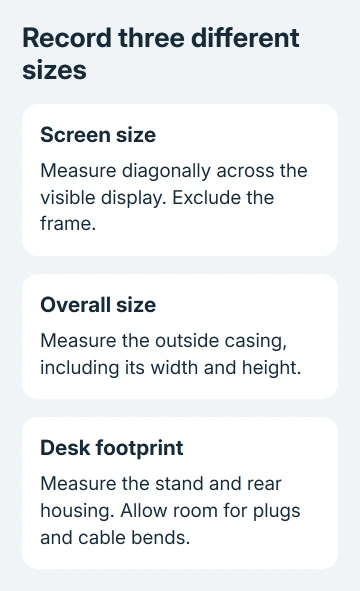
Measure a computer monitor diagonally across the visible screen, from one corner to the opposite corner, without its frame. That gives its screen size in inches.
For a desk, shelf or case, measure the whole monitor and stand separately. The advertised screen size doesn't tell you the space needed for the casing and stand.
Measure the display area from corner to corner
Keep the monitor stable on its stand and find the edges of the actual display area. The bezel is the frame around the screen. Start just inside that frame, where the picture can appear, rather than at the outside corner of the casing.
Hold a soft measuring tape from the top-left display corner to the bottom-right display corner. You can use the other pair of opposite corners instead. Read the diagonal without including the plastic frame at either end.
Keep the tape from scraping or pressing against the panel. A second person can hold one end just in front of the corner if the screen is large. Keep the monitor upright and steady rather than tilting it toward yourself to reach a corner.
HP says its monitor size measurement uses the viewable diagonal and excludes the bezel, frame and stand. The same method applies to a laptop display when you're checking screen size.
Write down the result as a diagonal, such as 23.8 inches diagonal, rather than simply calling it a width. That keeps you from confusing screen size with the width in a product listing.
Convert centimeters without rounding too early
Divide a centimeter measurement by 2.54 to convert it to inches. For example, a visible diagonal of 60.45 centimeters is about 23.8 inches. Keep the decimal until you've compared it with the model's specifications.
A screen sold in a 24-inch category may have a 23.8-inch viewable diagonal. Use the exact panel measurement for a precise fit instead of rounding your tape reading to match the category.
If your result differs by several inches, check where you placed the tape at both corners. A width measurement is smaller than the diagonal; including the casing adds material that isn't part of the display.
I'd repeat the diagonal once before ordering a fitted accessory. A tape slipping onto the frame is easy to miss, especially when a dark bezel blends into a switched-off screen.
Record the outer width, height and depth for a desk
For desk space, measure from the far-left edge of the casing to the far-right edge. Write that down as overall width. This measurement includes the frame and any part of the casing that extends beyond the display.
Measure from the desktop to the highest point of the monitor in the position you'll use. A height-adjustable stand can change that number. If the screen sits under a shelf, check the raised position too if you expect to use it there.
Next, measure the stand's footprint from its frontmost point to its rearmost point. Look for a rear housing or connector that extends farther than the base. Use whichever part reaches farthest when checking how much desk depth you'll need.
Allow room for plugs and cable bends behind it. Even when the stand fits on a shelf, the cables still need room behind it. Check the cable route with the display in its intended position.
For a replacement monitor, compare the maker's dimensions with stand with your available space. Dimensions without stand describe a different arrangement and aren't enough to judge how the supplied base will fit.
Compare different screen shapes fairly
The aspect ratio is the screen's shape, written as width compared with height, such as 16:9. Two displays with the same diagonal can have different widths and heights when their shapes differ.
A wider screen uses more of its diagonal horizontally, without necessarily adding height. When replacing two displays with one ultrawide, compare the usable width and height instead of relying on the diagonal label alone.
You can measure the visible width and visible height directly, inside the bezel, to compare working areas. Keep these numbers separate from the casing measurements so you're comparing screen area with screen area.
For a curved monitor, use the manufacturer's stated viewable diagonal and overall dimensions for the exact model. Don't bend a tape along the curved surface and compare that arc length with a flat screen's straight diagonal.
Our gaming monitor selection guide explains the other display choices once the physical size is known. Size alone doesn't tell you how sharp text will look or how smoothly a game will move.
Don't confuse resolution with physical inches
Resolution describes the pixel grid, such as 1920 x 1080, rather than the size of the panel. Changing resolution doesn't change the screen's physical diagonal. Displays of different sizes can use the same resolution.
Windows display settings are useful for checking resolution and arranging screens, but they aren't a tape measure. A numbered rectangle in the display arrangement isn't a reliable drawing of your monitor's outer casing or stand.
If an external display looks blurry, use the native-resolution checks separately. Measuring its diagonal won't fix an incorrect resolution, and choosing a different scale won't change its physical size.
For a fitted screen filter, follow the accessory maker's measurement instructions. You may need the exact viewable width, height and aspect ratio. A laptop bag, by contrast, must fit the laptop's whole body rather than just its display.
Confirm the model before buying a precise fit
Read the model label on the rear casing without opening the monitor. Record the full model code, including any suffix. Similar product names can refer to different stands, generations or display sizes.
Use the manual or specification sheet supplied for that exact model to confirm the measurements. If you can't find either, give the manufacturer the model code and ask for the viewable diagonal and dimensions with the original stand.
For an arm or wall mount, ask about the monitor's mounting compatibility and weight without its stand. A screen's width can't tell you whether the mount will support it.
The Short Version
Use the viewable diagonal for screen size, excluding the frame. Divide centimeters by 2.54 for inches. Check the casing and stand separately for furniture, and use model specifications for curved panels, fitted filters and mounts.
Checked November 9, 2026.

Isaac Smith is the founder and editor of PC Glance, a website that covers computers, laptops, and technology. He is a tech enthusiast and a computer geek who loves to share his insights and help his readers make smart choices when buying tech gadgets or laptops. He is always curious and updated about the latest tech trends.