An old My Templates.one file can make OneNote 2016 crash when you save a custom page template. Open that file from your Windows Templates folder and check for an older-format warning. Converting it fixed the crash for several owners.
This repair applies to templates carried forward from OneNote 2007. If every notebook crashes on opening, use the broader startup checks. If it only crashes when you save a template, check the file that holds your templates first.
In this guide
1. Protect the custom templates already on the PC
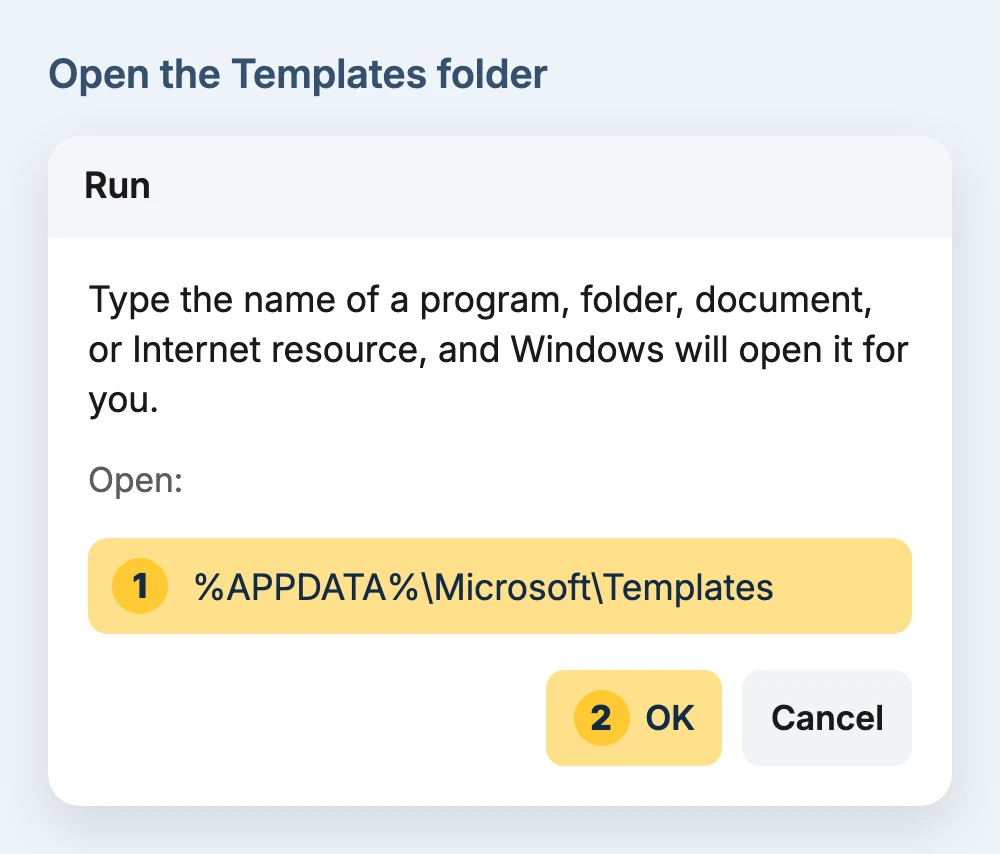
Close OneNote, then press Windows+R. Enter %APPDATA%\Microsoft\Templates and press Enter. That opens your Windows account's Templates folder without having to look up your user-folder name.
Look for My Templates.one. Make a copy in a separate backup folder before opening or converting it. This file contains your custom template pages, so replacing it with an empty file could discard layouts you still need.
The folder belongs to your current Windows account. On a PC with several accounts, check the one where saving the template crashes. An empty template collection in another account won't tell you why yours crashes.
If the file is missing, conversion won't help. Don't create a file with that name or copy one from an unrelated computer. Continue with the update and repair checks after confirming which OneNote edition is installed.
If you found the file, keep its backup separate and open the original in desktop OneNote. Opening it shows whether the file still uses the older format that this repair addresses.
2. Open My Templates.one and check its format
Double-click My Templates.one. In the successful report, OneNote opened the file and displayed a bar explaining that its contents came from an older OneNote format. The owner used that bar to upgrade it.
One owner had moved from OneNote 2007 to OneNote 2016. After upgrading the template file, saving custom templates worked again. Two later replies confirmed the same repair worked for them.
Check your file for that older-format message. Follow the conversion prompt if OneNote offers one. If it opens without a compatibility warning, leave it as it is. A crash alone doesn't mean the file needs converting.
Microsoft's notebook-format instructions explain that OneNote 2010, 2013 and 2016 share a format. Moving between those versions alone doesn't require a format upgrade.
For an older notebook opened in the desktop app, the documented route is File > Info, then Settings > Properties beside its name. Check Default Format before choosing Convert to 2010-2016 when that option applies.
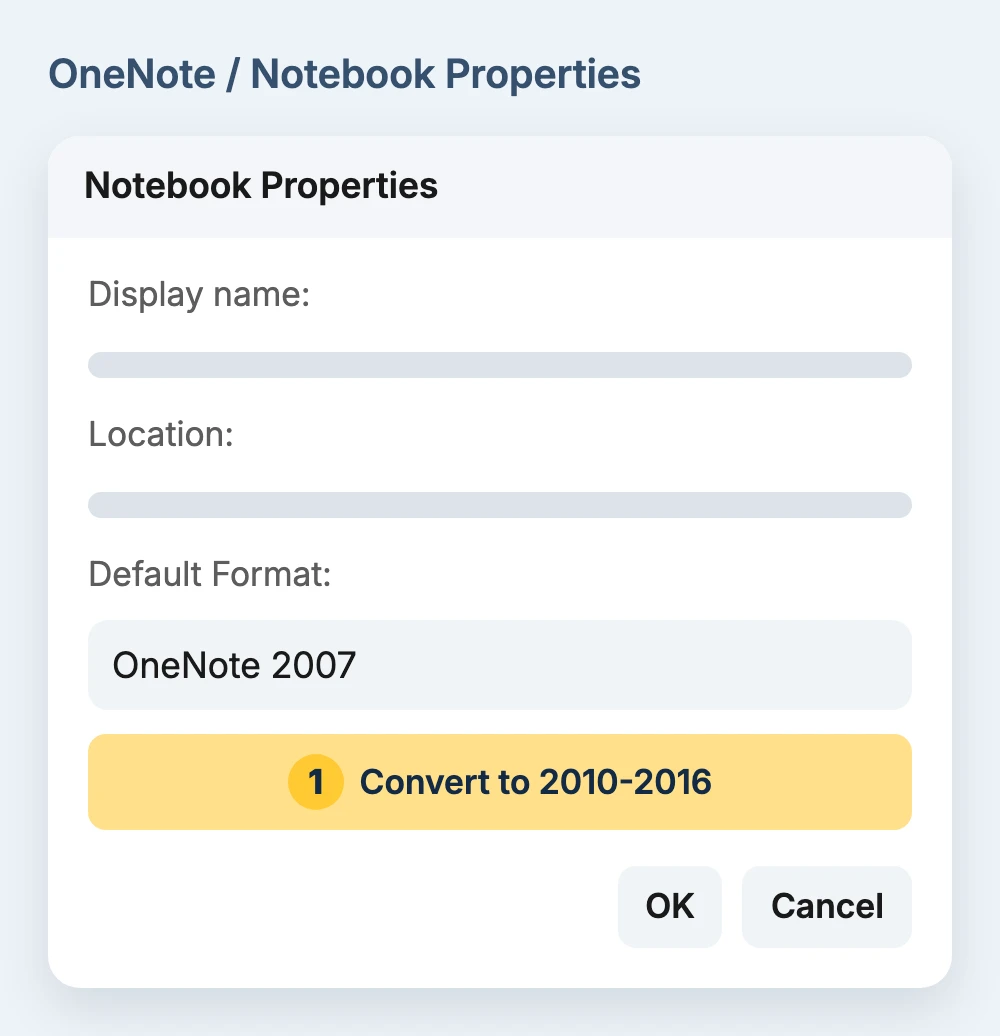
Don't convert every notebook just because one template file failed. Check that the template file opens in its newer format and that saving a template no longer crashes.
3. Save a simple template to confirm the repair
Return to a normal notebook and create a blank test page. Add a short heading so you'll recognize it later. Use the test page rather than risking a complicated layout while checking whether saving works again.
Choose View > Paper Size. In the Paper Size pane, use its final link, Save current page as a template. Give the template a distinct test name and complete the save dialog.
If saving finishes, open the Page Templates pane from Insert and look under My Templates. Apply the new entry to another blank page. That checks both saving the layout and retrieving it afterward.
A template applies to a new, empty page. It doesn't redesign a page that already contains your notes. If the saved entry appears but won't apply to the page you're using, try a blank page before calling that another save failure.
Our OneNote organization guide covers ordinary pages and sections if you're rebuilding the notebook around those layouts. Keep your existing notes separate from the temporary template test.
When a simple template saves but a particular page crashes, note which page it is and what it contains. Tell support which page fails. Reinstalling Windows would be a drastic response to one page crashing.
4. Update OneNote when the template isn't an old-format file
Open File > Account in the desktop Office app. If Update Options appears, choose Update Now. Finish the update, close Office applications when requested, then retry the simple template save.
For an installation without that update control, use the update method supplied with your Office edition or ask workplace IT. Your IT team may control updates and hide that button even when the app works normally.
Check for a File menu in desktop OneNote. Neither the web app nor OneNote for Windows 10, now retired, offers this local template-file workflow. Apply this repair to the desktop installation that crashes.
Template files can survive an app upgrade, so reinstalling the same program doesn't necessarily replace the old file. Check its format to see whether that's what needs changing.
I'd inspect an inherited template file before committing to a reinstall. The successful owner had already been steered toward reinstalling Windows, yet converting the template store resolved their specific failure.
5. Repair the app if template conversion cannot help
If a simple template still crashes after updates, preserve unsynced notebook work before repairing Office. Our OneNote startup repair guide covers the application-level repair route when the problem extends past one template.
On Windows 11, open Settings > Apps > Installed apps, locate your Office installation and select Modify in its menu. On Windows 10, select Office under Apps & features and choose Modify.
For Click-to-Run, choose Quick Repair or the more thorough Online Repair. Older Windows Installer editions offer a repair option through their setup dialog. Choose the Office installation that includes your affected OneNote app.
If it still crashes, tell IT or Microsoft 365 support your OneNote version, the save action, and whether My Templates.one showed a conversion warning. Include the blank-page test result and keep the backed-up file for review.
The Short Version
Back up My Templates.one, open it in desktop OneNote, and convert it if an old-format warning appears. Save and apply a simple test template afterward. Use updates and Office repair when the file isn't an old-format template store.
Checked November 27, 2026.
 If you have any business, I can build it online