

Your PC starts normally, runs for about five minutes, and then freezes solid. The mouse stops, the keyboard stops, and only the power button gets you out.
I would look at the Secure Boot certificate update before you reinstall Windows, because a reinstall does not stop it.
It began for many people with the May 2026 updates, on Windows 10 and 11, and later updates brought it back. A single question about it on Microsoft's answers site has 60+ people with it, and owners traced it to one scheduled task.
Why it freezes a few minutes after start
Microsoft is replacing the Secure Boot certificates Windows has used since 2011. In its words, "These older certificates begin expiring in June 2026".
Windows Update installs the new ones through a scheduled task Microsoft names "\Microsoft\Windows\PI\Secure-Boot-Update". Microsoft says "The task that processes these updates runs every 12 hours".
On some older PCs, owners found, that write to the firmware is what hangs the machine. One wrote that the task "runs a few minutes after every boot", which matches the freeze.
Most of these reports came from older Dell desktops and laptops, from an OptiPlex 3040 to an Inspiron 3542 made around 2014.
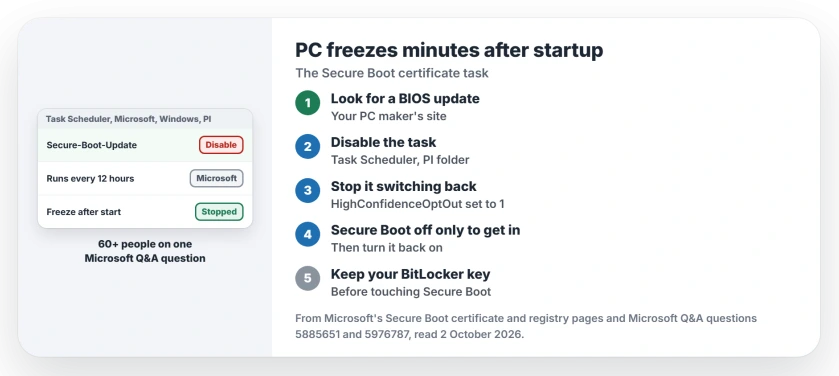
Status: checked 2 October 2026. Microsoft has not fixed the freeze itself. Owners stopped it with a BIOS update or by disabling the Secure-Boot-Update task; 60+ share the question.
1. Look for a BIOS update first
Microsoft says some PCs need new firmware from their maker before the certificates can go in. On your maker's support site, enter the model and look for a BIOS newer than yours.
One Dell Inspiron 3250 owner did exactly that. After BIOS 3.12.1 they kept Secure Boot on and reported: "I have had zero problems in the last 24 hours".
That is the cleanest fix, because your PC still gets the new certificates. Updating a BIOS has its own rules, so read them before you start.
2. Turn off the Secure-Boot-Update task
No newer BIOS for your model? Press Windows + R and run taskschd.msc. Open Task Scheduler Library, then Microsoft, Windows, PI.
Right-click Secure-Boot-Update and choose Disable. An owner with a Dell Vostro 3900 did this and wrote: "After rebooting, the freezes disappeared".
Work quickly after a restart. One owner's guide notes that the task usually waits a few minutes after boot, which gives you a window.
3. Stop updates switching it back on
The owner who traced the cause also set two values in the registry, under HKEY_LOCAL_MACHINE\SYSTEM\CurrentControlSet\Control\SecureBoot. AvailableUpdates goes to 0, and a new DWORD called HighConfidenceOptOut goes to 1.
Microsoft documents both on its Secure Boot registry page. For HighConfidenceOptOut it says: "You can set this key to a non-zero value to opt-out of the high confidence buckets".
Ours: I would back up the registry first. And know what you give up, since your PC keeps the old certificates until you undo both changes.
4. If it freezes too fast, use Secure Boot off as a door
One owner fixed the freeze by turning Secure Boot off in the BIOS, and that answer has 20+ helpful votes. Another owner followed it and said "it works".
A moderator recommended a better version of it. Turn Secure Boot off, start Windows, disable the task, then turn Secure Boot back on.
Ours: find your BitLocker recovery key before you touch Secure Boot. On an encrypted PC, the change can make Windows ask for that key at the next start.
What did not help
Reinstalling Windows did not last, because the next update brought the freeze back for owners who reinstalled more than once. System Restore froze too, and Windows reinstalled an update one couple had removed.
On Windows 10, one owner stayed stable after uninstalling August's KB5120249, at least so far. Each of these results is user-reported.
If Windows Security also shows a yellow Secure Boot warning, read that exact message first.
Why does my PC freeze a few minutes after startup?
For the owners on Microsoft's board since May 2026, it was the Secure Boot certificate update. A scheduled task tries to write the new certificates to the firmware, and some older PCs hang when it does.
Is it safe to disable the Secure-Boot-Update task?
It stops the freezing, and the task can be switched back on later. While it is off your PC keeps the 2011 certificates, and Microsoft says such PCs carry on starting normally but miss new boot protections.
Do I need to switch off Secure Boot?
Only long enough to disable the task. Turn it back on afterwards, and have your BitLocker recovery key ready first.
The Short Version
- The freeze comes minutes after every start.
- Older firmware chokes on the Secure Boot update.
- Look for a newer BIOS first.
- Or disable the Secure-Boot-Update task.
- A registry opt-out keeps the task off.
- Turn Secure Boot off only to get in, then back on.
- Have your BitLocker recovery key ready.
Where to Next
Check your PC maker's site for a BIOS update today. If there is none, disable the Secure-Boot-Update task the next time your PC starts, before the freeze has time to arrive.
If yours froze too, add your PC model in the comments. A list by model would help the next owner find the right fix faster.

Isaac Smith is the founder and editor of PC Glance, a website that covers computers, laptops, and technology. He is a tech enthusiast and a computer geek who loves to share his insights and help his readers make smart choices when buying tech gadgets or laptops. He is always curious and updated about the latest tech trends.