A color-filled double check in Google Messages means the other person has read your RCS message. Two unfilled checks mean delivered, while a single check means sent. Regular SMS texts don't give you that same read confirmation.
The important catch is the recipient's setting: they must share read receipts. Without a receipt, there isn't a reliable way to tell whether they read the text, even when their phone received it.
In this guide
Read the status beside your outgoing text
In Google Messages, open the chat and look at the status beside the text you sent. Check each message individually. The latest text can still be sending even when earlier messages have arrived.
These are Google's published RCS status meanings. RCS is the newer messaging service that supports features such as typing indicators, higher-quality media and read receipts over an internet connection.
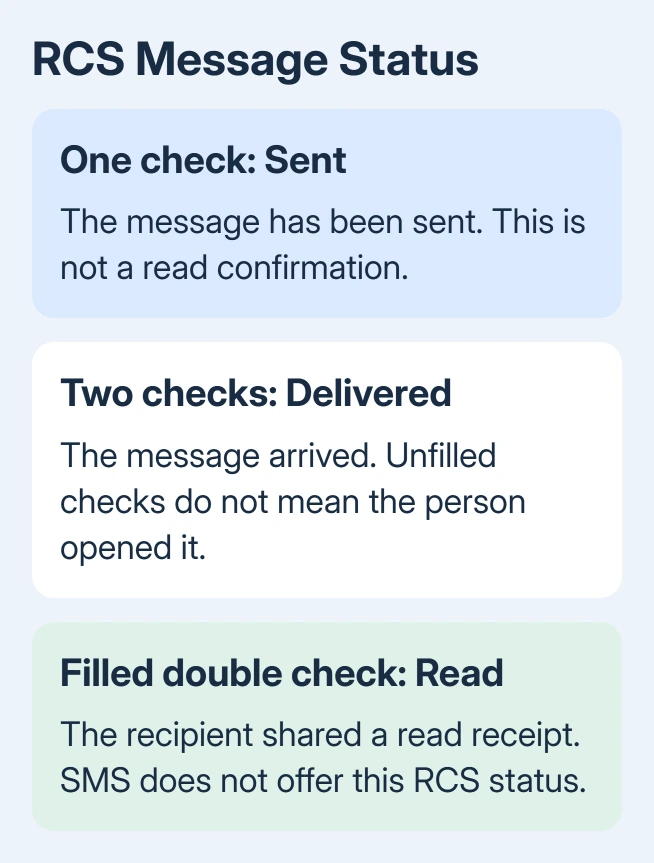
- Single check: The message has been sent.
- Double check: The message has been delivered.
- Color-filled double check: The message has been read.
The app's colors and placement can change with its theme or version. Look at whether the checks are filled rather than expecting Google Messages to look exactly the same on every phone.
A delivered status is useful, but it doesn't mean the person opened the conversation. Their phone can receive a message while they're busy, asleep or using another app.
Likewise, a sent status isn't a read status that has failed to turn blue. The app hasn't confirmed delivery yet. Deal with a sending problem separately from the question of whether someone read it.
For a text meant to leave at a chosen time, check the scheduled message before interpreting its later delivery status.
Is this message RCS or an ordinary text?
Look at the message-entry area before sending another text. RCS message means the next message will use RCS. Text message means it will use SMS or MMS, the older carrier text services.
That label describes the message about to be sent. A conversation can switch between RCS and SMS. That label doesn't turn an earlier SMS into an RCS message or add a missing receipt to it.
An SMS delivery report, where your carrier and app offer one, confirms delivery rather than reading. Don't treat a delivery report or a successful send as confirmation that someone opened the text.
Google's RCS status explanation connects read receipts to RCS. When the recipient doesn't use RCS, those features won't work in that conversation.
The other person doesn't always need an Android phone. RCS can work between supported Android phones and iPhones, depending on device, carrier and settings. A green bubble on their iPhone alone doesn't distinguish RCS from SMS.
For readers comparing those iPhone indicators, our iMessage blocking checks explain why a missing Read label isn't an answer about blocking. Android's missing receipt has the same basic limit: silence isn't a definite explanation.
Find the read-receipt switch in Google Messages
The setting on your own phone shares your own reading status with the other person. It can't make someone else's phone report when they read yours.
- Open Google Messages.
- Tap the account picture or initial near the upper-right corner.
- Select Messages settings > RCS chats.
- Look for Send read receipts and enable it to share your own reading status.
Some versions call the RCS section Chat features. Use that entry when RCS chats isn't shown. These instructions apply to Google Messages; another texting app can put its controls in a different place.
To receive read confirmations from a contact, that contact must enable their own read receipts. Ask them to check their setting if you're both trying to get the feature working. You can't change their choice from your phone.
I'd check the app name before changing anything else. A Samsung phone can run Google Messages, Samsung Messages or another default texting app, and the phone's brand alone doesn't tell you which instructions apply.
Changing your default app also won't add a read receipt that was never sent for an old text. After you've both checked your settings, send a new RCS message to see whether receipts work.
RCS is connected, but reading remains unconfirmed
In Messages settings > RCS chats, look at the connection status. Connected means your phone is ready to use RCS with compatible contacts. A setup or verification status means your phone hasn't finished setting up RCS yet.
Confirm that cellular data or Wi-Fi actually reaches the internet. RCS needs an internet connection. Being able to make a cellular call doesn't tell you whether RCS can reach the internet.
If RCS works with one contact but not another, check that conversation: the recipient's RCS availability, their receipt setting, or a message sent as SMS. It doesn't automatically mean your own app is broken.
When all RCS conversations fail, review your connection and RCS status first. Google's RCS setup steps give the current registration controls. Avoid repeatedly turning RCS off and on as a way of chasing a receipt.
For a stuck message, decide whether it needs to arrive more urgently than it needs a read receipt. Sending it as SMS can help it arrive when RCS isn't available, but that SMS won't have an RCS read receipt.
Keep app receipts separate from Android text receipts
WhatsApp, Signal and other messaging apps use their own receipt systems. A tick in one app doesn't tell you what happened to a text sent in another. Check the status in the app that carried the message.
Notification previews can make this harder to judge. Someone can see some text on a lock screen without giving you the same confirmation as opening the conversation. A missing receipt can't tell you whether that happened.
Deleting a thread isn't a way to make its receipts refresh. If the conversation itself has disappeared, retrieving Android text messages is a separate recovery question. Keep the conversation while you check its status.
If RCS setup stays stuck, use the RCS help page's troubleshooting link or ask your carrier about support for your phone and SIM. Give the exact connection status so they can check why RCS won't connect, rather than chase a read receipt.
For a delivered message with no reading confirmation, ask the recipient directly. Call when it's urgent. Apps promising to reveal hidden reading activity don't replace the recipient's own receipt setting.
The Short Version
Filled double checks confirm reading in Google Messages RCS chats; unfilled double checks mean delivered. The recipient must share receipts. SMS doesn't give the same confirmation. Check the app, message type and RCS status.
Checked November 12, 2026.