Yes, a Wi-Fi owner may see which sites your phone connects to, depending on the router and its logs. HTTPS normally hides page contents, passwords and messages, but it doesn't make the destination completely private.
Incognito won't hide that network activity. For browsing you don't want passing through someone else's Wi-Fi, disconnect from that network and use cellular data, or use a trusted VPN that protects the traffic you want to keep private.
In this guide
Separate the website name from what's on the page
A router might show a connection to a domain, such as example.com. That website name doesn't automatically reveal the article you opened, your search or the text you entered there.
With HTTPS, your browser encrypts the data exchanged with the site. Someone watching ordinary network traffic can't simply read the protected page as it passes through their router.
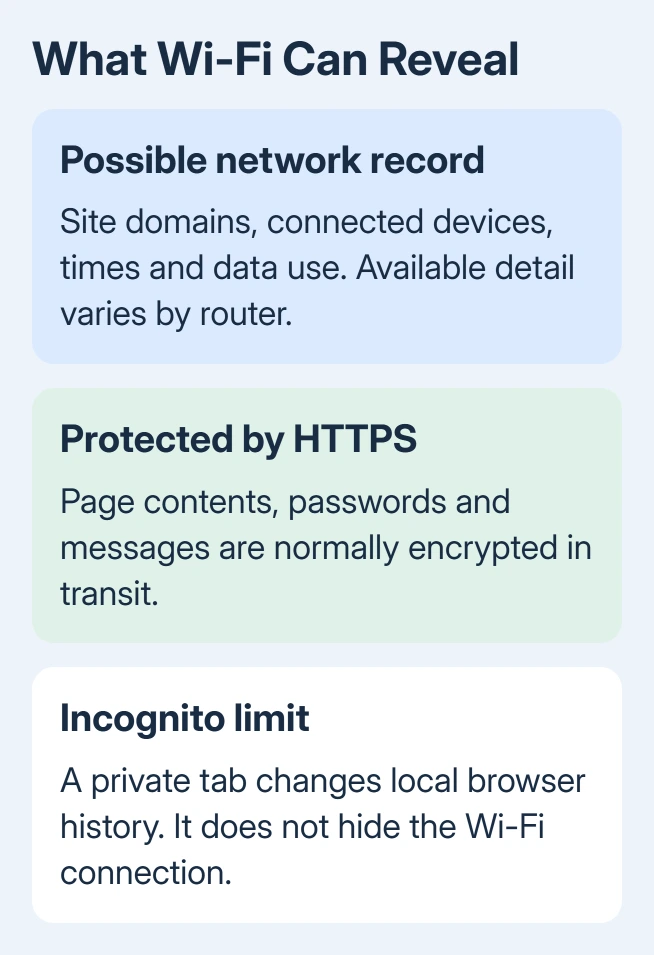
The destination can still be exposed through domain lookups or connection details. A domain lookup turns a site's name into an address the phone can reach.
Encrypted lookups can reduce that exposure, but aren't a complete anonymity setting.
A router may also show the connected device, connection times and data use. Those details can tell its owner that a phone was active without revealing what its user actually read.
Remember that distinction if someone claims they can see everything. Seeing a connection to a video service isn't the same as seeing the video title, your password or a private message inside the service.
The router decides what history is available
There isn't one browsing-history screen shared by every Wi-Fi router. Some show little more than connected devices. Others have parental controls, security reports or website activity attached to a device profile.
For example, TP-Link describes top visited websites in supported HomeShield profiles. Its content filtering explanation also distinguishes those controls from access to the contents of HTTPS pages.
The reports you can see depend on the model, software, subscription and settings. Not every household has website logging enabled, and not every router stores a permanent list.
A basic router's system log may contain connection events rather than website names.
Background apps complicate the picture too. A phone connects to services for notifications, syncing and updates without someone opening those sites. A website name in a report doesn't tell you whether someone chose to visit it.
Owning the Wi-Fi also doesn't give someone your browser account password. Network reports and history synced through a shared browser account are separate ways information can become visible.
If someone can use your unlocked phone or a signed-in account, check that access separately. Changing networks won't sign them out of an account they already control.
Incognito changes the phone's history, not the network
Private browsing mainly changes what your browser saves on the phone after you close the private session. It doesn't send traffic along a different internet connection or prevent the router from handling it.
Google's Incognito guidance makes the network limit clear: organizations managing the connection may still observe activity. A school, workplace or internet provider doesn't disappear from the route because a private tab is open.
Deleting browser history later also doesn't remove records stored elsewhere. It clears the browser's own records, but can't reach into a router's reports.
On a Mac, opening an Incognito window is useful for a separate browsing session on that computer. The same privacy limit applies when you're browsing on a phone.
I'd choose the connection first when network privacy is the concern. Opening another private tab on the same Wi-Fi doesn't change who carries your traffic.
Use cellular data to keep this Wi-Fi out of the route
Cellular data is the simplest option when you want to stop sending a personal phone's browsing through a particular Wi-Fi network. Your mobile carrier then carries the connection, which changes who can see the network traffic.
- On an iPhone, open Settings > Wi-Fi and turn Wi-Fi off. Check Settings > Cellular to confirm cellular data is available.
- For Pixel phones and devices with similar menus, open Settings > Network & internet > Internet and turn Wi-Fi off. Enable cellular data for the active SIM if needed.
- On a Samsung phone, look in Settings > Connections > Wi-Fi. Look under Connections > Data usage for the cellular-data switch on many models.
- Look for cellular service in the status bar, then open the page again. Without mobile service or an active data plan, turning Wi-Fi off leaves the phone offline.
Use Settings on the iPhone for this switch. The Wi-Fi control in Control Center disconnects from nearby networks temporarily and isn't the same as turning Wi-Fi fully off in Settings.
Using cellular data doesn't hide activity from the carrier, websites or signed-in accounts. It does remove that household or cafe router from the browsing connection while Wi-Fi remains disconnected.
Switching to a hotspot supplied by the same person won't solve this. That hotspot is another network they operate. Use your own mobile connection if that's the separation you need.
A VPN helps with a different privacy boundary
A VPN sends protected traffic through an encrypted connection to the VPN provider. The local network sees that connection and its data use. Ordinary monitoring on that network can't see the destinations inside the tunnel.
You'll need to trust the VPN provider instead. A VPN doesn't erase records a website keeps when you're signed in, and it doesn't conceal activity from software installed on the phone itself.
Check the VPN app's connection state before browsing. Installing the app isn't enough; it needs to be connected. Also check whether the VPN leaves out any apps or traffic. Anything it leaves out isn't protected by that VPN connection.
Our VPN explanation covers that change of route. Don't assume an unfamiliar free app is a sensible choice simply because it puts a VPN symbol on the phone.
With an employer-managed or school-issued phone, ask the administrator what they can monitor. A managed device or an installed inspection certificate can change what the organization sees, beyond what an ordinary home Wi-Fi owner can see.
If someone claims to know your browsing, ask what record they saw: a router profile, a shared account or the phone itself. The answer tells you whether to change networks, review account access or ask about device management.
The Short Version
A Wi-Fi owner may see destinations, but HTTPS normally protects contents. Incognito doesn't hide network traffic. Use cellular data to avoid that Wi-Fi, or a trusted VPN for protected traffic. Check account access separately.
Checked November 12, 2026.