

You stop a service in Services, or something stops it for you, and it sits at Stopping. Try again, and Windows says it is starting or stopping. Try later, it says, but later never comes.
I would not restart the whole PC first. A stuck service runs inside one process, and you can usually end just that process in a minute.
Two Super User questions about services that refuse to stop have over 160,000 views between them, and on Microsoft Q&A, owners report it with Windows Audio, the firewall and Windows Installer.
Why a service hangs at Stopping
Windows asks the service to stop, then waits for it to say it has. If its program hangs while shutting down, that answer never arrives, and Services shows Stopping for good.
The 2012 asker hit the same wall when their net stop command came back with: "The service is starting or stopping. Please try again later".
The way out is the process behind your service. An answer on that question put it plainly: "You need to find the PID for the service, then kill it".
Ours: on this laptop, 134 of the 139 processes that run services hold one service each. That makes ending one far safer than in the Windows 7 days of those questions.
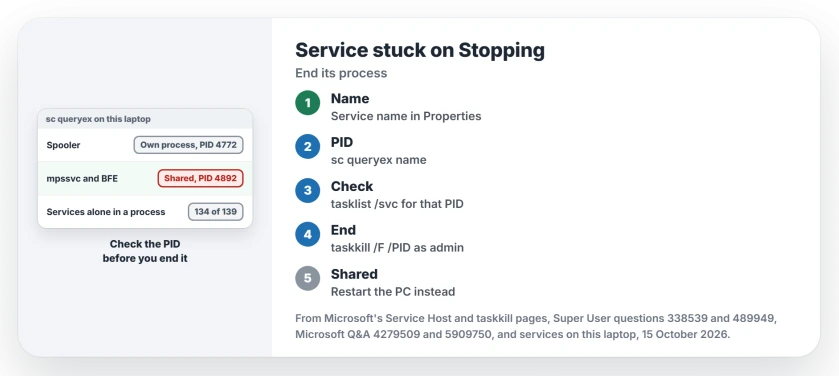
Status: sc queryex and tasklist were run here on 15 October 2026, Windows 11 25H2, against Microsoft's taskkill and Service Host pages. No service or process was ended.
1. Find the service's process ID
Open Services and double-click the stuck service. Note its Service name, which can differ from the name in the list.
Then run this in Command Prompt, with your service's name in place of Spooler:
sc queryex SpoolerLook at two lines. STATE shows 3 STOP_PENDING while it is stuck. PID gives the process number you need.
Ours: for the Print Spooler here, sc queryex returned PID 4772 and the type WIN32_OWN_PROCESS. Own process means nothing else lives in it.
2. Check what else runs in that process
A process can host several services, so look before you end it. This lists every service inside one PID:
tasklist /svc /fi "PID eq 4772"Microsoft's Service Host page explains why one service per process is now normal. Microsoft says the split "is automatic for systems with more than 3.5 GB of RAM running the Client Desktop SKU".
Some services stay grouped anyway. Microsoft names a pair: "the Base Filtering Engine (BFE) and the Windows Firewall (Mpssvc) will be grouped together in a single host group".
Ours: that pair shares process 4892 here. Four other groups exist. One of them holds Plug and Play and the power service, so I would never end it.
3. End it from an administrator prompt
Start Command Prompt as an administrator from its right-click menu. Then end the process by its number:
taskkill /F /PID 4772Microsoft's taskkill page says /f "Specifies that processes be forcefully ended".
An owner on the 127,177 view question added the key detail: "Run the command prompt as administrator" first, and with that, taskkill worked for them.
Then start the service again from Services. If it was Windows Audio and your sound is still missing, the no sound checklist takes it from there.
The opposite trouble, a service set to Automatic that never starts after a reboot, has its own fix, and the Delayed Start page reads the boot log for it.
When the process holds several services
Restart the PC instead. Ending a shared process stops every service in it, and your list from step 2 shows who would go down.
The firewall is one such case. A Microsoft Q&A owner had Windows Defender Firewall stuck at STOP_PENDING with error 0x800706d9. In their words, they had been "dealing with this issue for the better half of a year".
Here, that service reports NOT_STOPPABLE and shares its process with BFE.
If the stuck one was the Print Spooler, the Spooler SubSystem App page shows how to clear the jobs it was holding.
Access is denied? Security software guards its own
The 127,177 view question was about a protection agent no administrator could stop. The accepted answer explained why: "Many security software installs a special driver that intercepts any changes to its services and processes".
Its way round was Safe Mode, where "the driver is normally not loaded". Another owner found the admin prompt "is not sufficient" in some cases, which fits.
If it belongs to your employer, leave it alone and ask IT.
The Short Version
- A service stuck at Stopping is a process that hung while shutting down.
- Run sc queryex with the service name to get its PID.
- Run tasklist /svc with that PID to see what else lives there.
- One service? End it with taskkill /F /PID from an administrator prompt, then start it again.
- Several services, or Access is denied? Restart, or use Safe Mode for security software.
Where to Next
Which service hung for you, and did taskkill free it? Name it in the comments, because I am collecting the ones that end cleanly.

Isaac Smith is the founder and editor of PC Glance, a website that covers computers, laptops, and technology. He is a tech enthusiast and a computer geek who loves to share his insights and help his readers make smart choices when buying tech gadgets or laptops. He is always curious and updated about the latest tech trends.