
Word keeps opening blank documents on its own, even while you're busy in another app, and closing each window gets old fast.
I would check your Word version first. Microsoft fixed one cause of this behavior in 2025, and an owner confirmed the update helped. Let's check that fix before changing your templates or reinstalling Office.
Match the fix to your Word version
Microsoft documents this fault in the Windows desktop edition of Word for Microsoft 365, starting with Version 2507, build 19029. Its blank-document issue page lists Version 2509, build 19231, and newer as fixed.
That page describes the original fault. Two owners reported similar behavior on Version 2601 in February 2026, but Microsoft has not acknowledged those later cases on its issue page.
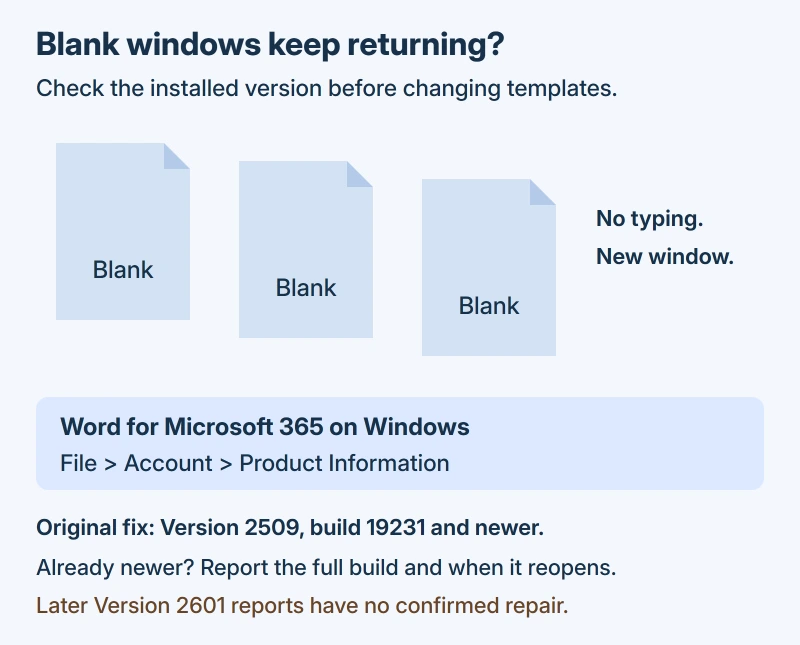
Status: the Windows desktop edition of Word for Microsoft 365, checked 17 October 2026. The original fault has a vendor fix; later Version 2601 reports remain unresolved in the thread.
Open File > Account in Word. Under Product Information, note the full product name and its version; About Word gives you more detail, including the full build. Keep those numbers handy.
If you're already beyond the fixed version, continue to the last section rather than installing an old release. Choose whichever current update your Office installation offers.
Install the update offered to your PC
Save your open documents first. Microsoft's Office update instructions use this route in the Windows desktop app:
- Select File > Account.
- Choose Update Options > Update Now.
- Choose Enable Updates first if needed.
- Let Office finish, then close its update message.
Use Word for a while afterward. This fault can take hours to return, so one quiet minute doesn't tell you much.
Updating to Version 2509 was reported working by one owner for their users on October 18, 2025, in the Microsoft Q&A thread.
Their later reply listed the Current Channel fix as 2509, build 19231.20216, and a Monthly Enterprise Channel fix as 2508, build 19127.20314. Those are their reported channel details, separate from Microsoft's shorter public notice.
Can't find Update Options at all? Microsoft says an installation with only an About button can use volume licensing or company-managed updates. Your help desk can check its update channel.
Send them your recorded Office details and the issue-page link. That gives them something specific to check.
Leave your work templates in place
I wouldn't empty Word's Startup folder first. Some owners stopped the repeated openings that way, but others needed those files for their document tools. One owner quickly withdrew their success report.
The confirmed Office update offers a much simpler starting point than working through every suggestion in the thread, without removing the templates you use each day.
If an unexpected window contains your actual writing, read it before dismissing it. Our Word recovery instructions explain how to keep a recovered copy when Word offers one.
If new windows still appear after updating
Note whether Word reopens just after you close it, during Windows sign-in, or while you're using another app and have left Word alone.
Include how often it happens when you contact support, because those are different patterns even if each produces a blank window.
I would send a picture of File > Account with that description, so your help desk can check the installed build alongside your document tools. There isn't a confirmed repair for every later report in the saved thread.
If your real problem is repeated Save As dialogs while saving a file, use the Word Save As loop fixes instead. That guide starts with getting your writing into a file you can save.
When the program stops launching entirely, the Word startup ladder compares a failed app with a damaged file before template replacement or repair.
The Short Version
- Check the Word product, version and full build under File > Account.
- For the original Microsoft 365 fault, install the offered Office updates.
- Give the update time before deciding whether the random openings stopped.
- Keep needed work templates, and send support your build and reopening pattern if it continues.
Where to Next
When does your extra window appear: after closing Word, or much later? Tell me the version and full build too, so we can keep newer cases separate from the fixed 2025 fault.

Isaac Smith is the founder and editor of PC Glance, a website that covers computers, laptops, and technology. He is a tech enthusiast and a computer geek who loves to share his insights and help his readers make smart choices when buying tech gadgets or laptops. He is always curious and updated about the latest tech trends.