
You swipe a notification away on your Apple Watch the way you always have, and the unread badge on your iPhone stays exactly where it was. That changed in watchOS 26 and nobody was told.
The unread badge just sits there, on the Watch, the iPhone, and the Mac, until you open the full thread.
Apple has known about it since watchOS 26.0 and has not put it back. So the answer is part workaround, part a separate setting the update switched off.
Let me show you what dismissing actually does now, and what to do instead if you want the badge cleared.
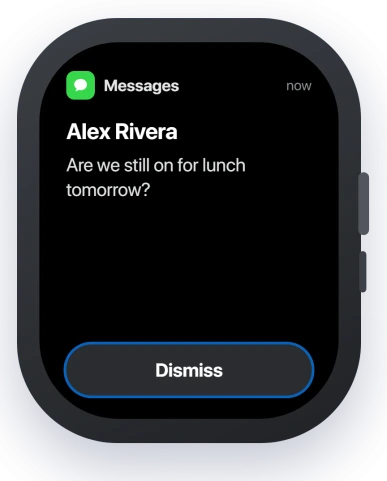
The dismiss gesture: tap the button, not the swipe
The change is narrow. A quick swipe to dismiss, or a press of the Digital Crown, no longer marks the message read. The unread state hangs around and syncs to your other devices.
The gesture that still works is the actual Dismiss button. When a notification is open, scroll to the very bottom and tap Dismiss, and the message is marked read across your devices. Opening the thread does the same.
So until Apple reverts this, clear messages by scrolling to Dismiss or opening them, not by flicking them away.
Apple's own steps are in See and respond to notifications on Apple Watch.
The other half: your iMessage Send and Receive got switched off
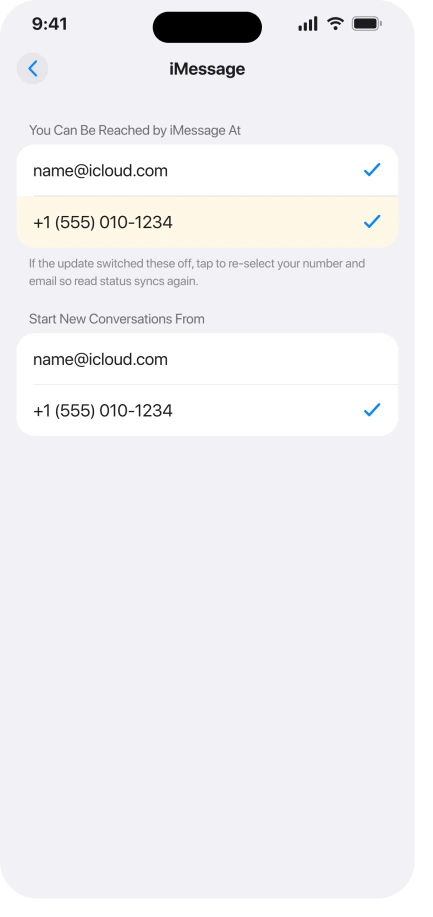
There is a second problem wearing the same symptom, and this one you can fix. The iOS 26 update turned off some people's iMessage Send and Receive addresses.
When that happens, read status stops syncing, so a message you read on the iPhone never clears on the Watch, and it is worst with plain SMS.
On the iPhone, open Settings, Apps, Messages, then Send and Receive. Re-select your phone number and your Apple Account email so both are ticked.
While you are there, make sure iMessage is on, and that it is the same Apple Account your Watch uses.
This is the fix for the phantom unreads that came out of nowhere after the update. It will not change the dismiss gesture, but it restores the sync that clears a read message everywhere.
It pairs with iMessage won't activate on iOS 26 if your account looks half signed in.
Clear the ones already stuck
The messages already sitting unread will not clear themselves. A few quick ways to wipe them.
- Ask Siri on the Watch. Raise your wrist and say "read my unread messages." It walks through them and clears the indicator, and nothing gets deleted.
- Restart both devices. Turn the Watch and the iPhone off and on, and force-restart either one if it is unresponsive. This clears a stuck state more often than anything else here.
- Reset the mirror. On the iPhone, open the Watch app, Notifications, Messages, and switch from Mirror my iPhone to Custom. Clear the stuck alerts on the Watch, restart it, then switch back to Mirror my iPhone.
The red dot setting only hides it
A toggle called Notifications Indicator controls the red dot at the top of the watch face. You can turn it off in the Watch app, under Notifications.
It does not mark anything read, though. It only hides the dot, so the messages are still counted as unread underneath.
Use it if the dot bothers you, but know it is covering the symptom, not clearing it. Apple covers it under Notifications on your Apple Watch.
If it still will not clear
When the sync is genuinely stuck, step up to these.
- Turn iMessage off and on. In Settings, Apps, Messages, switch iMessage off, wait a minute, and switch it back on, then restart the Watch. Reactivation can take a few minutes.
- Toggle Messages in iCloud. In Settings, your name, iCloud, turn Messages off and back on. Read status rides on this sync, so resetting it can shake the count loose.
- Unpair and re-pair, last of all. Unpair the Watch, which backs it up to the iPhone first, then pair it again and restore. It is slow, and for some the count creeps back after a day, so save it for last.
Status: the dismiss-no-longer-marks-read change is unfixed through watchOS 26.5 and Apple has not reverted it, so it is a workaround. The Send and Receive reset is the real fix for the sync side.
What will not fix it, and what is not this bug
- Waiting for an update. watchOS 26.5 did not fix the dismiss change, and Apple has not said it will, so do not hold out for a build that clears it.
- Turning off the red dot. That hides the indicator and marks nothing read. The unread count is still there.
- This is not notifications failing to arrive. If alerts never reach the Watch in the first place, that is Apple Watch not getting notifications, a different problem.
- It is a Messages thing, not every app. The dismiss change is about message notifications. Other apps still clear the way they used to.
Why does my Apple Watch show unread messages I already read?
Two things cause it on watchOS 26. Dismissing a notification by swiping no longer marks the message read, so the unread state lingers.
Separately, the update can switch off your iMessage Send and Receive, which stops read status from syncing between the iPhone and the Watch.
Fix the second at Settings, Apps, Messages, Send and Receive. For the first, clear messages with the Dismiss button or by opening them.
Did watchOS 26.5 fix the notification bug?
No. As of watchOS 26.5, dismissing a message notification by swiping still does not mark it read, and Apple has not reverted the change.
It has been reported since watchOS 26.0 with no fix shipped, so treat the Dismiss button as the way to clear messages for now.
How do I mark a message read from my Apple Watch now?
Open the message thread, or when the notification is showing, scroll to the very bottom and tap the Dismiss button. Both mark it read across your devices.
The quick swipe-away and the Digital Crown no longer do, which is the watchOS 26 change behind this.
The Short Version
- watchOS 26 changed dismissing: a swipe or a Digital Crown press no longer marks a message read, so unread badges pile up on the Watch, iPhone, and Mac. It is unfixed through 26.5.
- Clear messages with the actual Dismiss button (scroll to the bottom of the notification) or by opening the thread. Both still mark them read.
- The other cause is the update switching off iMessage Send and Receive. Re-select your number and email at Settings, Apps, Messages, Send and Receive.
- Wipe the ones already stuck with Siri's "read my unread messages," a restart of both devices, or the Mirror my iPhone off and on reset.
- The Notifications Indicator toggle only hides the red dot, it does not mark anything read.
Where to Next
And if a Mac stops showing notifications the moment it is docked, that combination has its own cause.
One kind of notification never arrives rather than never leaves. Hypertension notifications not showing on watchOS 26 covers what has to be set first.
- Alerts not reaching the Watch at all: Apple Watch not getting notifications
- iMessage acting half signed in: iMessage won't activate on iOS 26

Isaac Smith is the founder and editor of PC Glance, a website that covers computers, laptops, and technology. He is a tech enthusiast and a computer geek who loves to share his insights and help his readers make smart choices when buying tech gadgets or laptops. He is always curious and updated about the latest tech trends.