
Your Apple TV is telling the soundbar that an old stereo show is Dolby Atmos, and the sound has gone flat and odd. That is a confusing one, because the badge on the front of your amplifier says everything is fine.
One setting sits behind it, and the same setting sits behind the exact opposite complaint from other people.
Let me show you what it really does, and then you can pick which way you want it.
First, check your Apple TV can even do this
Continuous Audio Connection needs Apple TV 4K, 2nd generation (2021) or 3rd generation (2022).
Apple TV HD and the original 2017 Apple TV 4K received tvOS 26.4 but not this setting.
Reporting also says it appears only when the Apple TV is connected to an Atmos-capable audio system, and Apple's tvOS 26 user guide adds that some Audio Format options "appear only if they're supported by your TV or receiver."
So if the setting is missing from your screen, hardware is the documented reason, not a menu you failed to open.
If your sound goes to a HomePod rather than down an HDMI cable, this is not your setting at all.
HomePod audio from an Apple TV is the one to read, and it starts with both devices sharing a room in the Home app.
Where Continuous Audio Connection is in Apple TV settings
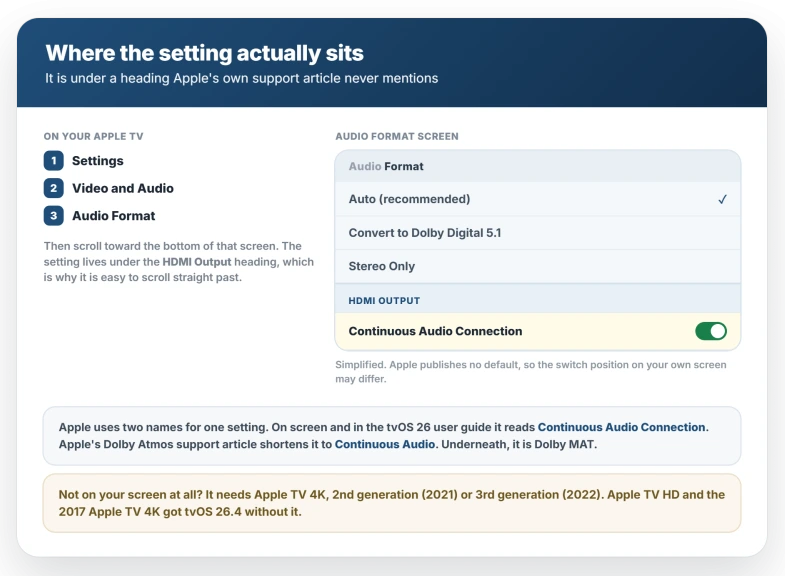
Go to Settings, then Video and Audio, then Audio Format. The setting sits near the bottom of that screen, under a heading marked HDMI Output.
That heading matters, because Apple's own Dolby Atmos article gives the path without ever mentioning it.
The names are inconsistent across Apple's own pages, which makes searching harder than it should be. On screen and in Apple's tvOS 26 user guide the option reads Continuous Audio Connection.
The Dolby Atmos article shortens it to Continuous Audio. Underneath, it is Dolby MAT.
The same applies to the other options on that screen.
The user guide lists them as Auto (recommended), Convert to Dolby Digital 5.1, Stereo Only and Dolby Atmos, while the Dolby Atmos article calls them Stereo, Dolby Digital 5.1 and Dolby Atmos.
Most setups are meant to stay on Auto.
One older instruction to disregard. Apple's Dolby Atmos article tells you to turn on Change Format first.
That wording dates back to the tvOS 15 user guide and the current tvOS 26 guide has dropped it, so do not assume it is what stands between you and the setting.
Turn it off to get your receiver's upmixing back
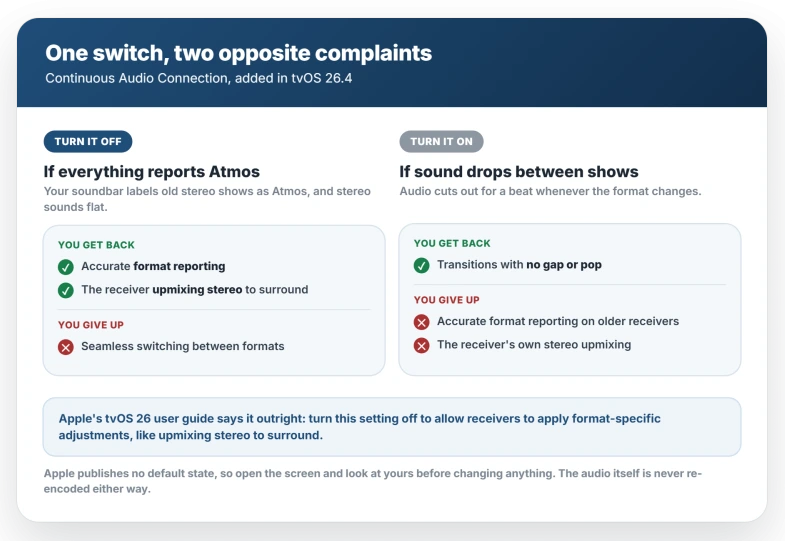
Apple is blunt about this in the tvOS 26 user guide, where the setting carries the instruction to "turn this setting off to allow receivers to apply format-specific adjustments, like upmixing stereo to surround."
That is Apple recommending the off position for exactly the complaint that brought you here.
The Dolby Atmos article says the same thing more carefully:
> "When Continuous Audio Connection is on, older receivers might indicate an Atmos signal, but the original audio plays as intended, which may also affect the ability of a receiver to distinguish a stereo signal for upmixing if the receiver supports that."
Two things follow. The audio itself is untouched, which Apple states twice across those pages, so an Atmos label on a stereo show is a reporting problem and not a quality one.
And if your receiver has an upmixing mode that spreads stereo across your speakers, it needs to see a stereo signal to apply it, which is the part that stops.
Do not use age as the test, despite Apple's wording.
The best-documented case is a Sonos Arc Ultra with Era 300s, hardware from 2023 and 2024, and one member of that discussion objected directly that an Arc Ultra is anything but old.
Why it reports Atmos is genuinely disputed
Apple never explains the cause, only that it can happen, and the two trade explanations contradict each other.
Pocket-lint argues the Dolby MAT bundle is automatically flagged as Atmos, so the receiver does not bother upmixing stereo even when it is capable.
FlatpanelsHD says the opposite: that Dolby MAT is uncompressed PCM carrying metadata, that stereo remains stereo, and that a receiver reporting Atmos on non-Atmos content is misconfigured by its manufacturer.
Both point to the same lever at your end, so the disagreement does not change what you do. It does change what you should expect from a receiver firmware update, since only one of those accounts predicts one would help.
If you have the opposite complaint
Some people came to this setting from the other direction, wanting the dropouts gone.
The audio link drops and re-establishes each time the format changes, and the gap you hear is that break.
Apple describes Continuous Audio Connection as giving "seamless transitions across audio formats without glitches or dropped signals," which is the same thing said from the fix's side.
Apple's tvOS 26.4 release note says the update "fixes an issue with audio playback on Apple TV 4K that can occur when sound transitions between programs with different formats, like Dolby Atmos and stereo." That note never names Continuous Audio Connection. It describes the symptom the setting is built to prevent, in the release that introduced the setting, which is why the two read as one story.
Apple has not said so in as many words.
If turning it on does not stop the dropouts, the fault is not this setting. Dropouts with HomePods attached are the same symptom on a path this switch does not reach, and owners reported those surviving tvOS 26.4.
If the speakers are missing from the list altogether rather than sounding wrong, that is a different failure again, and AirPlay devices not appearing on iOS 26 is the closer match.
There is no format readout on the Apple TV
Before you start switching things, one limitation. The Apple TV does not show you what format it is currently sending. The readout lives on the receiver or soundbar, usually its front panel or its app.
If your soundbar has no display and no app that reports the incoming format, you have no instrument, and the only signal available is whether stereo content sounds right to you.
Where you can read it, the fastest way to settle the question is to change one thing, then play something you know is stereo and something you know is Atmos, and compare what the receiver reports for each.
A middle option if you want both
Pocket-lint suggests a route that is not obvious from the settings screen: leave Continuous Audio Connection off, but set Audio Format to Stereo Only.
That sends uncompressed two-channel audio, which a receiver may be able to turn into simulated surround on its own.
It gives up genuine Atmos on material that has it, so it suits someone who mostly watches stereo content and values the upmixing.
Which Apple TV setups support Dolby Atmos
Apple lists four arrangements:
- One or two HomePod speakers
- A television that supports Dolby Atmos audio
- A Dolby Atmos compatible sound bar with a television that supports Dolby Atmos audio
- A Dolby Atmos-enabled AV receiver
The soundbar bullet has an extra condition, because in that arrangement the sound reaches the bar through the TV, so the TV has to support Atmos as well.
If you are connected by ARC rather than eARC, you may only get the compressed version.
Apple also states plainly that HomePod mini does not support Dolby Atmos, so a HomePod mini pair will never report it whatever this switch is doing.
What does not help
- Reinstalling apps or resetting the Apple TV. The behavior follows a system audio setting, so a reset returns you to whatever that setting was.
- Assuming a receiver firmware update will arrive. It might. FlatpanelsHD argues a receiver reporting Atmos on non-Atmos content is misconfigured by its maker, and Sonos owners spent March expecting a Sonos-side fix. None had landed by the time that discussion closed, so the Apple TV switch is the lever you control today.
- Changing this when your sound goes to a HomePod. It sits under HDMI Output and does not reach a HomePod or AirPlay path.
- Waiting for a later update. As of 29 July 2026, two days after tvOS 26.6 shipped, Apple has not added a 26.6 entry to its tvOS update page at all, and the developer release notes for 26.6 list only a HealthKit and a StoreKit fix.
- Turning Dolby Atmos off instead. This one does work, and a Sonos owner confirmed it restores accurate reporting. It also gives up Atmos on material that genuinely has it, so Continuous Audio Connection is the narrower control.
Status: Continuous Audio Connection arrived with tvOS 26.4 and is documented through 26.6. Apple publishes no default, and its tvOS 26 guide says to turn it off to restore upmixing.
Where is Continuous Audio Connection on Apple TV?
Settings, then Video and Audio, then Audio Format, near the bottom under a heading marked HDMI Output.
It needs Apple TV 4K 2nd or 3rd generation, so it will not appear on Apple TV HD or the 2017 model. Apple's Dolby Atmos article shortens the name to Continuous Audio, which is the same setting.
Is Continuous Audio Connection on by default?
Apple publishes no default on any of its pages.
Hands-on reports point one way: a beta tester found it already switched on when he installed the tvOS 26.4 beta, and a walkthrough published three days after the public release says it is on by default.
Other coverage describes it as optional, so treat it as unsettled and go look at yours.
Does Continuous Audio Connection change how my audio sounds?
Indirectly yes, though not by altering the audio. Apple says the original plays as intended, so nothing is re-encoded.
What changes is what your receiver is told, and if it relies on detecting a stereo signal to apply its own upmixing it can no longer do that, so stereo material can sound flatter.
The Short Version
- One setting sits behind two opposite complaints. Off gives accurate format reporting and lets a receiver upmix stereo. On gives seamless transitions between formats.
- It needs Apple TV 4K 2nd or 3rd generation. On older hardware it does not appear at all.
- Find it at Settings > Video and Audio > Audio Format, near the bottom, under HDMI Output.
- The names differ across Apple's pages. On screen it is Continuous Audio Connection; Apple's Dolby Atmos article calls it Continuous Audio. It is Dolby MAT underneath.
- Apple's tvOS 26 user guide says to turn it off to let receivers upmix stereo to surround.
- The audio is not re-encoded, so this is a reporting and upmixing issue.
- Ignore age as a test. The best-documented case is a 2024 Sonos Arc Ultra.
- The Apple TV shows no format readout, so the receiver's own display is the only instrument.
Where to Next
One setting, two opposite complaints, and which way you want it depends entirely on what you use the Apple TV for.
Off gives you honest format reporting and lets a stereo mix sound like a stereo mix. On is worth keeping if your setup genuinely benefits.
Try it off for a week and see whether the sound settles. If it does not, tell me what soundbar or receiver you are running it into, because that end matters too.

Isaac Smith is the founder and editor of PC Glance, a website that covers computers, laptops, and technology. He is a tech enthusiast and a computer geek who loves to share his insights and help his readers make smart choices when buying tech gadgets or laptops. He is always curious and updated about the latest tech trends.