
You open Safari, go to the tabs screen, and the tabs you had yesterday are not there. Before you decide they are gone for good, do one thing for me.
Look at the Tab Group name in the middle at the bottom of that screen.
More often than not your tabs are sitting perfectly safely in another group, and I will show you how to get back to them.
Which set of tabs are you looking at?
Getting to the tabs screen depends on your layout. Apple's route is to tap the More button, then tap All Tabs. If your Tabs layout is set to Bottom or Top instead, tap the tabs button.
Every route on this page starts there, and the layout choice is at Settings > Apps > Safari.
The Tab Group selector sits in the bottom center of that screen. Apple's tip is that tapping it moves you between your Tab Groups, and each group shows only its own tabs.
The profile, if you have ever made one.
Apple states it outright on its Safari profiles page: "Each profile has separate favorites, histories, tabs, and Tab Groups." Switch profile and every tab you had is replaced by that profile's own set.
Switching back restores them.
Switching is safe.
Deleting is not, and Apple's warning on that page is blunt: deleting a profile "also erases the favorites, history, and Tab Groups associated with the profile, and closes all websites open in the profile", and "This action can't be undone."
Apple adds a detail that catches anyone with more than one device: profiles made on an iPhone "also appear in Safari settings on any iPhone, iPad, or Mac where you're signed in to the same Apple Account".
So a profile created on a Mac turns up on the phone, and can end up being the one you are looking at.
Private Browsing, which locks rather than closing.
From Apple's private browsing page: "If you have a passcode set on your iPhone, Private Browsing locks when it's not in use." When you leave it, "The websites you have open in Private Browsing stay open, and Private Browsing locks."
Swipe right on the tab bar until Private Browsing opens, then tap Unlock. Apple notes it "may not lock immediately", so a set of private tabs still on screen is not proof it will stay that way.
Two other things about private tabs settle a lot of confusion.
Apple says they do not appear in History or in the list of tabs on your other devices, and that they "aren't shared with your other Apple devices, even if you're signed in to the same Apple Account".
A private tab opened on your iPhone was never going to reach your iPad.
Getting recently closed tabs back
It has been ten minutes, and you know exactly which tab you want.
Open the tabs screen, then tap All Tabs. Touch and hold the New Tab button at the bottom left, and Apple's instruction is to "choose from the list of recently closed tabs".
Apple publishes no limit for that list and no expiry, so treat it as the first thing to try rather than something to come back to tomorrow.
If what you want is on it, reopen everything now, then read the next section so it stops happening.
The setting that closes tabs for you
One section of this page stands on different ground from the rest. Apple never documents this setting. Its Safari pages do have a "Close tabs" heading, but that only covers closing tabs by hand.
The options Manually, After One Day, After One Week and After One Month appear on no Apple page: not the Safari tabs guide, not the Safari settings page, not Tab Groups, and not the iPad or Mac equivalents.
The switch is real and it is on your phone, but everything here comes from third parties, and the sources block names them.
Open Settings, tap Apps, tap Safari, then tap Close Tabs.
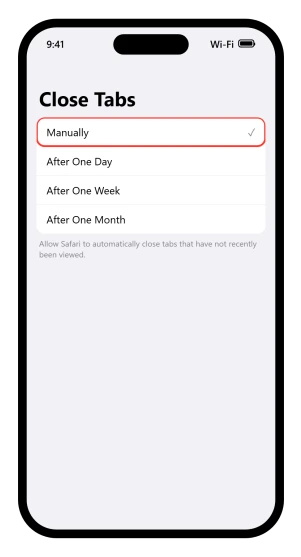
If it already says Manually, this is not your cause and you can move on. The one source that states a default says Manually is it, so plenty of phones are set that way, and it costs ten seconds to rule out.
On any of the other three, Safari closes tabs you have not looked at inside that window.
Not tabs you opened recently, tabs you last viewed inside it, which is why the ones that go are the ones you were keeping for later.
Set it to Manually and Safari stops closing anything by itself. It does not bring back what has already gone.
There is a catch for anyone using profiles, because two causes on this page meet here. Tabs in a profile you are not currently using are still on that clock.
Spend a fortnight in your work profile with Close Tabs set to a week, and the personal ones will have been closed while you were elsewhere.
Two of our own pages tell you to do the opposite, and they are not wrong.
Our guide to Safari reloading tabs tells readers to set Close Tabs to After One Week, because a wall of open tabs is a standing memory cost and fewer tabs means the one you care about survives.
That is the right trade if your problem is a tab that reloads and eats what you typed. It is the wrong one if your problem is tabs going missing.
Pick the symptom that is actually costing you something.
The other three ways tabs really go
Deleting a profile is one, and that section has it. Here are the other two.
Close All Tabs. Apple's own tip is a warning as much as a feature: touch and hold Done on the tabs screen and Safari offers to close every tab in that Tab Group at once, with the number printed on the button, as Close All 12 Tabs or whatever you have open.
It takes two deliberate steps, so it is rarely a slip, but somebody who tapped it a fortnight ago will not remember doing it.
Somebody else, in a shared Tab Group. Apple, on its shared Tab Groups page: "Collaborators can add and remove tabs from the Tab Group, and everyone sees updates in real time." If the group that emptied is one you share, no action on your phone caused it.
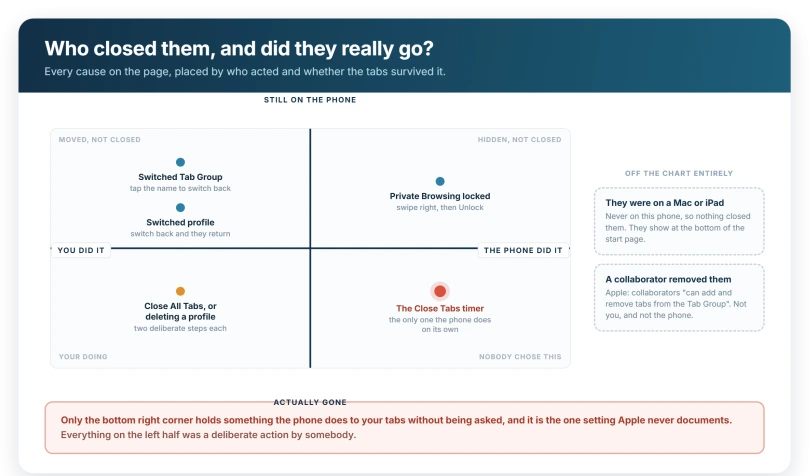
Those three, plus the Close Tabs setting, are the only things here that end with tabs actually gone. Everything else has just moved them.
Where were you when you last saw them?
If the missing tabs were open on a Mac or an iPad, they were open on that device rather than this one.
Apple's route: open All Tabs, tap the New Tab button, then scroll to the bottom of the start page to see tabs open on your other devices.
It needs iCloud Tabs turned on for your start page, and Safari switched on at Settings > your name > iCloud > See All.
The same screen closes a remote tab if you touch and hold the link and choose Close, which explains how a tab can be closed from a device you were not holding.
When nothing on this page fits
No profiles, no Tab Groups, Private Browsing empty, Close Tabs already on Manually, and nothing in the recently closed list.
Browsing history is the usual fallback. It keeps the addresses even though it does not restore the tabs, and that is usually enough to rebuild the handful that mattered.
Using Chrome on a computer as well? It keeps the last session in two small files, and copying them before the next start can bring a crashed session back.
There is one heavier route. A device backup made before the tabs vanished contains Safari data, so restoring from it brings the tabs back with everything else from that date.
It also throws away everything since, which is why it is a last resort rather than a fix.
On a Mac, if you would rather Safari used windows than tabs at all, the Safari windows page shows the settings that get closest.
What to change today so this stops
Set Close Tabs to Manually if losing tabs bothers you more than a slow Safari does.
Then stop using tabs as storage. A bookmark outlives every cause on this page, because it is not a tab, and Apple notes that saved bookmarks are reachable "from any profile".
If bookmarks are your real problem they fail in their own way, and our guide to Safari bookmarks not syncing opens on the pattern, that tabs often keep syncing while bookmarks do not, which makes it feel random.
What does not help
- Force quitting Safari and reopening it. Tabs in another group or profile were never closed, so a restart reveals nothing. If the real complaint is a tab coming back blank rather than missing, our guide to Safari reloading tabs starts somewhere else entirely, with a hidden Developer setting called Fast App Termination.
- Signing out of iCloud and back in. iCloud does keep Tab Groups in step across your devices, so it can explain a group changing, but it holds no backup of this phone's tabs to restore from.
- Clearing history and website data. Apple says it removes the history of websites you visited, which is the very thing you might have used to find the pages again.
Status: current for iOS 26.6. Apple documents Tab Groups, profiles, Private Browsing and recently closed tabs. It documents the Close Tabs timer on no page we could find.
Why did all my Safari tabs disappear on iPhone?
Usually they did not. Safari keeps separate tabs for each profile and each Tab Group, and Private Browsing locks rather than closing. Four things really do close them: the Close Tabs timer, Close All Tabs, deleting a Safari profile, and a collaborator removing tabs from a shared Tab Group.
How do I stop Safari closing my tabs automatically?
Open Settings, tap Apps, tap Safari, then tap Close Tabs and choose Manually. Safari then leaves tabs alone until you close them yourself. This does not restore tabs already closed, so check the recently closed list first, then change the setting.
How do I get closed Safari tabs back on iPhone?
Open the tabs screen, tap All Tabs, then touch and hold the New Tab button at the bottom left and choose from the list of recently closed tabs. Apple publishes no size or lifetime for that list, so try it before anything else rather than tomorrow.
Where are my Private Browsing tabs?
Still open and locked, if your iPhone has a passcode. Apple says Private Browsing locks when it is not in use and the websites stay open. Open All Tabs, swipe right on the tab bar until Private Browsing appears, then tap Unlock. Apple adds that it may not lock immediately.
The Short Version
- Check the Tab Group name in the bottom center of the tabs screen before anything else.
- Each profile has its own tabs, along with its own history and favorites.
- Deleting a profile closes its tabs for good, and Apple says that cannot be undone.
- Private Browsing locks rather than closing. Swipe right on the tab bar and unlock.
- Recently closed tabs are behind a touch and hold on the New Tab button, and Apple publishes no lifetime for that list.
- Close Tabs at Settings > Apps > Safari shuts tabs you have not viewed for a day, a week or a month. Set it to Manually.
- No Apple page we could find describes that timer. Everything here about it comes from third parties.
- Close All Tabs hides behind a long press on Done, not on the close button.
Where to Next
Look at the Tab Group name before you mourn anything. Your tabs are usually sitting safely in a group you did not mean to leave.
After that, check whether Safari is closing them for you on a timer, because that setting is easy to set once and forget.
If they are genuinely gone from every group, tell me in the comments how long they had been open, because that points straight at one cause.

Isaac Smith is the founder and editor of PC Glance, a website that covers computers, laptops, and technology. He is a tech enthusiast and a computer geek who loves to share his insights and help his readers make smart choices when buying tech gadgets or laptops. He is always curious and updated about the latest tech trends.