
Your iPhone will not get past setup, and if this is a phone you have just bought or been handed, I know what you are worrying about.
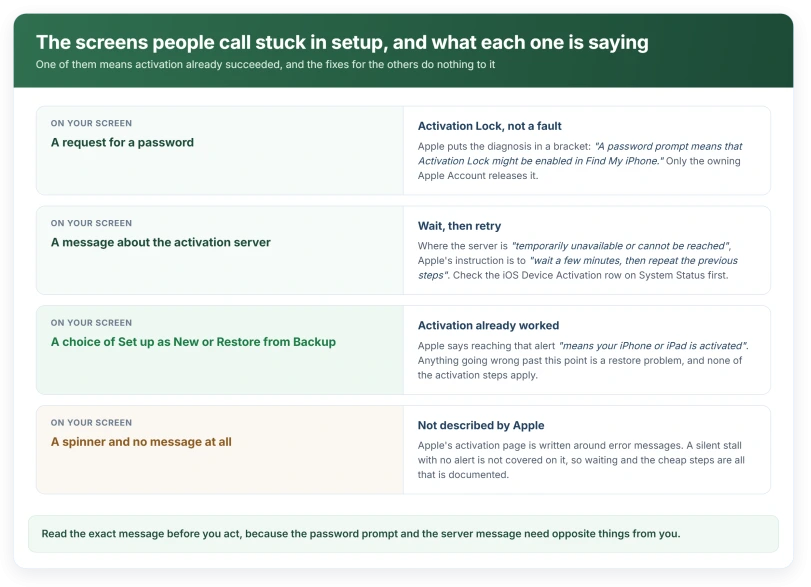
There are two situations here and they want opposite things from you. If it asked you for a password, the phone is locked to somebody's Apple Account and no amount of restarting will shift it.
If it never asked, you are waiting on a server, and there are three quick things worth trying.
Before anything else, check that you are actually stuck
Plenty of people arrive here having already finished.
Apple, on not being able to activate an iPhone: when an alert appears offering Set up as New or Restore from Backup, "it means your iPhone or iPad is activated."
So if either of those is on your screen, activation already worked. What you have now is a restore problem, or a transfer problem. Nothing on this page applies.
The same goes for a spinner that has been turning for two minutes. Give it longer. Every step below costs you more than waiting does.
If it asked for a password, that is the answer
This is the branch that decides everything, and Apple states it more quietly than anything else on the page.
Apple: "If asked to enter your password as you activate your iPhone or iPad, enter the password. (A password prompt means that Activation Lock might be enabled in Find My iPhone.)"
The instruction is in the sentence. The diagnosis is in the bracket after it.
A phone asking for a password is not malfunctioning. The entire point of the feature is to refuse setup to anybody who cannot prove they own the device.
So the usual fixes do nothing here. Restarting, swapping networks, none of it. If the previous owner's account is still on the phone, only that account can release it.
Our page on what Activation Lock keys off covers the switch that turns it on, which is better to know before you sell a phone than after.
Any service offering to strip Activation Lock for a fee is a scam. Giving one your credentials leaves you worse off than the screen you started on.
Check whether it is Apple that is down
Before you touch the phone again, spend thirty seconds on another device.
Apple: "Check the list on the System Status page. If the box by iOS Device Activation isn't green, try to activate your iPhone or iPad later."
iOS Device Activation has its own entry, separate from the iCloud and Apple Account rows people actually check. It can be amber while the rest of the page is green.
It is the only check on this page that can tell you the fault is not yours at all. Do it before you restart anything.
The three steps, in the order that matters
There are only three, and the order is doing real work.
- "Restart your iPhone or iPad."
- "If you're using a cellular-data connection, connect to a reliable Wi-Fi network instead."
- "If you get an error message on your iPhone or iPad that says the activation server is temporarily unavailable or cannot be reached when trying to activate, wait a few minutes, then repeat the previous steps."
Read the middle one again. Apple wants you off cellular, not onto it. A phone that has never been activated has no confirmed carrier connection yet, so cellular is the weaker of the two routes at exactly this moment.
And the third one says wait, then repeat. Not repeat immediately. A server that is temporarily unavailable is not talked round by a fourth attempt in ninety seconds.
If your Wi-Fi will not hold long enough to get through this, our page on Wi-Fi dropping after an update covers the two toggles that cause most of it.
Moving to a computer is the next step, not the first
Apple's route: make sure you have "the latest version of macOS or the latest version of iTunes", check the computer has an internet connection, connect the phone with its cable, then "Wait while your computer detects and activates your iPhone or iPad".
The computer is not doing anything clever. It gives the phone a second route to the same servers. That helps when the phone's own connection is the thing failing.
The two computer errors mean completely different things
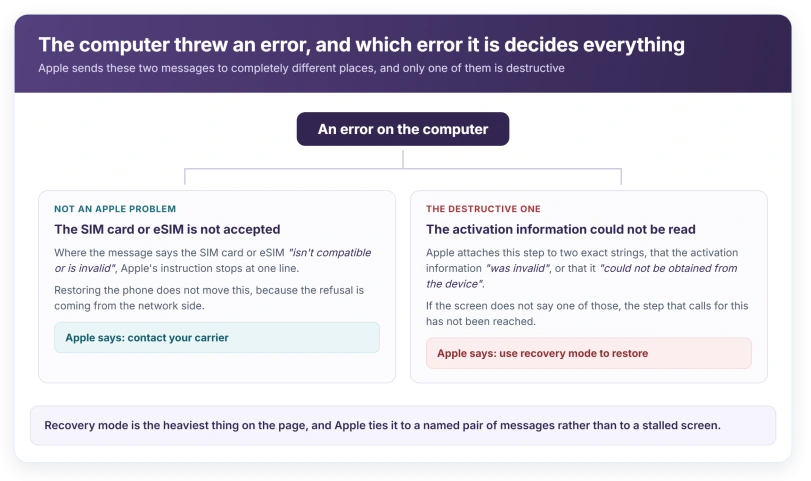
If the computer throws a message, which message it is decides everything that follows.
The first one. Apple: "If you get an error message on your computer that says that the SIM card or eSIM isn't compatible or is invalid, contact your carrier."
That is a carrier problem and no amount of restoring will move it. Apple sends you to the carrier and stops there.
If your SIM is making its own separate demands, our page on what a PUK request actually means covers the case where the SIM is locked rather than the phone.
The second one is where the computer reports that the activation information was invalid, or that it could not be obtained from the device. Apple's instruction there is to "use recovery mode to restore your iPhone or iPad."
Be careful with that one. A recovery mode restore is the most destructive thing on this page, and it is the only step Apple ties to a specific pair of error strings.
If your screen does not say one of those two things, you have not reached the step that calls for it.
Status: iOS 26.6, checked 16 August 2026. Apple's activation page was last published in March 2025 and has not been revised for iOS 26.
If it just sits there with no message at all
No password prompt, no error, no server message. Just a screen that never moves on.
This is the hardest version to advise on, and it is worth saying so plainly: Apple does not publish a step list for it. Everything above is written around a message of some kind, and you have not got one.
What still applies is the cheap end. Restart it. Move it onto a stable Wi-Fi network rather than cellular. Leave it alone for longer than feels reasonable, because a setup step that looks frozen is often just slow.
Past those, do not escalate on your own. A restore wipes the phone, and nothing here has told you the phone is the problem yet.
Why does my new iPhone ask for a password during setup?
Because Activation Lock is probably switched on for an Apple Account already tied to the phone. Apple states this in a bracket on its activation page. It is a theft protection working as designed rather than a fault, and it is released only by the account that set it, not by a restore.
Is a stuck setup screen a hardware problem?
Nothing on Apple's activation page points at hardware. Every cause it names is an account, a server or a carrier: Activation Lock, the iOS Device Activation service, an unreliable connection, or a SIM or eSIM the carrier will not accept. Hardware is not among them.
How long should I wait before restarting?
Apple gives no number. Where it does address the server message, its instruction is to "wait a few minutes, then repeat the previous steps", so a few minutes is the only interval Apple attaches to any of this, and it applies to retrying rather than to the first wait.
Should I use recovery mode?
Only if the computer names one of two exact errors, that the "activation information was invalid" or that it "could not be obtained from the device". Those are the only strings Apple attaches to recovery mode on this topic. Anything else means an earlier step has not been finished yet.
The Short Version
- If the screen offers Set up as New or Restore from Backup, activation already worked.
- A password request during setup means Activation Lock is probably on, and only the owning account clears it.
- Apple names one service to check by name: iOS Device Activation on the System Status page.
- Apple's order is restart, move from cellular to Wi-Fi, then wait a few minutes before retrying.
- A computer is the second route to the same servers, not a stronger one.
- A SIM or eSIM error sends you to your carrier, and Apple stops there.
- Recovery mode is tied to two exact error strings and nothing else.
Where to Next
Look at what the screen is asking for before you do anything drastic. A password prompt and a silent wait are two different problems, and only one of them is yours to solve.
If it is asking for a password that is not yours, no restore, no cable and no reset will move it, and anyone promising otherwise is selling something.
And if setup finished but your apps did not come across, seven things explain the gap.
If it is sitting silent, give it the quick checks and then time. Come back and tell me which of the two you had, because the split is the part people get wrong.

Isaac Smith is the founder and editor of PC Glance, a website that covers computers, laptops, and technology. He is a tech enthusiast and a computer geek who loves to share his insights and help his readers make smart choices when buying tech gadgets or laptops. He is always curious and updated about the latest tech trends.