

Your new iPhone 18 Pro has a cloudy patch on the camera plateau, and it seems to come back after you wipe it. That is worrying when the phone is only days old. I would clean it properly once before you think about a return.
A black 18 Pro owner raised it on MacRumors on 29 September, after a newspaper story about the same thing. Their thread drew about 300 views in under two days.
What owners describe
The opening poster was careful, since they "Used a case from day one, haven't touched the plateau yet", and still saw it.
Cleaning only helped for a while, because it was "very difficult to clean, and when you do clean/remove it then it returns a short time later".
Another owner wrote: "Same on my device. Showed up day 1." A member planning to buy added that "the models in the stores have them too".
Not every phone shows it, and one owner wrote: "My black 18 Pro has no discoloration whatsoever". Another, with a light finish, wrote: "No discoloration noticed on my Glacier color".
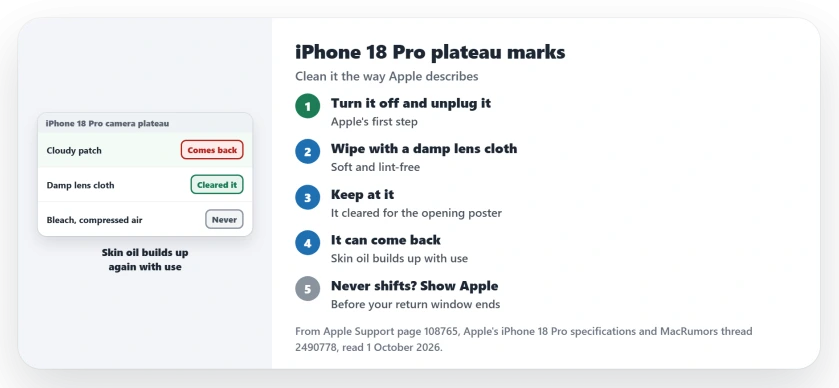
Status: checked 1 October 2026. Persistent cleaning with a lens cloth kept the opening poster's plateau clear for a day. Apple's cleaning page gives the method but does not mention these marks.
1. Clean it the way Apple describes
Apple's cleaning page has you turn the phone off and unplug every cable first.
Then use a cloth, not a cleaner. Apple says to "clean with a soft, slightly damp, lint-free cloth", and names "a lens cloth or other microfiber cloth" as examples.
Mind the lenses and openings on the plateau, since Apple's rule is to "Avoid getting moisture in openings".
2. Keep at it
One quick wipe may not shift your marks, and the opening poster had to push before it worked.
Their update a day later: "After some very persistent cleaning with a lens cloth mine has remained discoloration-free for the last day". So keep wiping. Then check it under a bright light.
3. Expect it to come back with use
One member read the photos as skin oil. In their view, it "appears to be finger oils that have accumulated on the aluminum".
They added what that means day to day: "It should come off with a cleaning, but oils will eventually build up again with use". The darker finishes show it most, in their experience.
Apple has said something similar about older models. On the 15 Pro and 16 Pro, Apple says "the oil from your skin might temporarily alter the color of the outside band".
Its cure for those was the same cloth: "Wiping your iPhone with a soft, slightly damp, lint-free cloth will restore the original look". Apple does not name the 18 Pro in that line, so take it as a pointer, not a ruling.
The same member drew a line under last year, too. In their words, the marks are "not the same thing that happened last year with a handful of orange phones permanently turning pink".
4. Know what Apple allows beyond water
If a damp cloth leaves a film, Apple allows a little more. You "may gently wipe the exterior surfaces of your iPhone" with a 70 percent isopropyl alcohol wipe, a 75 percent ethyl alcohol wipe or Clorox Disinfecting Wipes.
Apple also rules out bleach, hydrogen peroxide and compressed air.
Skip anything rough as well. Apple warns that "abrasive materials will diminish the coating and might scratch your iPhone".
5. If it never comes off, show Apple
If the patch survives careful cleaning, it is no longer a smudge question. Take the phone to Apple and show them before your return window closes.
The phone is new, so time matters. The iPhone 18 Pro crackling page sets out Apple's 14-day window and the choice between a return and an exchange. And if Face ID will not set up on yours, see the Face ID page.
What causes the cloudy patch on an iPhone 18 Pro plateau?
Owners report a cloudy patch on new black 18 Pro phones. One member put it down to skin oil on the aluminum, and careful cleaning cleared it for the opening poster.
How do I clean the iPhone 18 Pro camera plateau?
Turn the phone off and unplug it, then wipe it with a soft, slightly damp, lint-free cloth such as a lens cloth, keeping moisture out of the openings.
Is the iPhone 18 Pro changing color?
There is no sign of that in the thread. The opening poster cleaned it off, and a member compared it with the oil marks dark finishes collect every year.
The Short Version
- Some new 18 Pro plateaus look cloudy.
- Turn the phone off and unplug it.
- Wipe with a slightly damp lens cloth.
- Be persistent, then check under bright light.
- Skin oil builds up again with use.
- No bleach, no compressed air, nothing abrasive.
- If it never shifts, show Apple in time.
Where to Next
Turn your phone off now and give the plateau one slow, careful clean. Then look at it again tomorrow, after a normal day of use.
If yours will not come clean at all, tell me your finish and what you tried in a comment. I will add each result to this page.

Isaac Smith is the founder and editor of PC Glance, a website that covers computers, laptops, and technology. He is a tech enthusiast and a computer geek who loves to share his insights and help his readers make smart choices when buying tech gadgets or laptops. He is always curious and updated about the latest tech trends.