
Click to Do will not start, and Windows insists it needs a few more updates, even though Windows Update says you are current. Retry just flashes another box. I would check your Windows version before you try a single repair command.
Over 10 owners flagged it as their problem too on Microsoft Q&A after it went up on 4 September. For a month nothing on the thread worked. Then, on 1 October, one owner installed Windows 11 26H2 and Click to Do came back.
What the message says
Settings shows the full text: "Couldn't update Click to Do. Click to Do needs a few more updates before it's ready to use." The asker left their laptop on for hours and restarted, with no change.
Retry only flashes a second box asking you to stay connected to the internet and check back soon. On the asker's Galaxy Book 5 Pro, a Copilot+ PC, it never cleared.
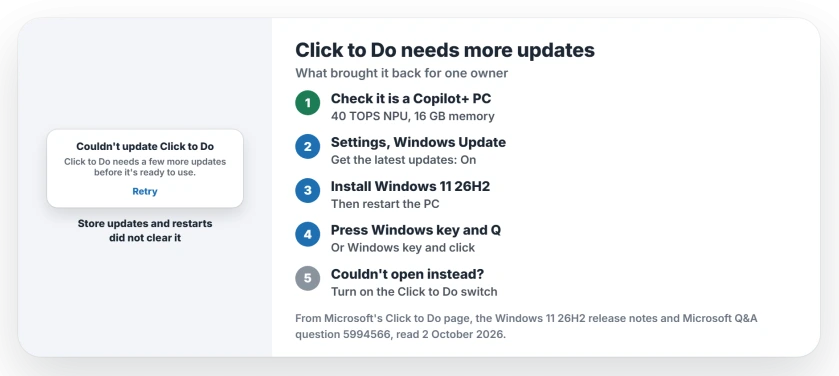
Status: checked 2 October 2026. One owner's Click to Do began working after they installed Windows 11 26H2. Store updates, restarts and repair commands did nothing for others.
1. Confirm it is a Copilot+ PC
Click to Do only runs on a Copilot+ PC. Microsoft's Click to Do page lists a 40 TOPS NPU, 16 GB of memory, 8 logical processors and 256 GB of storage.
If your PC qualifies, the chip and memory are not to blame. The message points at missing parts of Windows.
2. Turn on the early updates switch
Microsoft is rolling 26H2 out gradually. Its release notes say the first PCs to get it are the ones with the early updates switch on.
That switch starts with the words Get the latest updates, in Settings, Windows Update. The 26H2 page shows where to find it and what to expect.
3. Install 26H2, then try again
This step is the one that worked. The owner had tried "pretty much all of the obscure commands etc with no success", installed 26H2 one evening, and wrote the next morning: "Clicktodo now works."
Then test it. After the restart, press Windows key and Q, or hold the Windows key and click. Microsoft lists both, plus a right swipe on a touch screen.
4. Check the Click to Do switch
Click to Do has its own switch in Settings, Privacy and security, Click to Do. Microsoft says it cannot be removed, but you can disable or enable it there.
With the switch off, Microsoft says the shortcuts do nothing, and Snipping Tool shows Couldn't open Click to Do instead. So Couldn't open means the switch, while Couldn't update means missing updates. Check which one you have.
5. The Recall theory, still unproven
Two owners suspect Recall. One wrote that "click to do uses the recall engine", and the owner it was fixed for had disabled Recall soon after it first installed.
Microsoft documents them as separate features. Recall is optional and can be removed, while Click to Do cannot. Ours: none of the owners tested turning Recall back on, so we would leave Recall as it is for now.
What did not help
Owners ran Get updates in the Microsoft Store, installed every Windows update including optional ones, and restarted. A moderator then suggested Repair or Reset from Installed apps. None of it helped.
That second step goes nowhere. One owner found its Settings entry at 0 bytes with Repair and Reset unavailable, and another wrote: "Click to Do does not appear in that list."
If you want to know what Recall records before deciding anything, the Recall page covers its snapshots and its off switch.
Why does Click to Do say it needs a few more updates?
Windows has not finished installing the parts Click to Do needs, and normal updates did not complete them for owners. One owner's install of Windows 11 26H2 did.
Does Windows 11 26H2 fix Click to Do?
It did for one owner on 1 October 2026, after a month of failed fixes. Microsoft offers it first to PCs with the early updates switch turned on.
Can I repair or reset Click to Do?
Not in the usual way. Windows treats it as a built-in piece, not an app, so owners found no working Repair or Reset buttons.
The Short Version
- The message means Click to Do is missing parts.
- It needs a Copilot+ PC to run at all.
- Store updates and restarts did not fix it.
- Repair and Reset were unavailable.
- Installing Windows 11 26H2 fixed it for one owner.
- Turn on the early updates switch to get 26H2.
- Couldn't open is a different message: the switch is off.
Where to Next
Open Settings, Windows Update, and switch on the option that starts Get the latest updates. Check for updates. Once 26H2 installs, restart and press Windows key and Q.
Did 26H2 not bring Click to Do back for you? Tell me your PC model under the article, and I will track every result here.

Isaac Smith is the founder and editor of PC Glance, a website that covers computers, laptops, and technology. He is a tech enthusiast and a computer geek who loves to share his insights and help his readers make smart choices when buying tech gadgets or laptops. He is always curious and updated about the latest tech trends.