
You scroll your Outlook calendar into 2027 and the holidays thin out or stop. Easter and Labor Day are gone, and re-adding them changes nothing. I would add a holiday calendar from another source before you rebuild anything.
Microsoft has confirmed the gap in the United States, the United Kingdom and many other countries. Three questions about it on Microsoft's Q&A board each have more than 10 people marking the same problem.
What Microsoft says is missing
Microsoft's known issue page is direct: "Some customers may notice that Outlook public holiday calendars do not contain all expected holiday entries for the latter half of 2026 and/or for 2027."
It hits Outlook on the web, the new Outlook and classic Outlook alike. One symptom it lists: "Holiday calendars contain holidays through 2026 but do not include holidays for 2027."
Microsoft's status is plain too: "Microsoft is aware of the issue and is actively investigating reports from multiple regions."
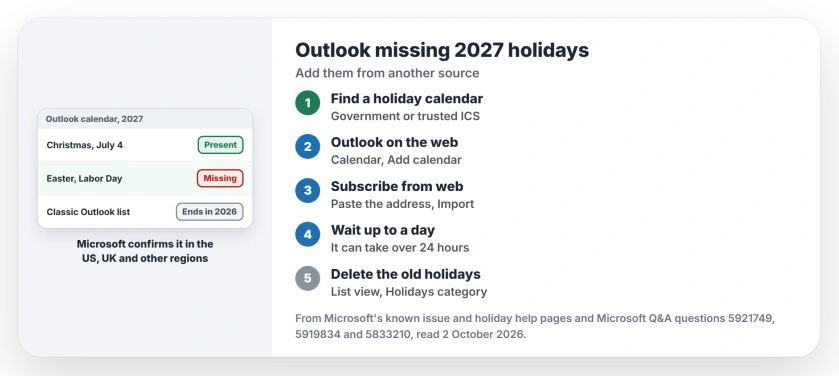
Status: checked 2 October 2026. Microsoft is investigating missing 2027 holidays in every Outlook. A subscribed holiday calendar from another source fixed it for one owner.
1. Know which holidays vanish
Fixed-date holidays mostly survive, as one owner found on Outlook.com. In their words, "labor day (first Monday in September) is missing, but July 4 (July 4) is present".
A business IT owner saw the same pattern for Easter: "all movable holidays based on Easter are missing". Some calendars stop earlier still. One owner's Jewish holidays ran only "up to a given date in December 2026".
2. Classic Outlook stops at 2026 anyway
There is a second, older limit. Microsoft's holiday help page says: "The holiday information provided in Outlook for Microsoft 365, Outlook 2019, and Outlook 2016 includes Gregorian calendar years 2016-2026."
So the Add Holidays button in classic Outlook cannot give you 2027 at all. Re-adding it only makes duplicates.
3. Subscribe to a holiday calendar elsewhere
Microsoft's own workaround is to "consider using an alternative source for holiday data", such as a government calendar or a third-party ICS subscription.
In Outlook on the web, open Calendar, select Add calendar, then Subscribe from web, paste the calendar's address and select Import. Microsoft notes: "This can sometimes take more than 24 hours."
This is what worked for the owner with the Jewish calendar. After adding an online calendar they wrote: "I can't believe how easy it was and I have been at this for weeks now."
4. Delete the old imported holidays
Once the new calendar shows up, remove the stale copies so you do not see each holiday twice. In classic Outlook, choose View, Change View, List, arrange by Categories, select the Holidays entries and delete them.
Microsoft's support cases point the same way. Its page says "manual deletion and re-import of calendar data can work for individual users but may not be practical for larger organizations."
5. Add the few you need by hand
If you only miss a day or two, create them as all-day events yourself. Ours: it takes a minute per holiday and nothing can sync it away.
Check them again in December, though. Microsoft says it is still working on its own data, and its holidays may return on top of yours.
If events refuse to go when you delete them, the recurring event page explains why they come back. And if your iPhone shows a different set of events from Outlook, the iPhone calendar page helps you count them.
Why are holidays missing from my Outlook calendar in 2027?
It is a confirmed Microsoft fault: its holiday calendars miss entries for late 2026 and 2027 in many countries. Classic Outlook's built-in holiday list also ends in 2026.
How do I add 2027 holidays to Outlook?
Subscribe to a holiday calendar from another source, in Outlook on the web under Add calendar, Subscribe from web. You can also add the few you need as all-day events.
Will re-adding holidays in Outlook fix it?
No. Owners removed and re-added them with no change, and classic Outlook's list stops at 2026. Re-adding mainly creates duplicates.
The Short Version
- Outlook's holiday calendars miss many 2027 dates.
- Easter-based and weekday holidays go first.
- Microsoft confirms the fault and is investigating.
- Classic Outlook's own list ends in 2026.
- Subscribe to a holiday calendar from elsewhere.
- Delete the old imported holidays afterwards.
- Add one or two by hand if that is all you need.
Where to Next
Find your government's or a trusted provider's holiday calendar address now. Subscribe to it in Outlook on the web, then check Easter 2027 a day later.
If Microsoft's own holidays return for your country, I want to hear it. I will note the date they came back.

Isaac Smith is the founder and editor of PC Glance, a website that covers computers, laptops, and technology. He is a tech enthusiast and a computer geek who loves to share his insights and help his readers make smart choices when buying tech gadgets or laptops. He is always curious and updated about the latest tech trends.