
You open Edge to send a file to your phone with Drop, and the Drop button has gone. That is frustrating when it was your quick bridge between devices. I would look in OneDrive first, because your files went there.
Microsoft retired Drop in Edge 152 at the end of August. Eight people have flagged a Microsoft Q&A question about it as their own, and the answer is the same for all of them.
When Drop went
Microsoft says it plainly in its release notes for Edge 152.0.4191.53, dated 27 August 2026: "We're simplifying Microsoft Edge. Drop is retired in Microsoft Edge version 152".
Before that, Edge showed a notice in the Drop pane. In its words: "Drop is being retired. Files you shared are saved in your OneDrive". The same notice added that text notes needed to be downloaded separately.
The asker on Microsoft's board found the button missing on that exact build, in their words: "Microsoft Edge drop feature is missing", on Edge version 152.0.4191.53.
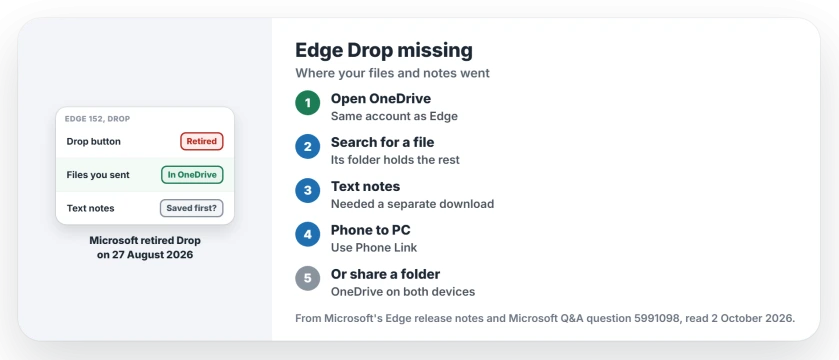
Status: checked 2 October 2026. Microsoft retired Drop in Edge 152 on 27 August. Files you sent are in your OneDrive; text notes had to be downloaded before the change.
1. Find your files in OneDrive
Drop never kept files in Edge itself, and Microsoft's notice says files you shared "are saved in your OneDrive", so they did not disappear with the button.
Ours: sign in at onedrive.com with the same Microsoft account you used in Edge. Search for a file you remember sending by its name, and the folder it sits in will show you the rest of what you sent.
2. Check whether you saved your text notes
Text notes were different. Edge offered a separate download for them while the Drop pane still worked.
An automatic answer on the Q&A question puts it bluntly: "For older text notes, they needed to be downloaded separately before retirement". If you skipped that download, the notes may be gone.
Ours: if another PC of yours still runs an older Edge and has not updated, open Drop there before it does. We have not tested this ourselves, so it may not work on your PC.
3. Use Phone Link to reach your phone
For sending files between a PC and a phone, Your Windows Guide points to Microsoft's Phone Link app as the closest replacement, since it can pass files and photos both ways.
If Phone Link will not pair, the Phone Link page covers the usual reasons.
4. Or share one OneDrive folder
Ours: a OneDrive folder that you open on both devices does what Drop did for files. Save a file into it on your PC, and it appears in the OneDrive app on your phone.
It takes a minute to set up. After that, you never need Edge to move a file between your devices.
5. Check the rest of Edge's clear-out
Drop is not the only thing Edge dropped this year. Collections went too, and Edge 152's notes also announced that real-time video translation is being retired.
Microsoft's Edge release notes list each change by version, so you can see what your copy has lost.
What did not help
Searching Edge's settings for Drop will not bring it back. On version 152 and later the feature is gone, which is user-reported by the asker and confirmed by Microsoft's notes.
Where did Edge Drop go?
Microsoft retired it in Edge version 152, released on 27 August 2026, so the Drop button and its pane no longer appear anywhere in Edge.
Are my Edge Drop files deleted?
No. Microsoft's notice says the files you shared are saved in your OneDrive. Text notes are the exception, because they had to be downloaded separately.
Can I get Edge Drop back?
Not in current Edge. For moving files between devices, Phone Link or a shared OneDrive folder covers the same job.
The Short Version
- Microsoft retired Drop in Edge 152.
- Your Drop files are in OneDrive.
- Text notes needed a separate download.
- Phone Link sends files to your phone.
- A shared OneDrive folder works too.
- Collections went the same way this year.
Where to Next
Sign in at onedrive.com and search for a file you sent through Drop. Then set up Phone Link or a shared folder for the next one.
If your Drop files are not in OneDrive, tell me which account you used in Edge. I will check what else might have happened and note it on this page.

Isaac Smith is the founder and editor of PC Glance, a website that covers computers, laptops, and technology. He is a tech enthusiast and a computer geek who loves to share his insights and help his readers make smart choices when buying tech gadgets or laptops. He is always curious and updated about the latest tech trends.