
You open Task Manager and Desktop Window Manager is using 1 GB, then 3 GB, and your PC slows down as the day goes on. A restart brings it back down, and then it climbs again.
I would change the graphics driver before anything else. A newer Intel driver from Intel's own site fixed it for owners, and going back to an older one worked for others.
Scans, SFC and closing apps did nothing for the people on the 400+ thread.
What Desktop Window Manager does
It draws every window you see. Microsoft's developer pages say "Desktop composition is performed by the Desktop Window Manager (DWM)". You cannot switch it off and still have a desktop.
A few hundred MB is normal. The 400+ asker saw "nearly 5Gb of memory". Ending the process only bought time. In their words: "If I kill this process it starts to use about 300Mb and then slowly rises to previous values".
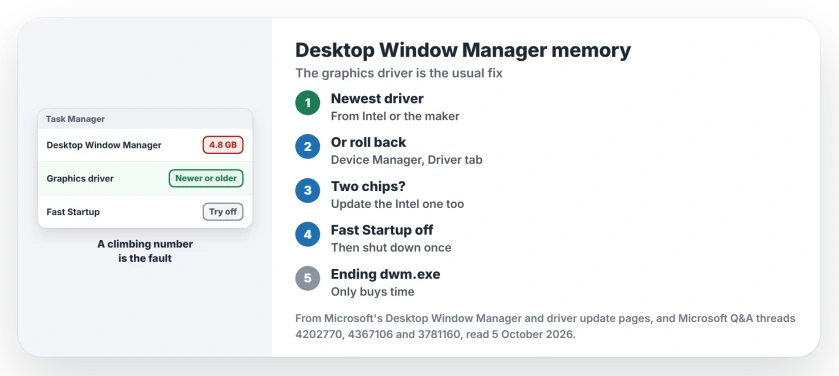
Status: checked 5 October 2026. A newer Intel graphics driver from Intel fixed it for owners, an older driver for others, and Fast Startup off for one.
Get the newest driver from the maker
The accepted fix on the 400+ thread came from a Windows 11 owner with Intel UHD Graphics. Device Manager said the driver was current. Intel's site had a newer one.
Afterwards Desktop Window Manager was "hovering around 75MB to 120 MB and not going beyond 1GB like it used to before". A volunteer moderator wrote that "The issue seems to be resolved with the Beta driver(Version 101.1121) from Intel".
On a laptop, check the maker's page too. The moderator warned that "if the OEM has made customizations to the chip, you need to ask them for updated driver as the installation would fail".
Or go back to an older driver
Microsoft's driver page says: "If the issue occurred after a Windows Update, reinstalling the previous driver often resolves it".
In Device Manager, open Display adapters, then your adapter's Properties, Driver tab, and choose Roll Back Driver.
A Windows 11 owner picked an older version from the list instead, under Update driver: "i chose a different version of the driver and it worked". Microsoft's driver steps cover both routes.
If your rollback fails, the maker's site still has older drivers. One owner's rollback failed in Device Manager. They went to Intel's site for the earliest driver it offered: "now I don't get this problem".
Try with Fast Startup off
One owner traced it to Fast Startup: "I disable the fast start up option on power option setting and it fix the problem". Fast Startup changes what a shutdown does, so Windows carries more over from the last session.
You will find it in Control Panel, under Power Options and the page for the power buttons. Unlock the grayed-out options at the top, untick Turn on fast startup, and use Shut down once.
Two graphics chips in one PC?
Many reports came from PCs with two chips. One was Intel, the other NVIDIA. One reader wrote that the problem was "a bug specifically with the drivers to the Intel HD/UHD 630", and their NVIDIA driver was already up to date.
Ours: update the Intel driver as well as the gaming card's. The desktop is often drawn by the chip your screen is plugged into.
Ending dwm.exe is only a stopgap
One reader ran a batch file to kill dwm.exe whenever games slowed down, and called it a "bubblegum solution". Ours: Windows starts it again at once, the screen flashes, and the memory climbs back.
I would use it only to get through a session. The driver is the fix; memory use in general reads higher than it is, so judge by whether the number keeps climbing.
What did not help
System file repairs. One owner wrote: "Running SFC and DISM had seemingly no affect on the more usage".
A clean reinstall, for another: "I did a fresh windows install but that did not help". Ours: a reinstall brings your same driver back.
Can I disable Desktop Window Manager?
No. Microsoft describes it as running as a Windows service, and it draws your desktop itself. Fix what makes it grow instead.
How much memory should dwm.exe use?
The owner whose fix was accepted saw about 75 to 120 MB afterwards. A figure that climbs hour after hour into gigabytes is the fault.
Windows Push Notifications User Service can climb the same way, and renaming one folder stopped it for an owner.
Is Desktop Window Manager a virus?
The real one is dwm.exe in the System32 folder, part of Windows. Ours: on Task Manager's Details tab, its right-click menu shows where the file lives.
The Short Version
- Get the newest graphics driver from Intel or your laptop maker.
- Or roll back, or pick an older driver in Device Manager.
- Intel plus NVIDIA? Update the Intel driver too.
- Try once with Fast Startup off.
- Ending dwm.exe only buys time.
- SFC, DISM and a reinstall did not help owners.
Where to Next
Note your display adapter's driver version in Device Manager now, and compare it with the newest one on the maker's site. If yours is newer and the leak started with it, roll back.
Which driver version fixed it for you? Share it in a comment with your graphics chip, since that is the detail other readers need.

Isaac Smith is the founder and editor of PC Glance, a website that covers computers, laptops, and technology. He is a tech enthusiast and a computer geek who loves to share his insights and help his readers make smart choices when buying tech gadgets or laptops. He is always curious and updated about the latest tech trends.