
Task Manager shows WMI Provider Host at 20, 50 or even 100 percent, and your PC freezes for a second every time it spikes. Restarting the service buys you a few minutes at best before it climbs again.
I would find out who keeps asking it questions. WMI Provider Host only answers requests from other programs, and Windows keeps a log of which program asked.
On Microsoft's forum the asker turned out to be an Xbox controller adapter, a graphics driver or a maker's utility. The two busiest threads have 100+ and 40+ people on them.
What WMI Provider Host does
It is WmiPrvSE.exe, the process that serves Windows Management Instrumentation. Microsoft says "In most scenarios, the CPU is consumed by the WmiPrvse.exe process".
Programs on your PC use WMI to read hardware details, sensors and settings, sometimes many times a second. The CPU really belongs to whichever program keeps asking, so ending WMI only hides it.
Status: checked 5 October 2026. Owners traced it through the WMI-Activity log. A firmware update stopped it for one Xbox controller owner, a cable for another.
1. Note the busy process in Task Manager
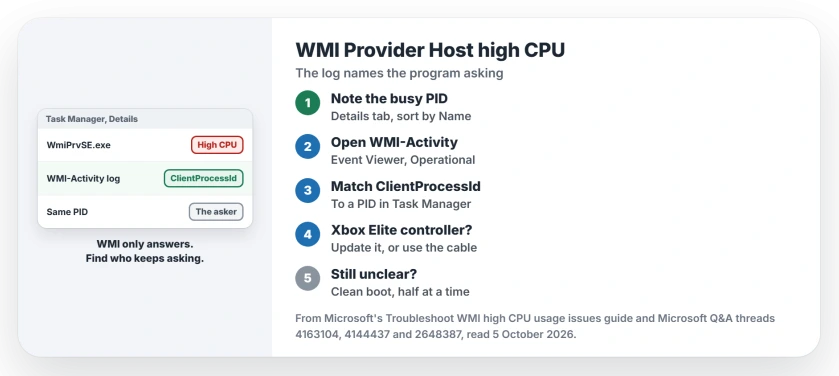
Microsoft's guide starts in Task Manager: open Details, sort by Name and find the WmiPrvSE.exe line that is using your CPU, then write down its PID.
Ours: seeing several WmiPrvSE.exe lines is normal. Only the busy one matters.
2. Read the WMI-Activity log
Open Event Viewer and go to Applications and Services Logs, Microsoft, Windows, WMI-Activity, Operational. Microsoft's WMI high CPU guide says this log shows "A client process that's initiating the query".
Each event carries a ClientProcessId, which you match against the PID column on the Details tab. A forum moderator called that the way "to find the offending process quickly".
They also warned: "The process may be short-lived and hence not present in Task Manager". Ours: look while the spike is happening, and you may find the log already on, as it was on our own Windows 11 PC. I would check this log first.
3. An Xbox controller? Update it or plug it in
The owner of the 40+ thread traced theirs to "the Xbox Elite 2 wireless driver/software in conjunction with the Nvidia container that gets called when a game is launched".
It never happened with the controller off or wired. If you game with one, start here.
A second owner agreed: "I can confirm the unplugging my dongle and only using the controller in wired mode completely prevents this from happening".
A third kept the wireless setup. In their words: "I forced it to update via the Xbox Accessories app", and the spikes stopped. You can run the same update from that app.
Xbox controllers that will not pair are a separate fault with their own fixes.
4. A graphics driver or a maker's tool?
The 100+ thread's owner removed the NVIDIA driver with DDU and installed NVIDIA's latest, then wrote: "It was almost certainly NVIDIA drivers". It came back about a month later after new updates, so if you try it, treat a clean driver as a start rather than the end.
One owner saw floods of errors from NvidiaContainer and Razer Game Manager in the log. On a Dell, a moderator suggested stopping five Dell services, and an owner did, then still traced the spikes to the graphics driver.
Ours: if the log names an .exe you do not recognize, check where the file lives before you remove anything.
5. Or find it with a clean boot
The 100+ owner tried a clean boot with their security software left on, and the verdict was simple: "After the restart, the issue seems to have disappeared". So a startup program was behind it.
Microsoft's clean boot article, quoted on the thread, says "the most efficient way to do this is to test half of them at a time". Turn half your startup items back on per restart until the spike returns. I would save this for last.
What only hides it
Restarting the WMI service. A 2015 owner ran a small script after every login and shared it "while waiting for the real solution". The 40+ owner found that stopping and starting it changed nothing at all.
Disabling WMI. Ours: other services depend on it, which is why that owner's script had to stop the Security Center and IP Helper services first.
Is WMI Provider Host a virus?
The real file is WmiPrvSE.exe in C:\Windows\System32\wbem. Ours: a copy anywhere else on your PC needs a scan before anything else.
Why are there several WMI Provider Host processes?
Windows starts separate hosts for different providers. Microsoft's own example in its guide shows three of them running at once.
Can I just end it in Task Manager?
You can. Windows starts a new host when the next program asks, so your spikes return while the asker keeps running.
The Short Version
- WMI Provider Host answers other programs, and one of them is busy.
- Note the busy WmiPrvSE.exe and its PID.
- Read the WMI-Activity log and match the ClientProcessId.
- Xbox Elite controller? Update it in Xbox Accessories, or use the cable.
- Clean graphics driver or clean boot next.
- Restarting or disabling WMI only hides it.
Where to Next
Open the WMI-Activity log during the next spike and note the ClientProcessId it shows. That one number names the program you need to update or unplug.
Which program was asking on your PC? Name it in the comments, because owners keep finding new ones.

Isaac Smith is the founder and editor of PC Glance, a website that covers computers, laptops, and technology. He is a tech enthusiast and a computer geek who loves to share his insights and help his readers make smart choices when buying tech gadgets or laptops. He is always curious and updated about the latest tech trends.