
You were following directions in Maps, and a friend got a text from you saying when you would arrive. You never typed it. You were not even meeting them.
I would look at the Share ETA feature in Maps before anything else. The accepted answer on Ask Different named it, and Apple's pages show how it can send that text without a tap from you during the trip.
The question has 1,504 views in ten days.
What your friend received
The asker, an owner on iOS 26.6.1, was driving with Maps over their car's Bluetooth. In their words: "My iPhone sent this text message by itself to my friend". It gave an arrival time and ended "I'll let you know if I am running late".
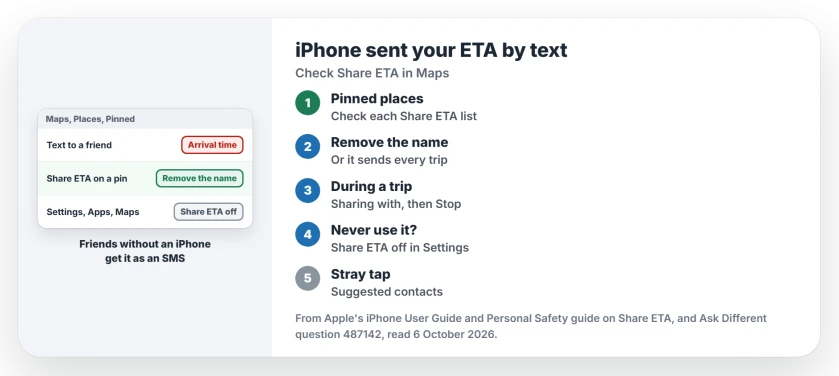
Status: checked 6 October 2026. An iPhone texted a friend an arrival time during Maps directions. Share ETA sent it; remove the contact from a pinned place or turn the feature off.
Why a text and not a Maps alert? Apple's Share ETA page says "People using other mobile devices receive an SMS message". So a friend without an iPhone sees a plain message that reads as if you wrote it yourself.
1. Check your pinned places
Share ETA can run on its own. Apple's safety guide puts it plainly: "each time you navigate to the pinned location, your ETA is shared with the contacts". You set that up once, maybe years ago, and then forget it.
To check, open Maps and tap your profile icon next to the search field. Tap Places, then Pinned, then the info button next to each place. The Share ETA section lists who gets your arrival time.
Take out any name you never meant to include. Apple warns that stopping during a trip is not enough: "The next time you navigate to this same pinned place, automatic ETA sharing begins again".
2. Stop it during a trip
Spotted it while driving? Open the route card and tap Sharing with. Then tap Stop Sharing ETA under each name.
Ours: your friend has already been told you are on the way by then. Apple says the first notice stays with them, but "they're no longer able to access your ETA or route information".
3. Turn Share ETA off
If you never use it, switch it off. Go to Settings, then Apps, then Maps, and Apple's last step is "Scroll down, then turn off Share ETA".
Ours: Apple ties the Share ETA button on the route card to that switch. Its page does not say whether pinned places stop sharing too, so I would clear them as well.
How it can start with the phone in a pocket
The asker had a theory of their own. They wondered if "the phone asked me if it should send an ETA update message and I accidentally accepted".
The answer leaned the same way: "You should have had to take a deliberate action to activate it".
Ours: the route card offers suggested contacts for Share ETA, so a stray tap or two from a pocket or a car mount can send it. Apple also lists Siri as a way in, with a request like "Share my ETA" spoken aloud.
Not the same as Check In
Check In in Messages is a different tool. It tells a friend when you get home, and why Check In alerted your friend covers what it sends and when.
If it is Find My location sharing that misbehaves instead, location sharing that broke after iOS 26 walks through the hidden switch.
The Short Version
- A text with your arrival time comes from Share ETA in Maps.
- Friends without an iPhone get it as an SMS.
- A pinned place can share your ETA every time you navigate there.
- Remove names under Places, Pinned, then Share ETA.
- Stopping during a trip does not stop the next one.
- Turn Share ETA off in Settings, Apps, Maps if you never use it.
Where to Next
Before your next drive, open Maps and check the Share ETA list on each pinned place. Take off anyone you did not choose.
Was it a pinned place, or a tap you never noticed? Tell me in the comments.

Isaac Smith is the founder and editor of PC Glance, a website that covers computers, laptops, and technology. He is a tech enthusiast and a computer geek who loves to share his insights and help his readers make smart choices when buying tech gadgets or laptops. He is always curious and updated about the latest tech trends.