
A Windows Security box asks you to plug a security key into a USB port. You have never owned one. Settings even lists a security key, and managing it asks for the same missing key.
I would not hunt for a hidden key. On Super User, the accepted answer explained why Windows asks at all, and the owner got their PIN back as a choice by replacing one website passkey.
The question has 6,642 views since February. Two Microsoft Q&A threads about the same box show 100+ and 80+ people with the same question.
The box you are seeing
One owner on Microsoft Q&A copied the box word for word. It ends "Insert your security key into the USB port". The asker of that thread wrote "I have no other choice but to hit cancel".
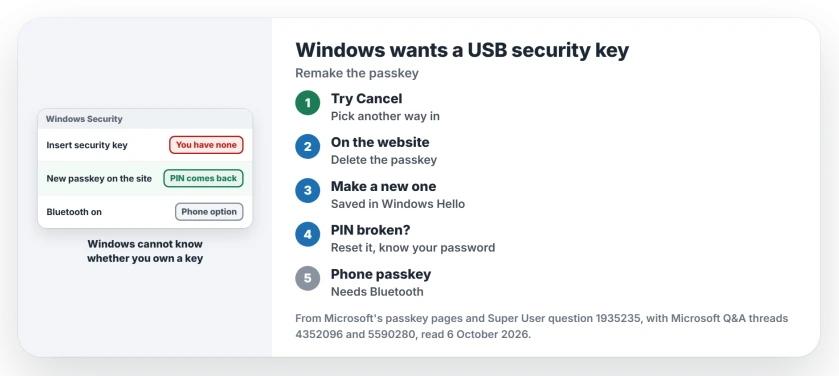
Status: checked 6 October 2026. Windows asked for a USB security key the owner never had. Windows Hello no longer held the passkey; a new passkey brought the PIN option back.
A commenter's habit is the quick try: "I just hit cancel and select my actual Passkey for the account". That works when the site offers another way in, such as a password or a code. For the Super User owner, it did not.
Why Windows asks for a key you do not own
The accepted answer starts with the part that confuses people. Windows has no list of your keys: "The OS doesn't keep track of any associations with hardware passkeys".
So it cannot know whether a USB key exists somewhere, in a drawer or on another desk.
When Windows Hello cannot answer for a site, it falls back. In the answer's words, "the only other choice is to prompt you to connect an external key". That happens with no PIN set up. It also happens when Hello lost that site's passkey.
The answer names two ways Hello loses them. One is switching virtualization-based security on or off, which people often do to run VirtualBox. The other is clearing the TPM: "Clearing the TPM will also do so".
1. Make a new passkey for that website
The owner's prompts came from Discord. They went to its security key settings, deleted the old passkey and made a fresh one. Confirmed by an owner: "I deleted it and created a new one. Now I have the option of USB or PIN again".
Ours: do the same in the account settings of whatever site or app shows the box. The new passkey is saved in Windows Hello. Your PIN works for it again.
2. Reset the PIN if it is broken too
The owner's PIN itself had stopped working. They reset Windows Hello's PIN storage and set a new PIN. Their summary: "deleting the Ngc folder, setting a new one and recreating the Discord passkey seems to have solved the issue".
Ours: I would try the gentle route first, under Settings, Accounts, Sign-in options, PIN, with I forgot my PIN or Remove. Know your account password before you remove a PIN, because Windows asks for it next.
3. Turn on Bluetooth for the phone option
Windows can also use a passkey stored on your phone or tablet instead. Microsoft's passkeys page says that for this, "both the Windows device and the mobile device must have Bluetooth enabled and connected to the Internet".
The answer spells out the result: "on a desktop without Bluetooth it'll directly ask for USB". Ours: a desktop PC with no Bluetooth adapter never sees the phone choice, only the USB one. That makes the box look stranger than it is.
When it happens on your Microsoft account
Another owner on Microsoft Q&A met the box after resetting their PC and signing in to Microsoft. They removed the passkey from their account on a second device. Then they signed in normally.
Microsoft says passkeys for a personal account live on its Advanced Security Options page, next to your other ways to sign in.
Its passkey help warns before you remove one: "If you do need to remove a passkey, make sure you add new information first".
If passkeys are new to you, what a passkey is, and why Windows keeps offering one starts from the beginning. For the face and fingerprint side, setting up Windows Hello covers the options.
The Short Version
- Windows asks for a USB key when Windows Hello cannot answer.
- It cannot know whether you own a key.
- A new website passkey brought the PIN back.
- Reset a broken PIN, but know your password first.
- The phone option needs Bluetooth on both devices.
- On a Microsoft account, add a new sign-in method before removing a passkey.
Where to Next
Open the security settings of the site that shows the box, delete its passkey and make a new one on this PC.
Which site kept asking you for a key? Tell me in the comments.

Isaac Smith is the founder and editor of PC Glance, a website that covers computers, laptops, and technology. He is a tech enthusiast and a computer geek who loves to share his insights and help his readers make smart choices when buying tech gadgets or laptops. He is always curious and updated about the latest tech trends.