
Your Android lock screen suddenly shows two clocks, each with a city name, and one of them has the wrong time. Unlock the phone and everything else is right.
I would leave the time zone alone. Both clocks come from a travel setting, and on Android Enthusiasts an owner cleared the wrong one by switching that setting off and on again.
Posted in January, it has 534 views so far. OnePlus, Samsung and Google each describe their own second clock in their manuals and help pages.
Where the second clock came from
On a OnePlus 8 in Ottawa, the asker had tried Extreme low battery mode for the first time. Since then "the lock screen (only) displays two clocks", one named Dalhousie and the other Ottawa.
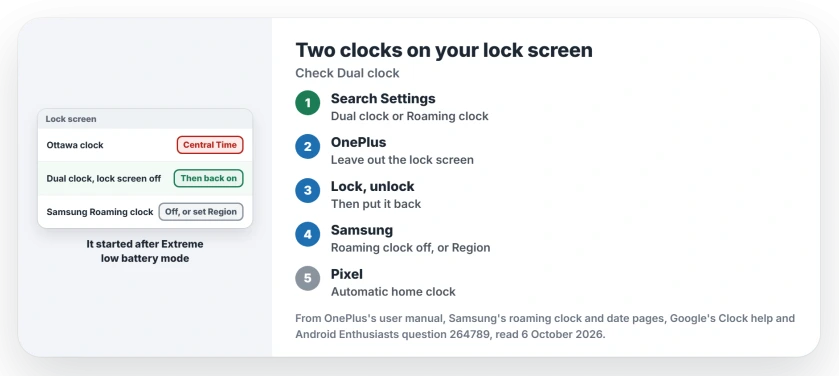
Status: checked 6 October 2026. A OnePlus lock screen showed two clocks, one wrong. Taking Dual clock off the lock screen, locking, then turning it back on fixed it.
The Dalhousie clock showed the right Eastern time, while the Ottawa clock "incorrectly shows Central Time". The phone set its own time and zone, and both were right. In their words, "Outside the lock screen, everything is correct".
Why a phone draws two clocks
The second clock is meant for travel. OnePlus's user manual describes Dual clock in one line: it will "Display two clocks when in a time zone outside of your usual residence".
Samsung's roaming clock does the same job on Galaxy phones, on the lock screen and the Always On Display. Samsung says that with automatic time on, "your device will use your mobile network to determine the date and time".
Ours: the phone draws two clocks when it thinks home and here are in different zones. In this case one of the two picked up a wrong zone, so the pair looked broken.
1. OnePlus: take Dual clock off the lock screen, then put it back
The accepted answer gives the path: Settings, Additional settings, Date & time, Dual clock. Change "Display dual clock on" so that it leaves out the lock screen.
Lock the phone with the side button and unlock it again. Then set the option as it was.
Confirmed by an owner: "Turning the dual clock feature off and on again resolved the issue". They found the setting by typing Dual clock into the Settings search box.
Ours: use that search box on any phone, since menus move between OxygenOS versions. A search finds the switch wherever it went.
2. Samsung Galaxy: Roaming clock
Samsung's roaming clock steps live under Settings, Lock screen and AOD. Turn on the Roaming clock toggle, then "Tap on Region" and choose your country and city.
Ours: switch Roaming clock off and the second clock goes. Want it for trips? I would set Region to your real home city. Near a time zone line, a tower across the border can change your zone and bring the clock back.
3. Pixel: the Clock app's home clock
Pixel phones handle it differently. Google keeps its version in the Clock app's settings, next to Home time zone. Google says on its time zone help page that you "Turn on Automatic home clock" to get home time while you are away.
Ours: a second clock in the Clock app or its home screen widget points to that switch, so turn it off there. If the widget itself vanished after a restart, the Pixel widget fix from September covers it.
What did not help
A restart came first, which I would try too, then a second trip into Extreme low battery mode and back out. Neither moved the wrong clock.
Ours: that mode is not the fix. If your battery is the reason you used it, start with the phone's battery usage screen to see what drains it.
Back from a trip to India? Check the SIM tray too, because a leftover Indian SIM can keep a panic call on the power button.
The Short Version
- Two lock screen clocks come from a travel setting.
- OnePlus calls it Dual clock, under Date & time.
- Take the lock screen out of it, lock, unlock, restore.
- Samsung calls it Roaming clock, under Lock screen and AOD.
- Pixel has Automatic home clock in the Clock app.
- A restart changed nothing for the owner.
Where to Next
Type Dual clock or Roaming clock into your phone's Settings search, switch it off, lock the phone, then turn it back on if you want it.
Which phone showed you a second clock? Say so in the comments.

Isaac Smith is the founder and editor of PC Glance, a website that covers computers, laptops, and technology. He is a tech enthusiast and a computer geek who loves to share his insights and help his readers make smart choices when buying tech gadgets or laptops. He is always curious and updated about the latest tech trends.