
You press the power button a few times to wake your phone, and it starts calling emergency services. It began after a trip to India.
That is alarming. Before you search every safety setting, I would check which SIM cards are still inside.
That is what fixed it for an owner on Android Enthusiasts with a Nokia G50. Asked in February 2025, the question has 1,855 views, and the owner answered it themselves the same day.
What the phone kept doing
In their words: "now any time I press the power button three times in quick succession, it calls the emergency services". They had read that "This is apparently required by Indian law".
Others had grumbled about it too. The feature "sometimes stays enabled after you leave India", they wrote, and theirs had.
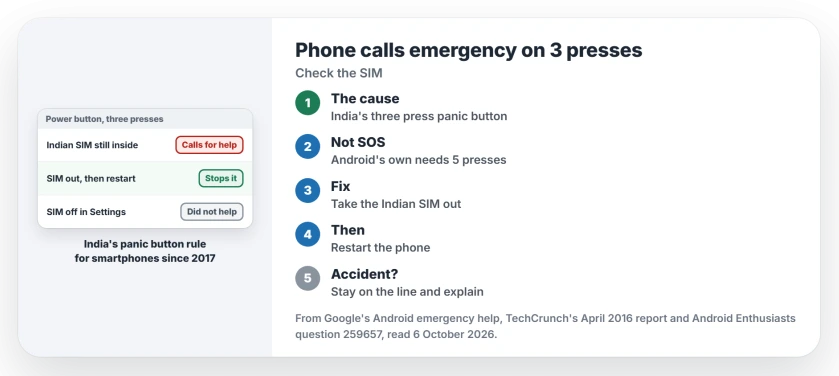
Status: checked 6 October 2026. A Nokia G50 kept calling emergency services on three power presses after a trip to India. Taking out the Indian SIM and restarting stopped it.
It was far too easy to trigger. They press the power button twice all the time, to open the camera or check the clock, and the phone often lags. One extra press, and it dialed.
Why India changes the button
India set this rule in 2016. TechCrunch reported that every phone sold there would need a panic button, worked "on smartphones, by pressing the power button three times".
According to the same report, India's telecoms minister set January 2017 as the start for every new phone.
The owner's G50 was a UK phone, so it was not set up that way at the factory. It still had an Indian Airtel SIM in its second slot, left there after the trip.
Ours: that leftover SIM is what the fix points at, since nothing else about the phone changed.
Why the SOS switch did not help
Android has its own Emergency SOS feature, and it works differently from the India one. Google says on its emergency help page: "On your phone, press the power button 5 times or more". The India feature counts three.
The owner found it runs "independently of and in parallel to" Emergency SOS. Turning Emergency SOS off changes nothing for it. Even the 5 press demo, which promises that no emergency actions will start, really called after three presses.
1. Take the Indian SIM out, then restart
The owner's answer is one line: "Take your Indian SIM out, then restart the phone". It worked at once, and three quick presses no longer dialed anyone.
They add a warning for anyone tempted by the software switch: "disabling the SIM completely from settings won't help". Theirs was already switched off in Settings. It has to come out of the tray.
Ours: if your Indian number lives on an eSIM, I would try deleting that eSIM profile and restarting the same way. No owner has confirmed that yet.
2. Keep the SIM, but know the rule
Still traveling, or keeping the Indian number for later? Then the three press rule stays. Wake the phone with a single press, or a tap on the screen if yours allows one.
On many Android phones, the owner's included, a double press opens the camera. That is where the accidents start.
Ours: if a call starts by mistake, do not hang up. Explain to the operator that it was an accident, since a hang-up can bring a call back. An iPhone has its own accidental call settings, and our page on iPhone emergency calls covers them.
Other phones
The asker found an older question about OnePlus phones, but its answers used OnePlus settings pages that a Nokia does not have, or needed root. So the switch, where one exists at all, depends on the maker and the model.
Ours: search Settings for SOS, power button and panic before you try anything drastic like a factory reset. Travel leaves other traces on Android too, such as a second clock on your lock screen.
The Short Version
- Phones sold in India must call for help on three power presses.
- A phone that kept an Indian SIM can keep the feature after you leave.
- It is separate from Android's 5 press Emergency SOS.
- Take the Indian SIM out of the tray and restart the phone.
- Switching the SIM off in Settings did not stop it.
- If a call starts by mistake, stay on the line and explain.
Where to Next
Power the phone off, take the Indian SIM out of its tray, and switch it back on.
Which phone did this happen on, and did removing the SIM stop it? Tell me in a comment.

Isaac Smith is the founder and editor of PC Glance, a website that covers computers, laptops, and technology. He is a tech enthusiast and a computer geek who loves to share his insights and help his readers make smart choices when buying tech gadgets or laptops. He is always curious and updated about the latest tech trends.